



Francis-Crossman17221443
Community Manager
Principal Product Manager
April 9, 2024
Question

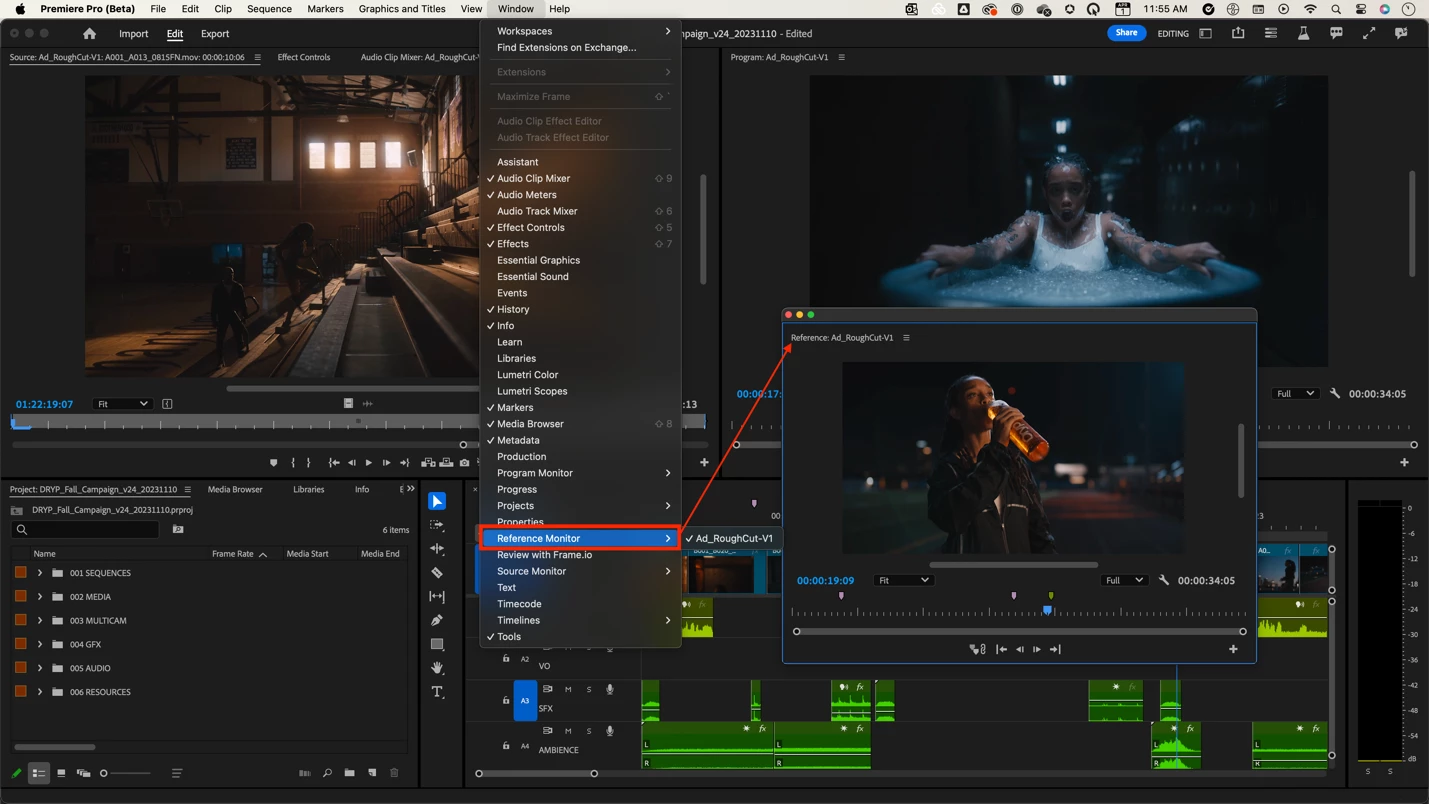
Now in Beta: Deprecation of the in-app reference monitor

  • April 9, 2024
  • 10 replies
  • 4797 views

Did you know that there are actually three monitor windows in Premiere Pro?  There are the Source Monitor and Program Monitor that everyone knows and loves, but there is also the Reference Monitor.  We have decided to remove the Reference Monitor due to extremely low usage and awareness.  In the ongoing effort to modernize our codebase and maintain the highest possible quality in the app, we sometimes have to say goodbye to old, out-of-date features.
 

Don’t worry!

  • We are NOT removing the source monitor.
  • We are NOT removing the external transmit monitor capability (what most people call a reference monitor).  Your AJA and BMD boxes will continue to function!

We want to know what you think.  Please join the conversation below.

10 replies

Participating Frequently
July 4, 2024

I would like to see it stay. I'm one of the few that actually use it. Thanks!

Bruce Bullis
Community Manager
Community Manager
July 4, 2024

For what specific workflows, do you actually use the reference monitor?

Inspiring
July 23, 2024

As a lot have mentioned above, I personally use it for color grading. I stumbled on this thread looking for the reference monitor in Beta and was sad to see it's been removed. I'm working on matching the color of two shots and having to jump back and forth...

Warren Heaton
Community Expert
Community Expert
June 30, 2024

I would prefer to keep the Reference Monitor.

Arnaud CC
Participant
June 29, 2024

I really don't think this is a good idea. The reference monitor provides a third point of view on a timeline when color matching. Like Avid Media Composer offers. You can then view the shot before with the program monitor with the comparison view... the reference monitor gives you the possibility of seeing the shot after. This is great for reducing color drift during calibration.

Inspiring
June 13, 2024

Wow never knew this existed and now that you've brought it to my attention, I feel like this could be awesome for colour grading and surely that doesn't slow down Premiere by just leaving it in there as a feature some actually do use (like people have commented here).

Comparison View is what I have primiarly used but is kind of bad since it's so annoying to move around the timeline on there and always have to copy and paste timecodes to update the Reference frame.


I guess either way, the reference mointor or comparison view should be updated so you can click on the Reference frame in the Program monitor, a box appears around it to indicate you've selected it and then you can move up and down the timeline which is only updating the reference frame timecode position.


Then if you click on the Current frame, the box will switch over and as you move around the timeline, you'll update the timecode on that current Frame.

Inspiring
June 21, 2024

I do use the reference monitor. As a reference (duh) for color grading other shots like the one in the reference monitor.

MyerPj
Community Expert
Community Expert
May 15, 2024

I've rarely used it. I won't miss it.

johnpooley3
Inspiring
May 8, 2024

This is definitely a loss for people doing color grading or color reference work. RIP SpeedGrade. Tough business decisions happen. 


Can you PLEASE PLEASE PLEASE address the long running Lumetri Scopes Waveform reference level issue? The Y axis of a waveform monitor should never ever EVER move. Yes, I can clamp the signal, but I want to see all the way to 108 IRE without having the chart jump around on me mindlessly. 


Participant
May 3, 2024

It is very good for colorgrading. So you don´t have to jump in the timeline to see the grading in your previous shot. I think i would miss it :(.

R Neil Haugen
Legend
April 30, 2024

I suppose ... I haven't used it that often, but at times it was a lifesaver.


I suppose one can have a sequence in the Source monitor, another in the Program ... hmmm.

Everyone's mileage always varies ...
Inspiring
July 23, 2024

Maybe if the source is already good to go, but in my case I want a certain look and the source is not there already so I'm trying to match edits to one shot to another shot with different lighting.. a lot of timeline jumping in my future

Ann Bens
Community Expert
Community Expert
July 23, 2024

You could put all your clips in a sequence > open in SM > then gang to timeline.

Now you could scroll through the clips in the SM.

Chris Spiegl
Community Expert
Community Expert
April 30, 2024

I appreciate the effort to clean up and modernize the code base and removing unused / rarely used features like this is a great step to being able to focus on what's actually important!


Great move!

Ann Bens
Community Expert
Community Expert
April 10, 2024

Wont miss the ref monitor:never use it