




Now in Beta: Import Your Own Transcript
We have heard your feedback: Those of you that have your own transcripts, already complete with proper spelling and punctuation, or in a language we don’t support, don’t want to re-transcribe using Premiere’s Speech to Text feature just so you can use captioning and Text-Based Editing.
Captioning and Text-Based Editing requires Premiere Pro to have timecodes for every word. We are publishing a JSON spec format that supports word-level timecode for captioning and Text-Based Editing. Developers can now build support for exporting to this spec, or write scripts to translate from other transcript formats to this JSON spec. (JSON spec is attached to this post.)
Guidance for non-developers
While developers are adding support for this new format to their transcription tools, we’ve found that modern LLMs can do an excellent job of converting existing transcripts into this JSON format. Every LLM is different and their capabilities are always changing, so this advice is generalized and not guaranteed to work for every situation.
Use an LLM to convert your existing transcript:
- Attach the JSON spec and your transcript file to the prompt
- Ask the LLM to reference JSON spec and convert your transcript file into that JSON format, making sure to follow the spec and preserve the specific timecodes for each word or sentence. Alternatively, you may have better luck asking the LLM to write and execute a python script that translates the format for you. See below for an example of that prompt.
- In Premiere Pro, load your source clip into the Source Monitor and open the Transcript tab of the Text panel
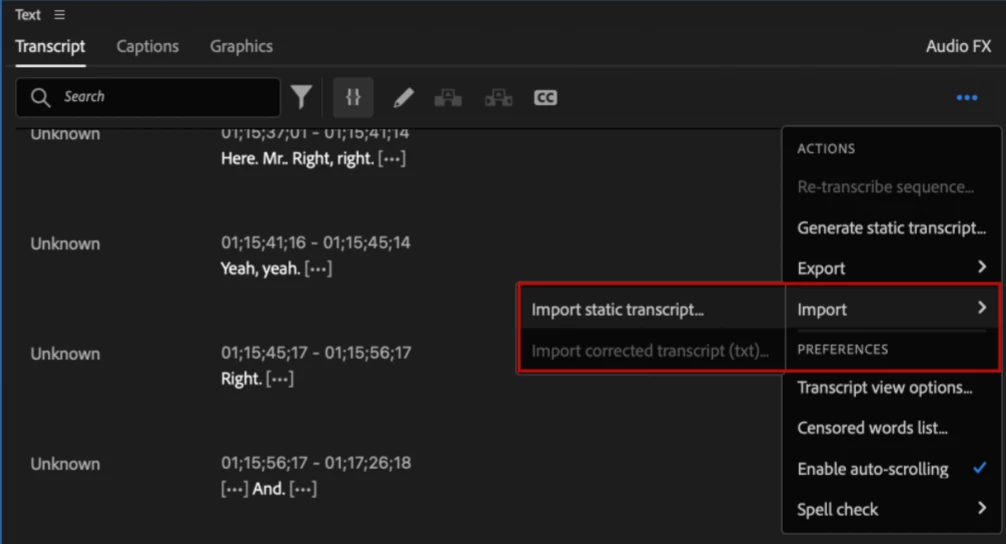
- Click on the Overflow (…) menu, and choose Import > Import Static Transcript
- Choose the JSON file that you created.
- Your clip now has a transcript attached that can be used for Text-Based Editing or accurate caption creation.
Example prompt:
Here is spec file for a transcript format and a transcript that has been written in a different format. Write a python converter that converts transcripts in the given format into transcripts from the spec'ed format. Make the conversion as lossless and precise as possible. Make sure that you follow the spec to the letter and don't deviate from it. Document the Python code and make it work on single transcripts and folders of transcripts. After the python code is written execute it on the given transcript and return the converted transcript.
 AdChoices