


AnnikaKoenig
Community Manager
Community Manager
August 22, 2023
Question

Now in Beta: Improved Browsing in the Essential Graphics panel

  • August 22, 2023
  • 7 replies
  • 8292 views

Improved Browsing in the Essential Graphics panel 


We are thrilled to unveil the latest enhancements to browsing templates in the Essential Graphics panel, designed to elevate your Mogrt management experience. Below you will find a description of the changes and at the very bottom a couple of questions for which we would love to hear from you! 


Streamlined organization 

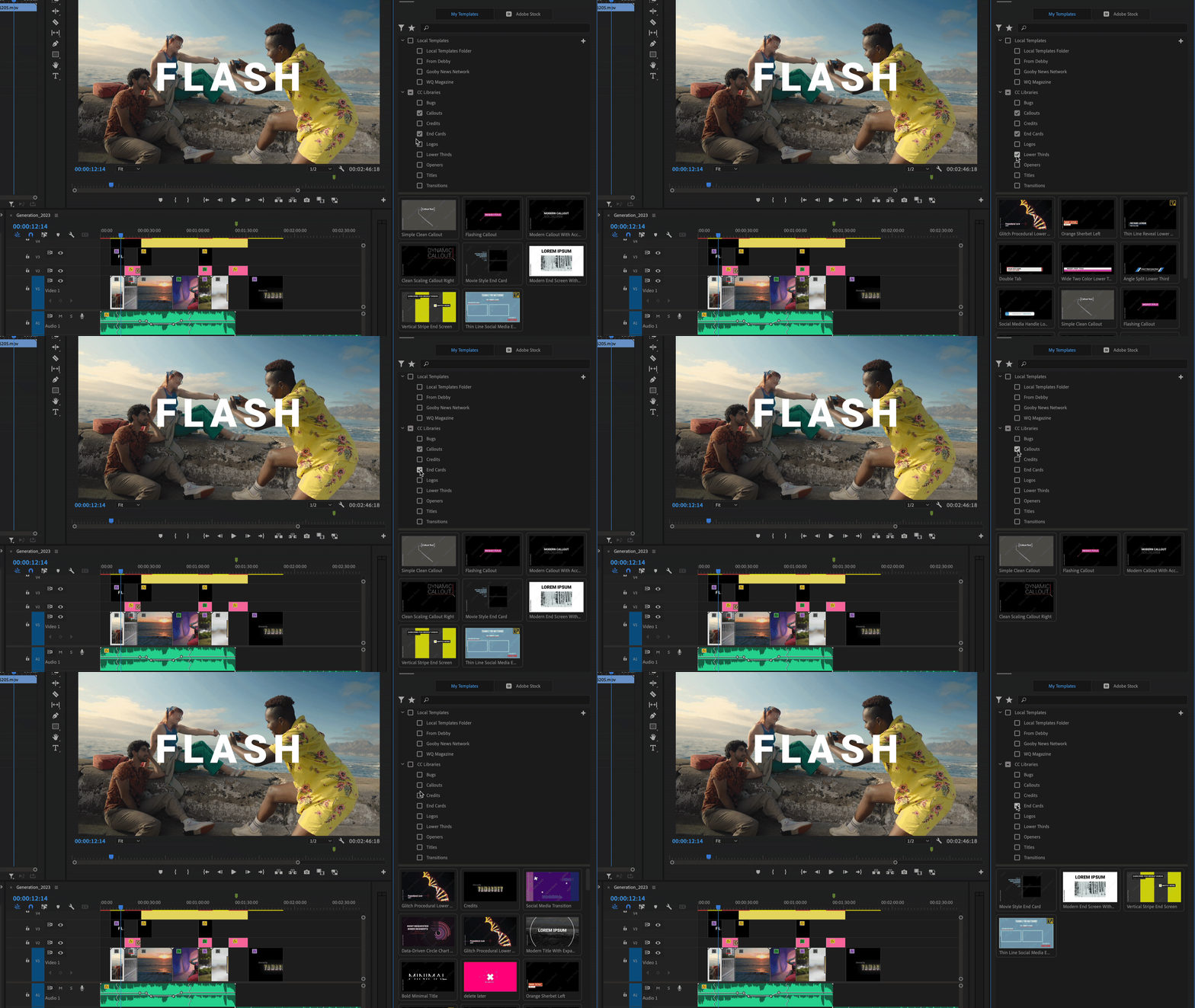
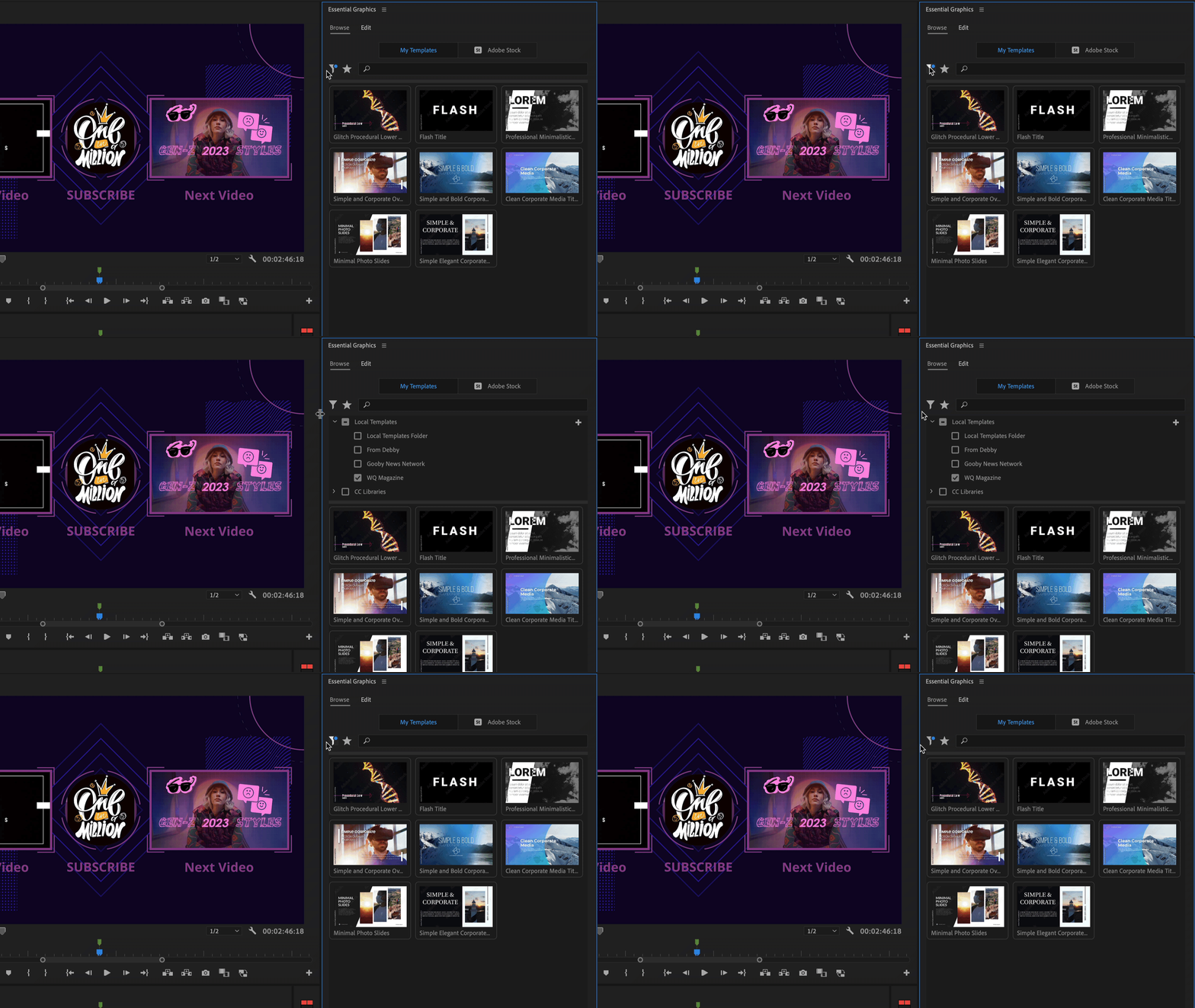
In response to user feedback, we have revamped the UI for Motion Graphics template locations. Instead of in a dropdown menu, we now display them as individual rows with check marks. This improvement makes it straightforward to browse a collection across different locations. 
 

Drag & Drop between locations

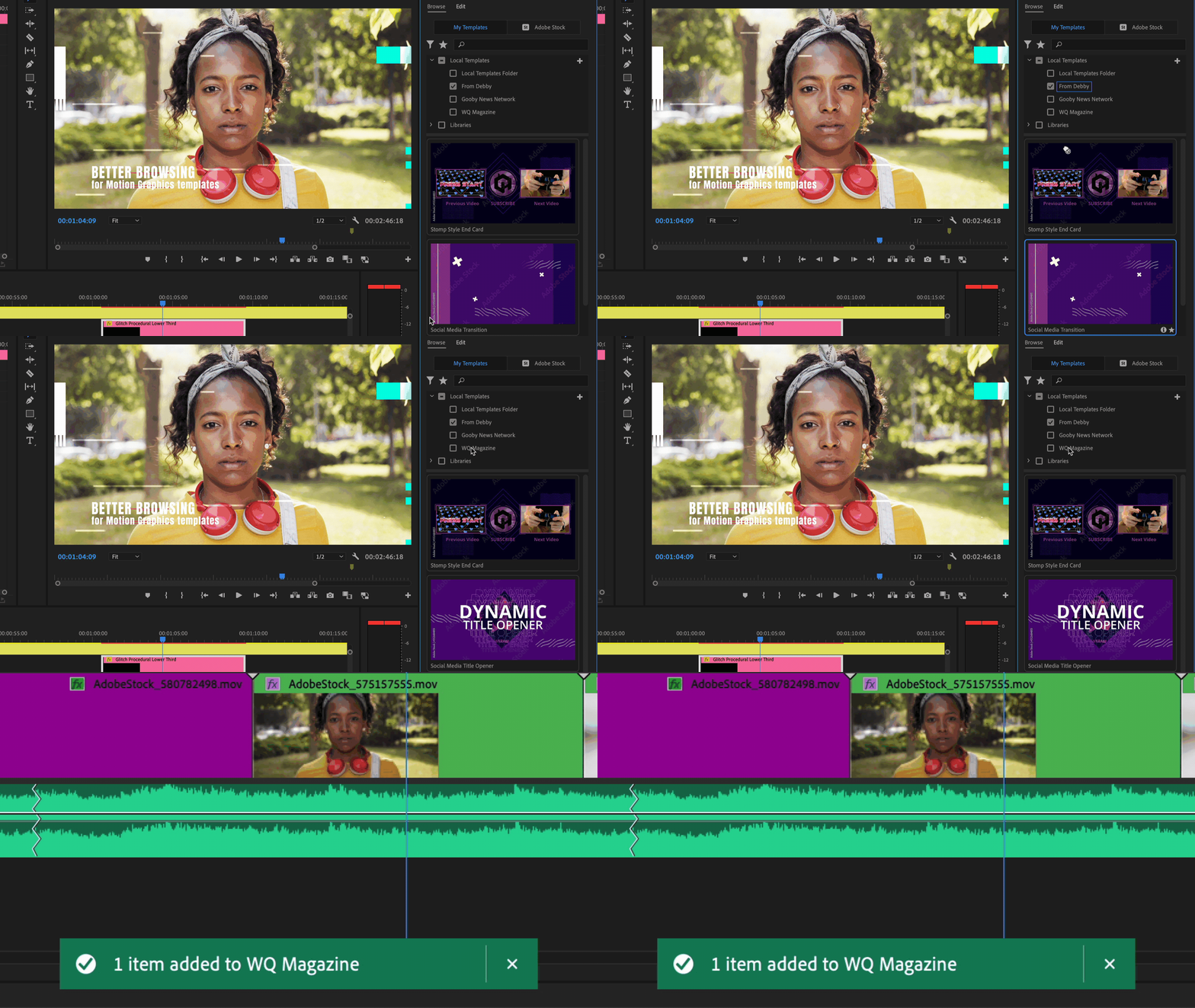
Our new UI empowers you to move or copy your Mogrts between different locations effortlessly. The process is intuitive, following the Finder/Explorer approach. Drag and drop to move Mogrts between local folders on the same disk, and they'll be copied if the folders are on different disks. Similarly, moving Mogrts between a local folder and a library will result in a copy operation. Note that copy or move between libraries is currently not supported from within the Essential Graphics panel. Use the Libraries panel here instead. 

When you select a Motion Graphics template, you'll notice a blue outline around its location, indicating which folder it currently resides in. This visual indicator offers a helpful reference for your organizational needs. 
 

Elevating additional folders 

We have made accessing Mogrts on your disk much easier. No more digging through the panel menu to find the hidden "Manage Additional folders." Now, you can simply click on the plus icon in the top right corner and navigate to your desired folder using Finder or Explorer. Whether it's a local folder, a cloud drive, or a shared network, you can seamlessly add it to the My Templates browser. 
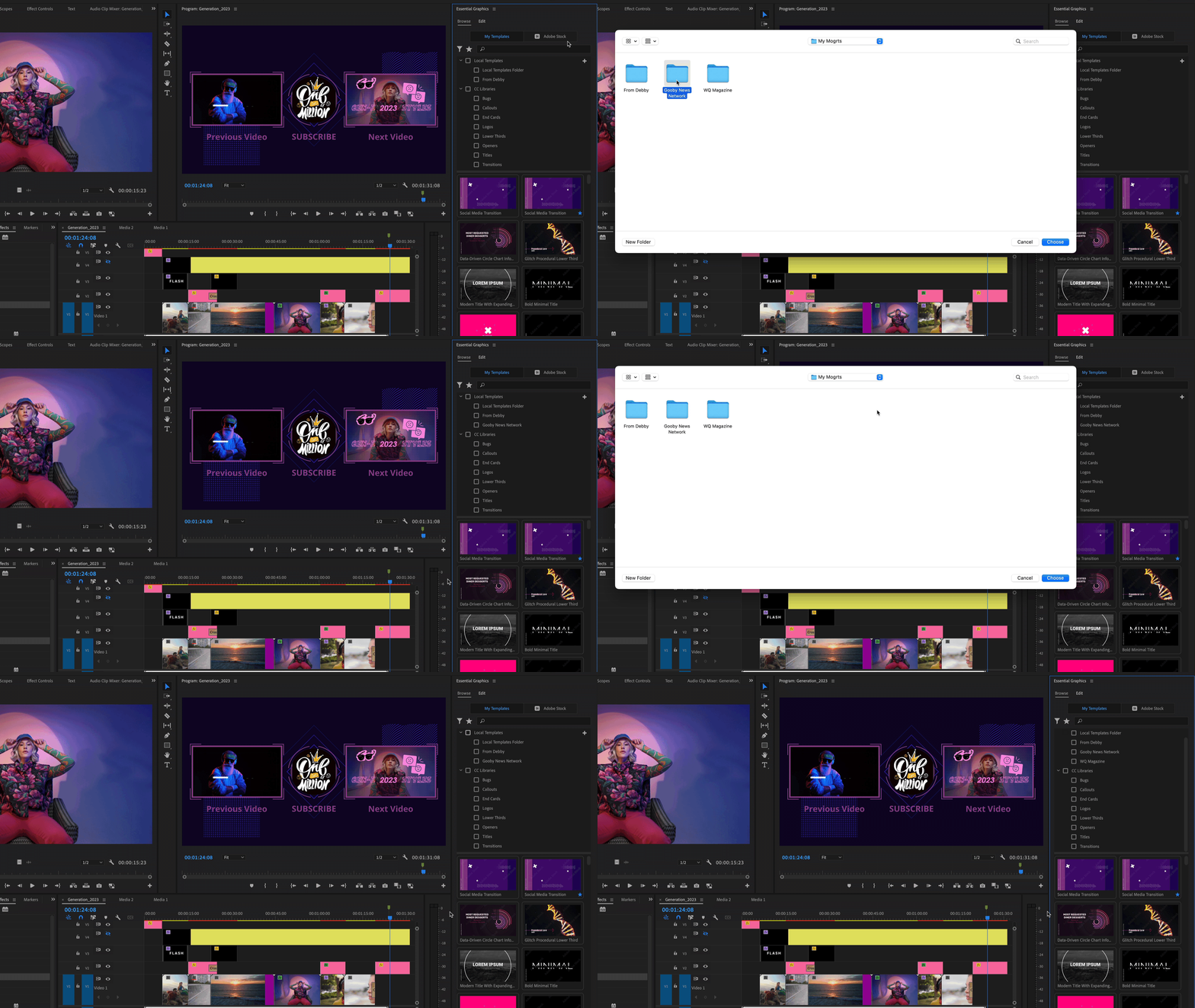
Please be aware that you need to add the actual folder on disk where the Mogrts are located, adding a parent folder with Mogrts in subfolders will not display the templates in the Essential Graphics panel. 

Management of your Mogrt folders on disk is possible from within the Essential Graphics panel through a context menu that offers the options Rename, Remove, and Reveal in Finder/Explorer. Renaming or removing a location in the Essential Graphics panel will not affect the folder on disk. 


Enhanced Views with a New Splitter 

We've introduced two distinct views for an improved browsing experience. The browser tree view displays your Mogrt locations, while below it, separated by a movable splitter, is the Mogrts view showcasing all templates from the selected locations. You can customize the splitter position, so you have full control of how much space you provide to each view. 
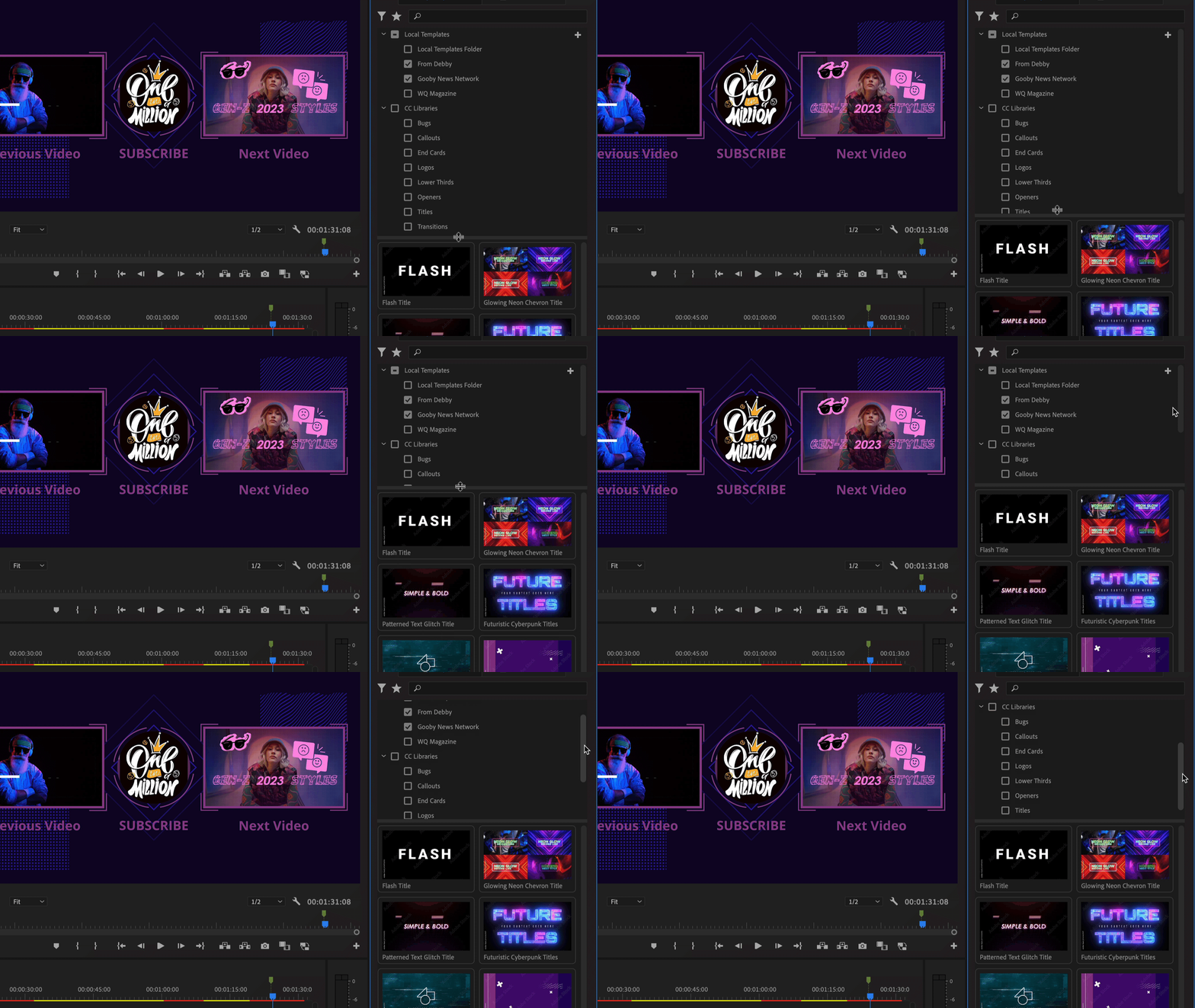
For those moments when you want a clutter-free interface, simply click on the top funnel button to hide the locations entirely. To bring them back, click the button again. 
 

Finding folders on disk 

It is now easy to find your custom local folders on disk by right-clicking the location in the Essential Graphics panel and selecting Reveal in Finder/Explorer.
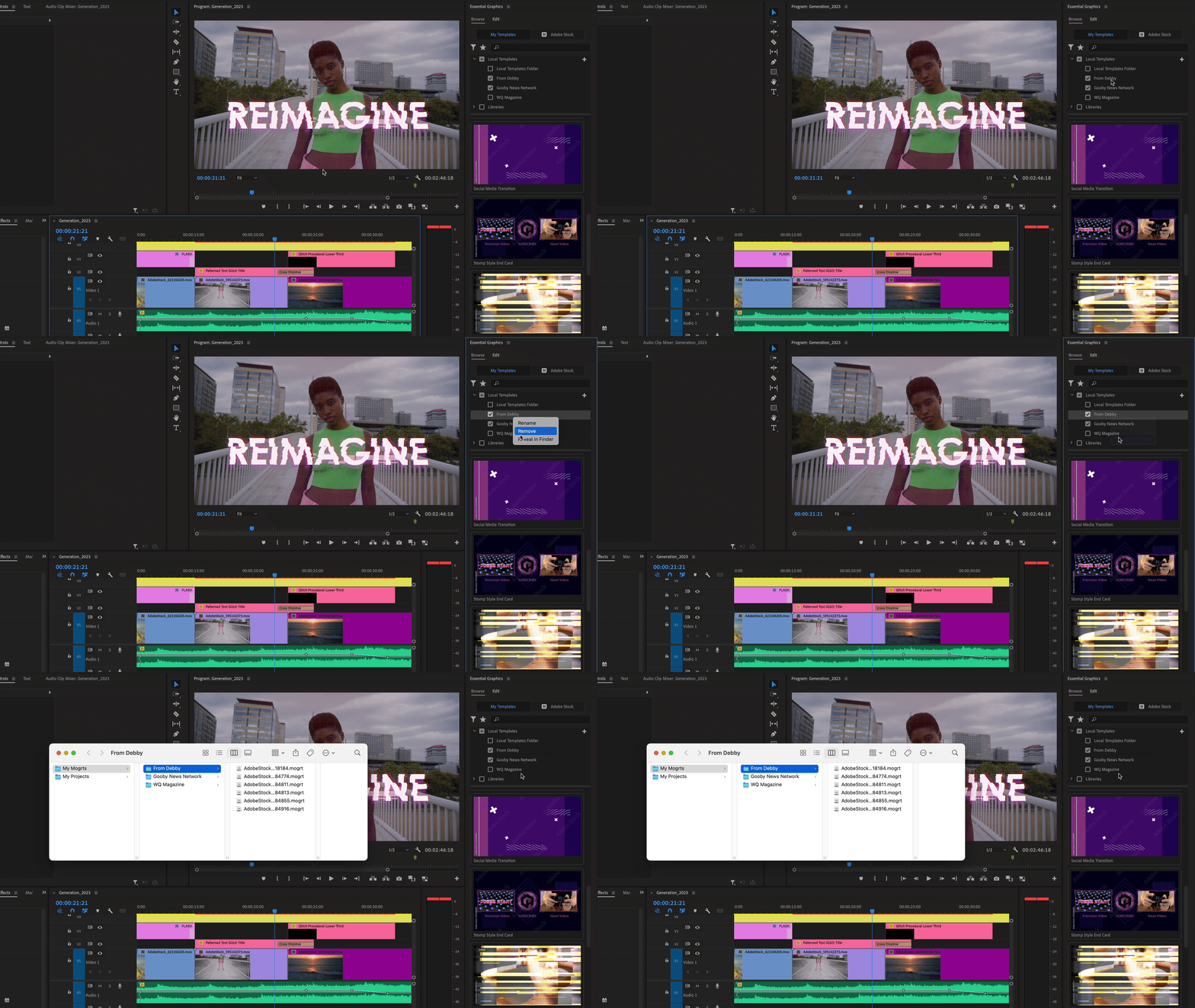
To assist users in getting started with Motion Graphics templates in Premiere Pro, we provide a collection of default templates in the Local Templates Folder. We understand that some users prefer to focus solely on their own content. To remove these templates, simply follow these steps: Right-click the Local Templates folder in the browser tree, and select Reveal in Finder/Explorer. From there, you can easily delete all Mogrts inside the Local Templates folder, while retaining the .txt file (PrMogrtInstall13-0-0.txt). Should you ever wish to restore them in the future, just delete the .txt file, and the Mogrts will regenerate themselves upon the next launch of Premiere Pro. 


What is still missing? 

We plan to add another key improvement to Mogrt organization: custom install locations and custom Adobe Stock download location. Currently all installed or downloaded Mogrts will be added to the Local Templates Folder. In the future we want to give the option to select a specific location (library or local) where they would like to add their templates to. 


Questions the team has: 

  1. Now that you can add, remove, rename and Reveal in Finder/Explorer from within the browser tree, do you see any reason to keep the “Manage Additional folders” dialog that you used to only be able to access through the Essential Graphics panel menu? 
  2. Moving vs. copying Mogrts: does our distinction of when to move and when to copy make sense for your workflows?  
  3. Would you ever like to hide the Local templates folder entirely? 
  4. So far libraries management in the Essential Graphics panel is quite limited. For example, in order to delete a Mogrt or the entire library, you would need to go into the libraries panel. Has this ever bothered you? 
  5. Now that you can drag and drop Mogrts into different locations in the browser tree, do you still need the context-menu options to “Copy to Library” or “Copy to Local Templates folder”? 
  6. Do you find the blue outline helpful for identifying the location of your selected Mogrt? 


We hope you enjoy these latest improvements to the Essential Graphics panel. Your feedback is essential to our continued efforts in providing a seamless user experience. Happy browsing!


This topic has been closed for replies.

7 replies

Roland Kahlenberg
Legend
October 19, 2023

I'm going to add a very 'worded' comment. 

The PPro Browse and Edit Panels are AMATEURISH. I would never ever pay for software that LOOKS as it does and WORKS as it does. 

It's only 'accepted' because it's part of an ecoSystem. It's horrendous to look at and there is ALIEN LOGIC to why/how it looks. 

It's truly a VILE MESS. I'd say FIX IT but there are so many issues, from the basic to professional to nuanced. It's really not worth being part of an Adobe App.  I am concerned that this even got out into public and has been running for 5 years. If I wasn't so vested in MoGRT AE-PPro workflow, I wouldn't even bother. I've actually stopped using it for very long periods, ever since it was introduced. 

I understand there are lots technical hurdles; trying to work seamlessly across two apps BUT even the UI is super-weird! Every line/row is HUGE - it's quite evident the UI was designed for a Touch App! 

So, the UI sucks! - no MoGRT Name  Visibility in Edit Mode. Sliders move in Whole Numbers - can't get DOT.NUMBER!, The Browser has ZERO Information - seriously! Who in their right mind designs a Comp Browser without INFO? 

What's happening there? What are the issues? Do you actually use the App in a professional environment/moment, for extended periods of time? Have you ever made or tried making money using this? There are huge issues and we're at or about 5 years since launch. 


Very Advanced After Effects Training | Adaptive & Responsive Toolkits | Intelligent Design Assets (IDAs) | MoGraph Design System DEV
Inspiring
August 31, 2023

This is a great addition. Will there be any preview support?


Currently I can go into the mogrt and change out thumb.png + thumb.mp4 to create a custom thumbnail + custom preview when hovering. Just curious what your thoughts are since this is a big overhaul of the essential graphics panel, Thanks!

AnnikaKoenig
Community Manager
Community Manager
August 31, 2023

We are already looking into it 🙂

Michael Cervinka
Participating Frequently
August 26, 2023

It would be very usefull and intuitive if I could import a folder of Third Pary templates such as text overlays in this window for easy access, rather than having to search enlessly for it in my effects, in general I should be able to import templates in a dedicated spot with previews for each, enabling this for Third Party templates from Motion Array for instance would be really intuitive. I only see that it looks available with Adobe Stock templates. 

Adobe Employee
August 28, 2023

Hi Michael! I can only assume that the templates you are referring to from Motion Array are in fact effect plugins. As long as the templates are .mogrt files you can use them with the Essential Graphics panel.

Michael Cervinka
Participating Frequently
August 28, 2023

Yes you are correct indeed, my bad, I litteraly realized this a little later that day. Thank you for checking. 

quote

Hi Michael! I can only assume that the templates you are referring to from Motion Array are in fact effect plugins. As long as the templates are .mogrt files you can use them with the Essential Graphics panel.


By @Annika Koenig


R Neil Haugen
Legend
August 23, 2023

Scrozier has an excellent point, and as he says, it has been a problem for the entire 'run' of the EGP. And as an early adopter of the EGP, I've been in general a big fan and supporter.


But that has also included arguing for exactly what Scrozier asks for ... all along: the ability to set (essentially) folders or bins for mogrts that stay with the project file.


Because so many jobs are done for specific clients. And you would never, ever use the mogrts branded for that client with a different client. Not even with a few mods. Just ... never.


So keeping tons of mogrts in the system is ... a waste of space. And an organizational hassle.

Everyone's mileage always varies ...
Gabby16bit
Known Participant
August 28, 2023

this.

Inspiring
August 23, 2023

First of all, thanks for taking a look at this. EG is a super powerful feature that has been hamstrung by wonky workflow problems.  


To be honest I've not used essential graphics much becasue of the lack of organzation and my overall allergic reaction to the library features in Adobe, so maybe the workflow I am looking for has been figured out in other ways but my inital reaction is this:


Two things: 


1. Overall, I would rather it just behave like bins do. F O L D E R S. Not sure why we are going with this filtering system which seems like a lot of extra clicks. Just give us folders. I could see this system working for a news room or single corporation, but for people on commercials or have many clients who want to use this, we need to be able to nest folders more to organzie effectively 


The number one request when they nuked EG folders in 2018 was to JUST BRING THEM BACK  and I don't think this clicky twirly thing is what we are asking for necesarily. I mean its better than nothing but seems a bit frustrating when folders exist and previosuly exsited. 


I want the EGs I'm seeing to be more directly tied to the project I'm working on, instead it ends up being a big bin that spans every single project I've ever decided to use EG on. I guess I could clear them all out and start over but I want to be able to build folder trees and I don't see that in this interface. 


For example I want a structure like this to be possible 


  • Addias - Shoot 1 
    • Lower Thirds
    • Titles
    • Transitions
    • Etc
  • Nike - Shoot 1
    • Lower Thirds
    • Titles
    • Transitions
    • Etc. 
  • New Balance
    • etc
    • etc
      • additional sub folder
    • etc
    • etc


2. Should auto-hide libararies that are not relevant to EG or have no Mogrts in them: for example, these librarys should not appear in the list. 


Ann Bens
Community Expert
Community Expert
August 23, 2023
quote


2. Should auto-hide libararies that are not relevant to EG or have no Mogrts in them: for example, these librarys should not appear in the list. 


By @Scott.C.


Posted not so long ago how to get rid of these libraries. Never got answer.

So gathering, you cannot delete them. Don't even know where to find them in my CC account.

AnnikaKoenig
Community Manager
Community Manager
August 23, 2023

Sorry Ann, it seems I had missed that post. It's good feedback. We're looking into it

R Neil Haugen
Legend
August 23, 2023

Thanks, Annika & team ... this is going to be a big help.


1) I do prefer to have multiple ways to get to something ... as well, it sometimes is pretty darn useful. So keep the option.


2) Agree with the previous poster, it should be 'copy' with base shortcut, 'move' with added modifier, to be very clear. Especially depending on the complexity & potential assets included in a mogrt, this must be done ... delicately.


3) ... Um, no ... why?


4) I prefer using the full Libraries workspace for full-on management of Library assets. So ... no.


5) Might as well leave it .. .see answer 1) above.


6) Probably a good UI idea ...


Neil

Everyone's mileage always varies ...
AnnikaKoenig
Community Manager
Community Manager
August 23, 2023

Thanks, Neil, for your input!


" 3)... Um, no ... why?"

We hope to soon offer custom install locations or download locations for Stock. This would mean that users could live their happy lives without needing the Local templates folder and instead only work with their default locations (be it local or in libraries).

R Neil Haugen
Legend
August 23, 2023

Ahhh ... thanks for the explanation!


Neil

Everyone's mileage always varies ...
Inspiring
August 23, 2023

1- The Manage Additional Folders feature/thingy has a very important feature that allows the user to replace an AeMoGRT in the OS without having to re-import it into PPro's EGP. This has been exceptionally helpful when developing AeMoGRTs. Developing AeMoGRTs for use in PPro requires tests in PPro and the development process may require multiple updates of the AeMoGRT; to tidy up bugs or refine the UI/UX. 

I am hopeful this hidden feature of folders added via Manage Additional Folders does not change. And I'm wondering if it's name should just be Manage Folders.

2 - Moving an asset can be destructive. I don't like the current set up as it can lead to undesirable results. I'd much rather have any drag+drop action lead to a Copy. For a Move, allow for a Modifier Key - so, shortcutKey+Drag+Drop. This way, everyone's gets to do what they want and there will be less of an issue with unhappy users who may err with the current/new construct.

3 - No. It's good for housekeeping.

4 - No

5 - If there's space on the Menu, leave it there. 

6 - Have not tried it BUT it does look useful.

HTH

AnnikaKoenig
Community Manager
Community Manager
August 23, 2023

Hi Robert! Thanks for your feedback. We have not removed "Manage Additional Folders" feature. On the contrary, we now made it more visible, you should try it out! And thanks for answering the questions!

Inspiring
August 23, 2023

It's been a while since I've been called "Robert" - there's always a first time.  😄