




Now in Beta: Software Rendering No Longer Available in Premiere Pro and Media Encoder
As of Premiere Pro v25.2, the option to choose software rendering was removed on Windows, Intel-based Macs, and in Media Encoder across all platforms. In v25.2, customers could still temporarily enable software rendering by holding the Shift key while launching Premiere Pro and selecting “Use Software Rendering Only (one-time only).”
In the latest beta versions of Premiere Pro and Media Encoder, this fallback has now been fully removed – software rendering is no longer available.
Software rendering can significantly reduce performance and limit rendering to 8-bit, which may cause image quality issues. Our goal is to ensure that Premiere Pro and Media Encoder always render correctly using the GPU.
If you encounter a project that renders correctly in software mode but not in v25.2, we’d greatly appreciate your feedback. Please follow the instructions here to report the issue:
👉 https://community.adobe.com/t5/premiere-pro-bugs/how-to-report-a-problem/idi-p/13361863
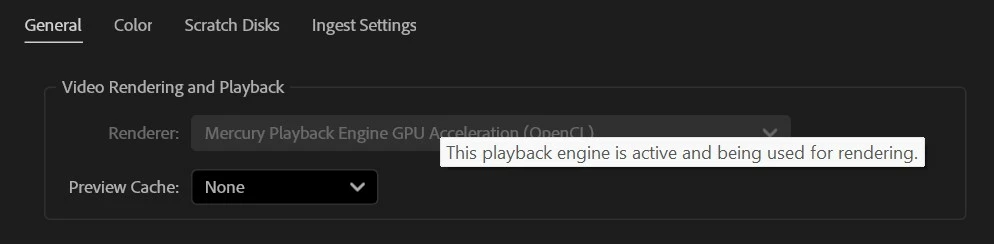
In the latest beta of Premiere Pro, we have also made a small change to the Project Settings dialog. In v25.2, a customer using a computer with a single GPU type would see the Renderer menu option greyed out. This indicated that there were no options to select but some customers reasonably thought that it meant that their GPU was not working. In the latest beta of Premiere Pro, we have added a tool tip to clarify that the GPU is being used for rendering. We'd welcome your feedback on this change; we had a lively discussion on the right wording for this and we're open to better ideas!
Best regards,
Fergus
 AdChoices