


Jessica Nuñez
Community Manager
Community Manager
September 5, 2025
Question

Now in Premiere Pro Beta: Audio + Video Waveforms in the Source Monitor

  • September 5, 2025
  • 7 replies
  • 2409 views

We’re excited to announce that you can now view audio waveforms and video playback simultaneously in the Source Monitor in Premiere Pro (Beta)! 


This highly requested feature (739 upvotes in the Adobe Community!!!) helps editors save time and tell better stories by making it easier to line up audio cues with video. Whether you’re cutting interviews, syncing dialogue, or finessing sound design, you can now see audio and video tracks together, allowing you to edit with greater precision and efficiency. 
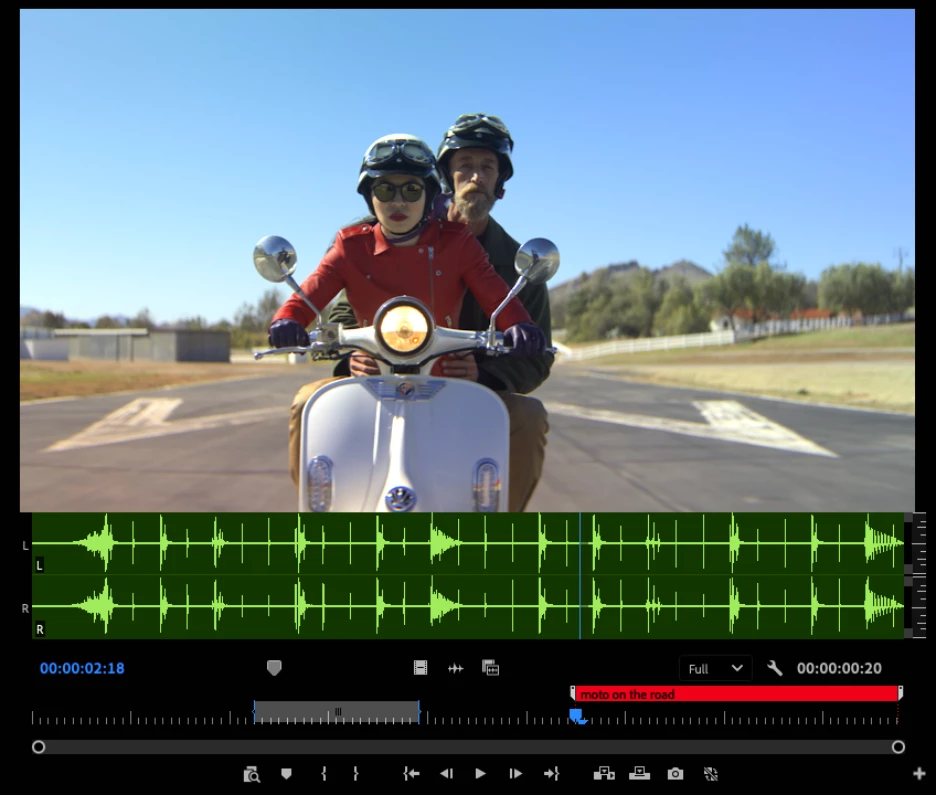


What You Can Do with Audio + Video Waveforms 

  • Toggle to show both audio waveform and video playback at the same time 
  • Scrub through media while monitoring both visual and audio tracks 
  • Set In/Out points as usual  
  • Add and move markers with full A/V visibility 
  • Works seamlessly with multiple audio channels 


Why It Matters 

Previously, users had to switch between video view and waveform view in the Source Monitor. Now, with both visible together, you can: 

  • Quickly spot audio cues while watching picture 
  • Save time when marking selects or syncing clips 
  • Improve storytelling by working more intuitively with both tracks in context 


How to Try It 

  1. Open the Source Monitor in Premiere Pro (Beta). 
  2. Enable the new A/V Preview mode toggle in the monitor settings. 
  3. Play or scrub your clip — you’ll see both the video and its audio waveform displayed simultaneously. 


Known Issues (Beta) 

  • Performance may vary with high channel-count audio. 
  • Let us know if you spot anything unexpected! 


We’d Love Your Feedback 

This feature is in its first iteration, and your input will help shape how it evolves. We’d especially love to know: 

  • Does this make your editing workflow faster? 
  • Are there specific use cases (e.g., dialogue editing, music syncing) where this helps most? 
  • What improvements or refinements would you like to see? 

Reply below with your thoughts, feature requests, and bug reports. 


Thanks for helping us make Premiere Pro better for all editors! 
—The Premiere Pro Team 

7 replies

Inspiring
November 2, 2025

Is it possible to have this functionality (showing audio & video in source monitor) for multicam clips? I use multicam to sync up dual system audio (sound being recorded separately to the camera video file), and I'd like to be able use this function with clips that I've synced using multicam mode.

hellopaul4
Inspiring
September 8, 2025

Brilliant! So glad to see some user requests being implemented! More of this kind of thing please, and less of the un-asked-for things (AI stuff, interface tweaks, etc.) please!

Participant
September 8, 2025

Hi! It would be fantastic to have the ability to adjust the proportions of video and audio in the window—especially important for files with 8 or more audio channels. Thanks, awesome update!

Participant
September 8, 2025

Community Expert
September 5, 2025

And I'll add one more;  the ability to only display in a single individual channel if needed. There are times when we have multi-channel audio which could be 8, 10, or 12 channels, but only actual audio on one single channel. It becomes quite cluttered when using multi-channel audio. 

Inspiring
September 5, 2025

Sounds like the answer to my question above is No.


Even with the two track example shown, there is a lot of duplicate information the user has to parse.

Community Expert
September 5, 2025

I did realize you can go from this:


To this by dragging one of the channels kinda down and away:


So that's something. But I don't have any 8 channel + in front of me to try. 

Community Expert
September 5, 2025

It works really well; it's a very nice addition, and will be very helpful.


I'm glad the waveform follows the zoom level because there are times with long clips where you have to be able to zoom in to make the waveform view useful. But if the playhead plays off the screen when you're zoomed in, it doesn't update until you hit stop. If it worked the way timeline will does with a Page Scroll, then it will be even more useful. 

Participant
September 5, 2025

HUGE! Thank you!

Inspiring
September 5, 2025

Is there an option to show a combined waveform for both/all tracks?

Community Manager
September 23, 2025

Hey @wesplate, this is Adolfo from Adobe. Do you mean like an overlay waveform of all the channels? 

Inspiring
September 23, 2025

I'm trying to say that I would want to see the waveform as mix of all the tracks in the clip. I made this Loom for you... https://www.loom.com/share/c8bcbb0d973641efaeafc684d07b0506?sid=ce0ec46b-0e89-43b2-be28-8b073aa3c651