



Francis-Crossman17221443
Community Manager
Community Manager
January 16, 2025
Answered

[Now Released] Label colors in sequence tabs

  • January 16, 2025
  • 16 replies
  • 4126 views

We can now display and change the label color of sequences right in the sequence panel.
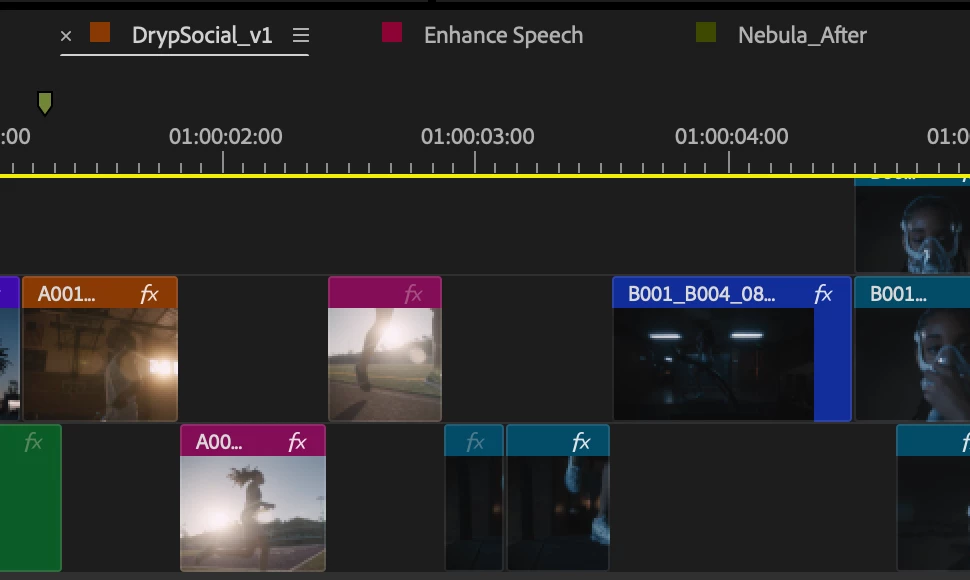


Steps to access the feature

  1. Update to the latest beta (v25.2 build 81 or later)
  2. Go to Timeline Display Settings (wrench in Timeline panel)
  3. Enable the following option: Show Sequence Label Color (it is off by default).
  4. This option will add a Label color swatch to the left of the Timeline > Sequence panel, similar to After Effects.


You can also assign a keyboard shortcut.  The Timeline > Sequence panel’s contextual menu (e.g., right-click) also has a Label dropdown menu at the bottom. This will change the label color for just that sequence and update the same sequence in the Project panel (and vice versa). You can also assign specific Timeline panel shortcuts to each Label color separate from Timeline clip Label colors to avoid conflicts.


Known bugs

  • Timeline Sequence Label color name changes are not reflected in Keyboard Shortcuts editor.  You can change the name of the label color, but the name changes are not reflected in the Keyboard Shortcuts editor.


Questions we have for you

  • Should this be on by default?


We want to know what you think.  Please join the conversation below.

Correct answer Christine Steele

Yes! This is helpful. I think it should be on by default. 

16 replies

Kevin-Monahan
Community Manager
Community Manager
January 18, 2025

I wonder if people are envisioning the entire sequence tab to turn to the label color. I was kind of envisioning that too. Now that I see the simple swatch, that's sufficient. If the whole tab was a light color, it would be too hard to read the text indicating the sequence. I hope this works OK for everyone. Nice going team.


Cheers,
Kevin


Kevin Monahan - Sr. Community & Engagement Strategist – Pro Video and Audio
Mike McCarthy
Community Expert
Community Expert
January 22, 2025

I vote turning this on by default.  I agree that the whole tab (or its outline, to keep the text legible) could be colored.  And bolding the text of the selected tab could make it easier to see what tab is currently selected, which has become harder to identify as the UI evolves.  What about color coding the different projects within a production?  Tinting the full panel BG for different projects could be helpful in identifying which panels go to which projects.

Shebbe
Community Expert
Community Expert
January 17, 2025

This is a great addition. Should be on by default imo.


@Francis-Crossman17221443 In the original post,  the sentence at Known bugs ends abruptly.

Francis-Crossman17221443
Community Manager
Community Manager
January 17, 2025

Dang.  Typo.  Thanks for pointing that out 

Christine SteeleCorrect answer
Participating Frequently
January 17, 2025

Yes! This is helpful. I think it should be on by default. 

Cheers!
Kevin-Monahan
Community Manager
Community Manager
January 18, 2025

Thanks for your comment, @Christine Steele. Nice to see you here.


Cheers,
Kevin


Kevin Monahan - Sr. Community & Engagement Strategist – Pro Video and Audio
Participating Frequently
January 18, 2025

I always enjoy your posts Kevin! 

Cheers!
Known Participant
January 16, 2025

In the beta, Selected panels don't have an under the title of the pannel, I preferred having underlines as it is hard so see what pannel you have selected in a single pannel section, Another option could be making the title alot more bold


Known Participant
January 16, 2025

this is in bata


TrentHappel
Adobe Employee
Adobe Employee
January 16, 2025

JamezFilmz, that is odd. In today's 25.2 Beta build 083, I see the underline for the selected Sequence panel.

I wonder if something happned to your workspace? Could you try resetting your workspace and see if it then works? (Window menu > Worspaces > Reset to Saved Layout)


Ann Bens
Community Expert
Community Expert
January 16, 2025

IMO Setting in the wrench should be at the top under Show source clip name and label

Or move the 3 label settings to their own section within the wrench.


Default on

TrentHappel
Adobe Employee
Adobe Employee
January 16, 2025

Appreciate the feedback AndrewTheGreat and Ann! I will note these requests.

AndrewTheGreat
Known Participant
January 16, 2025

Tested. Works fine. Didn't come across any bugs so far. Yes, it should be on by default but with an option to turn it off. A nice additional touch to this would be changing the sequence font color as well with an option to turn on and off this swatch icon.