


mattchristensen1
Community Manager
Community Manager
Nov 6, 2026 9:21 AM UTC
Sticky

Premiere AI Assistant Now Uses Firefly Credits From Your Plan

Since the AI Assistant came to Premiere (beta) in June, we've been hard at work improving it including support for custom skills, attaching external files, pasting in clips as references, and making it faster and more efficient with common tasks. Thank you for your feedback and input along the way.

Starting today we are removing the daily and weekly limits on usage. We've heard from many of you that you are impressed with what the Assistant can do, but you haven't been able to really put it into full use yet as you would inevitably hit our free daily limits. With this change, the Assistant will use Firefly credits from your Adobe account's plan.

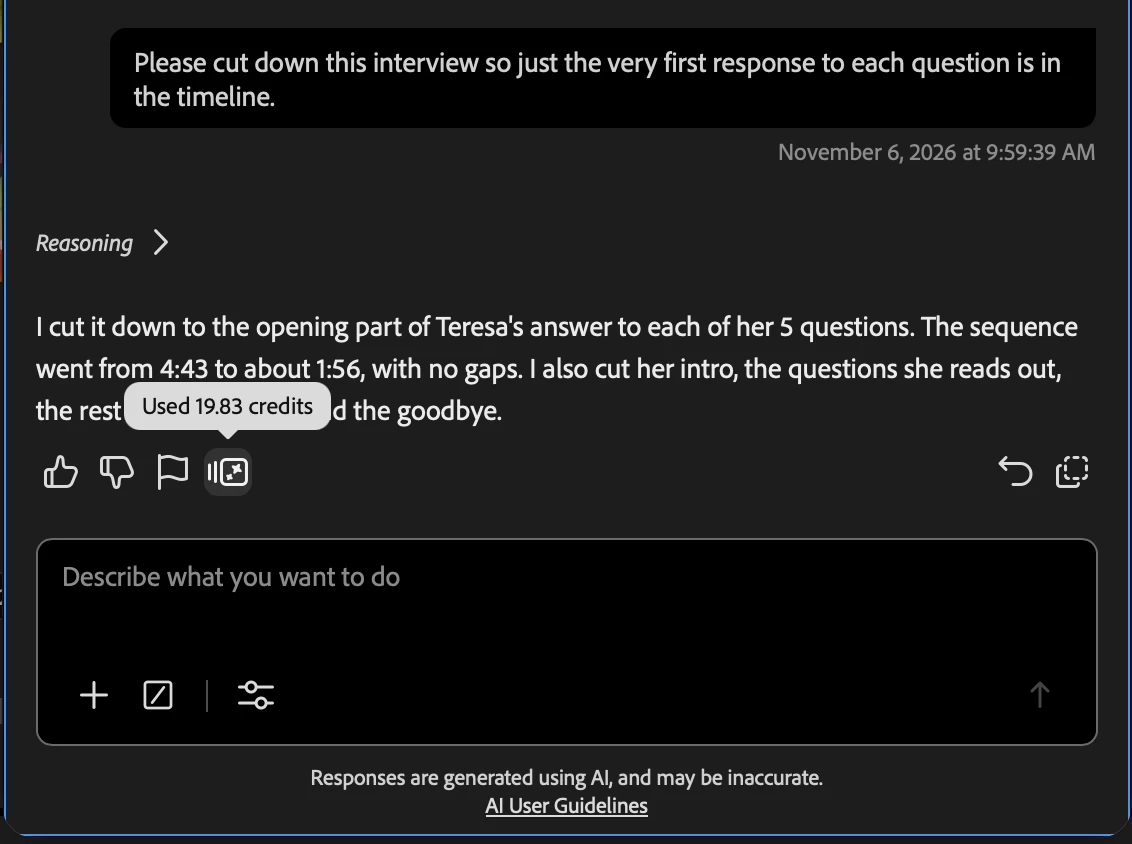
Each response from the Assistant will have a credits icon underneath it, and you can hover over it to see the credits used for that prompt and response. If your account is low on credits, you'll see a notification in the Assistant and can purchase more credits directly inside Premiere.
We'll have more news on the Assistant soon, but in the meantime we are excited to hear from you how the Assistant is helping you with your work in Premiere. Thank you!

5 replies

mschocker7
Participant
Nov 23, 2026 9:03 PM UTC

Using credits for almost EVERYTHING we want to do is super annoying...REALLY thinking about moving to Resolve!!

Translate
Participant
Nov 15, 2026 11:22 PM UTC

I agree. It's frustrating to see credits being consumed even for simple tasks that don't involve generating new content.

There's also a serious transparency issue. Adobe confirms that some AI Assistant operations run locally while others require cloud processing. However, it's not sufficiently clear which project data is transferred to external servers, which services process it, and where the processing takes place.

For European professionals, this also raises questions under the GDPR and the EU AI Act.

Under the GDPR, when personal data is involved, users need appropriate information about how that data is processed, for what purposes, by whom, and under which safeguards, particularly when transferred outside the EU. This matters when working with confidential interviews, unpublished footage, client projects, or sensitive information.

The EU AI Act also establishes transparency requirements for certain AI systems. Although it doesn't generally require disclosure of every technical detail, Adobe should explain its AI architecture and data flows more clearly, allowing professionals to make informed decisions.

There's also an economic question: why should subscribers consume generative credits simply to automate tasks like organizing clips or editing a timeline?

DaVinci Resolve offers an interesting comparison. Blackmagic integrates powerful AI tools through its Neural Engine, using local hardware for many operations, without charging credits per task. While these tools aren't directly equivalent to Adobe's conversational assistant, they demonstrate that alternative models exist.

I understand paying for cloud-based AI generation. What I question is using the same credit pool for routine editing automation and actual content generation, without transparent pricing or a clear explanation of the resources involved.

Adobe should clarify what runs locally, what requires cloud processing, how project data is protected, and why both types of operations consume generative credits.

Translate
Participant
Nov 9, 2026 10:51 PM UTC

It is incredibly frustrating to watch your credit balance tick down just for asking a basic conversational question or checking your status.

Adobe's current billing structure for the Premiere Pro AI Assistant charges generative credits for every single text response it generates. The system does not differentiate between a heavy timeline automation task and a simple text question like "How many credits do I have left?" or "What does this tool do?". Because every query triggers the backend LLM to process and generate text, it burns through a credit from your plan every time you press enter

Translate
A3user
Inspiring
Nov 6, 2026 3:34 PM UTC

Is there a way to check the credits that will be used before taking the action instead (or besides) after doing it?

Translate
mattchristensen1
Community Manager
Community Manager
Nov 6, 2026 3:43 PM UTC

No, it’s not possible to estimate the amount of credits that will be used when working with the Assistant. How many credits ultimately are used for a given request depends a lot on the type of sequence or project you are working on and what tools the Assistant needs to use to accomplish the task.

Translate