




Adobe Acrobat Sign transaction limits

Adobe Acrobat Sign transaction limits
TL; DR (read time: ~45 sec)
Adobe Sign limits transactions (documents sent for signature) by service level: Individual/Small Business gets 150 per user/year. Caps also apply to file size, pages per transaction, and signer count, with Enterprise able to request increases. KBA and Phone Authentication are Enterprise-only at 50/year each by default.
Learn about Adobe Sign transaction limits based on the service/subscription level for sending agreements.
Adobe Sign currently limits transactions based on the service level of the sending party.
A transaction is a document sent from your account for signature.
Adobe Sign Individual and Small Business plans include 150 transactions per user per year. Learn more about Adobe Sign’s Use Limitations.
Transaction Limit:
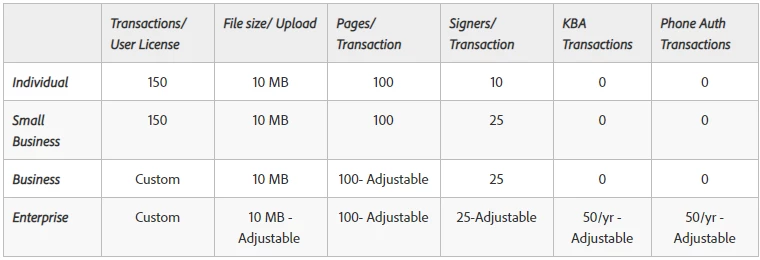
- File size/Upload: Adobe Sign limits the size of each file uploaded. If you attempt to upload a document outside these bounds, you get an error under the file that says, "Upload limit exceeded."
- Pages/Transaction: The whole transaction (all files merged together) has a total page limit. This limit is adjustable by the support team on request for business and enterprise customers. If you attempt to send a document that is larger than your account's set limit, you get the error "Adobe Sign was unable to create your agreement because the document(s) exceeded your page limit."
- Signers/Electronic transaction: The number of people who can sign an electronic signature transaction varies for each level of service. The free, individual, team and business service levels have hard caps on the total number of signers their transactions can include. Customers with an enterprise service level can request that this limit be increased.
- KBA transactions: Knowledge-Based Authentication is an advanced form of signer verification that is enabled at the enterprise level of service. The account comes with 50 KBA transactions per year by default.
- If you have a need for a higher volume of this service, contact your Success Manager or Sales Agent to discuss the volume requirement and price structure.
- Phone Authentication transactions: Phone Authentication transactions are also an advanced form of signer verification that is enabled at the enterprise level of service. The account comes with 50 Phone Authentication transactions per year, by default.
If you need a higher volume of this service, contact your Success Manager or Sales Agent to discuss the volume requirement and price structure.
Tell us if these helped you. Join the conversation here. We are listening!
To discover a host of other great features, go straight to: Get others to sign a document | Fill and sign a document yourself | Adobe Sign FAQ
 AdChoices