

Preran
Community Manager
Community Manager
January 26, 2026

Welcome to the new Adobe community
  • January 26, 2026
  • 72 replies
  • 14770 views


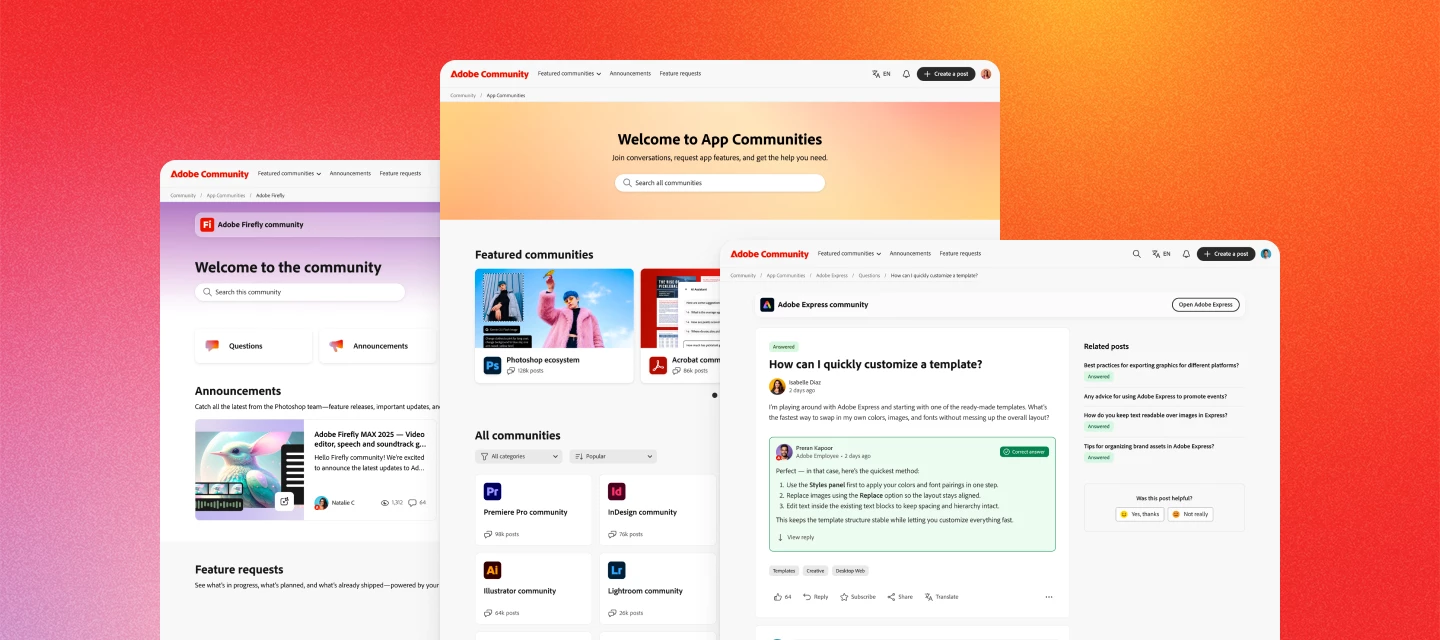
Hi everyone. The new Adobe Community experience is officially live! You’re now looking at a reimagined space designed to make it easier to connect, share feedback, and see how your ideas help shape Adobe products.


What’s new


A clearer way to share ideas and feedback

Feature requests and bug reports now have dedicated spaces, clearer status indicators, and voting—so it’s easier to see what’s gaining traction and what’s already in progress.


Better visibility into what’s happening

You can now track the status of feature requests and bugs as they move from idea → in development → released. When something you’ve voted on changes status, you’ll be notified.


Cleaner navigation, less noise

Discussions, announcements, and product feedback each have their own place—making it easier to find answers, discover what’s new, and focus on what matters most to you.


Richer posts and conversations

Create posts with images, videos, code blocks, and file attachments to share context, examples, and workflows more easily.


Stronger connections with Adobe teams and peers

Your community activity now connects to your Adobe ID, helping us better understand feedback and engage more meaningfully with the people using our products every day.


Your content is still here


All posts, replies, solutions, feature requests, and bug reports created on or before November 16 are already available. Content created between November 17 and launch day will be added soon—no data will be lost, and you won’t need to recreate anything.


Jump in


Explore your product communities, upvote ideas you care about, ask questions, and share what you’d like to see next. This community works best when your voice is part of the conversation.


Thank you for helping make Adobe Community what it is. We’re excited to keep building it with you.


— The Adobe Community Team


    72 replies

    johnrellis
    Legend
    February 5, 2026

    I wrote a free [link removed by moderator]  that automatically expands nested replies, expands the input box of new replies to fill the window, changes the initial reply ordering to oldest first, and shows up to 30 top-level replies at once.  See here for details:


    Peru Bob
    Community Expert
    Community Expert
    February 5, 2026

    @johnrellis 

    Thanks for that.

    Participating Frequently
    February 3, 2026

    I haven’t used PS CS4 for a couple years. Had no problems before. Now getting Error 131:4, and not being allowed to open up the program. Help!

    Nancy OShea
    Community Expert
    Community Expert
    February 3, 2026

    CS4 is officially end-of-life and unsupported. Its activation servers were shut down in 2021. 

    The software can no longer be activated, rendering it unusable…

    Legacy product users should upgrade to modern solutions, such as an annual Creative Cloud Photography Plan or Photoshop Elements (3 year license).


    Hope that helps.


    Nancy O'Shea— Product User & Community Expert
    Participating Frequently
    February 3, 2026

    I cannot go to specified Community Discussions from links in browser. I only get to the Welcome to the Adobe Community page. Is anyone else having this problem? Does anyone have a suggestion to fix? Thanks

    johnrellis
    Legend
    February 3, 2026

    @DAVID 640 Where are you encountering these links?  In emails or in other posts?  Do you think they could be to posts made in the last couple of months?

    GoldingD
    Legend
    February 3, 2026

    Moderator


    It appears that posting into this subject has gone off the rails. Can the wayward posts be relocated to proper locations.


    Well, dirty word, apparently moving posts is currently not possible? 

    ‘Was this new community forum not ready for prime time?

    jane-e
    Community Expert
    Community Expert
    February 3, 2026

    @GoldingD wrote: Can the wayward posts be relocated to proper locations.


    Moderators cannot move posts (yet)

    Jane

    Sameer K
    Community Manager
    Community Manager
    February 9, 2026

     ​@GoldingD, ​@jane-e ​@c.pfaffenbichler ​@davescm - Sorry for the delay, I am late, but I am sorting this out now. Feel free to tag me whenever threads need to be relocated. 

    Thanks!

    Sameer K

    Rodney W
    Participant
    February 3, 2026

    Honestly don’t remember what it was like before, but this is awful. No ability to filter by date, or software, or anything really, can’t even sort it and the AI results don’t match the input. How is any of this considered an improvement? Also, nothing links properly, its basically a million posts all lumped together. Guess I am going to Reddit.

    Nancy OShea
    Community Expert
    Community Expert
    February 4, 2026

    @Rodney W,

    Go to the main Community page and select the App/Service you’re looking for.

    Use Filters & Sorting features to help you find what you want.

    https://community.adobe.com/community


    All Posts are divided into sub-sections:

    • Questions,
    • Bug Reports,
    • Announcements, 
    • Feature Requests. 

    Hope that helps.


    Nancy O'Shea— Product User & Community Expert
    jeffh65754959
    Inspiring
    February 2, 2026

    I recently moved to this community from the previous ColdFusion forums.  I viewed the posts via Feedly and the Chrome RSS Feed Reader extension.  Is there a url, hidden or otherwise, that can be added to the RSS feed readers to monitor activity in the new community like we did in the old one?

    Inspiring
    February 2, 2026

    The very question I wanted to ask.

    johnrellis
    Legend
    February 2, 2026

    @jeffh65754959 and ​@PBArtattack, others have asked about RSS feeds, and it appears they’re not currently available for this new forum platform.  Not clear if they will ever be available -- Adobe hasn’t spoken.  See here for a previous discussion about RSS feeds:


    Mariano Molinari
    Participating Frequently
    February 2, 2026

    Hello! New here! I´m photographer and Adobe Certified Expert in Lightroom Classic. Live in Buenos Aires, Argentina and doing photography at my studio, specialized on product photography and headshots.😉

    Mariano Molinari
    johnrellis
    Legend
    February 1, 2026

    [This post contains formatting and embedded images that don't appear in email. View the post in your Web browser.] 


    @Nancy OShea Forgive my ignorance but what exactly is Gainsight? 

    Gainsight is the company providing the new forum platform. 


    If you view the HTML source of a forum web page, you’ll see many references to “insided” and “insided.com”. When you go to insided.com, you get redirected to Gainsight.com with this message:


    Nancy OShea
    Community Expert
    Community Expert
    February 1, 2026

    In case you’re wondering where your Private Messages are located.

    Click on your forum Avatar.

    Scroll down to Private Messages.


    Nancy O'Shea— Product User & Community Expert
    Papergardenxoxo
    Participant
    January 31, 2026

    Hello!

    I downloaded 3 separate editable text files and none of the design elements are coming through.  It keeps saying the fonts are missing event though I checked and the fonts are already loaded onto my computer.  None of the effects on the text are showing as advertised either. 

    #452720474

    #452620376

    #462554045

    jane-e
    Community Expert
    Community Expert
    January 31, 2026

    @Papergardenxoxo 

    • Which Adobe application are you using?
    • What Effects do you expect to see?
    • What do the numbers refer to?

    We might need some screenshots. Use the Insert Image button (mountain and sun) in a Reply window.


    Jane