

Preran
Community Manager
Community Manager
January 26, 2026

Welcome to the new Adobe community
  • January 26, 2026
  • 72 replies
  • 14773 views


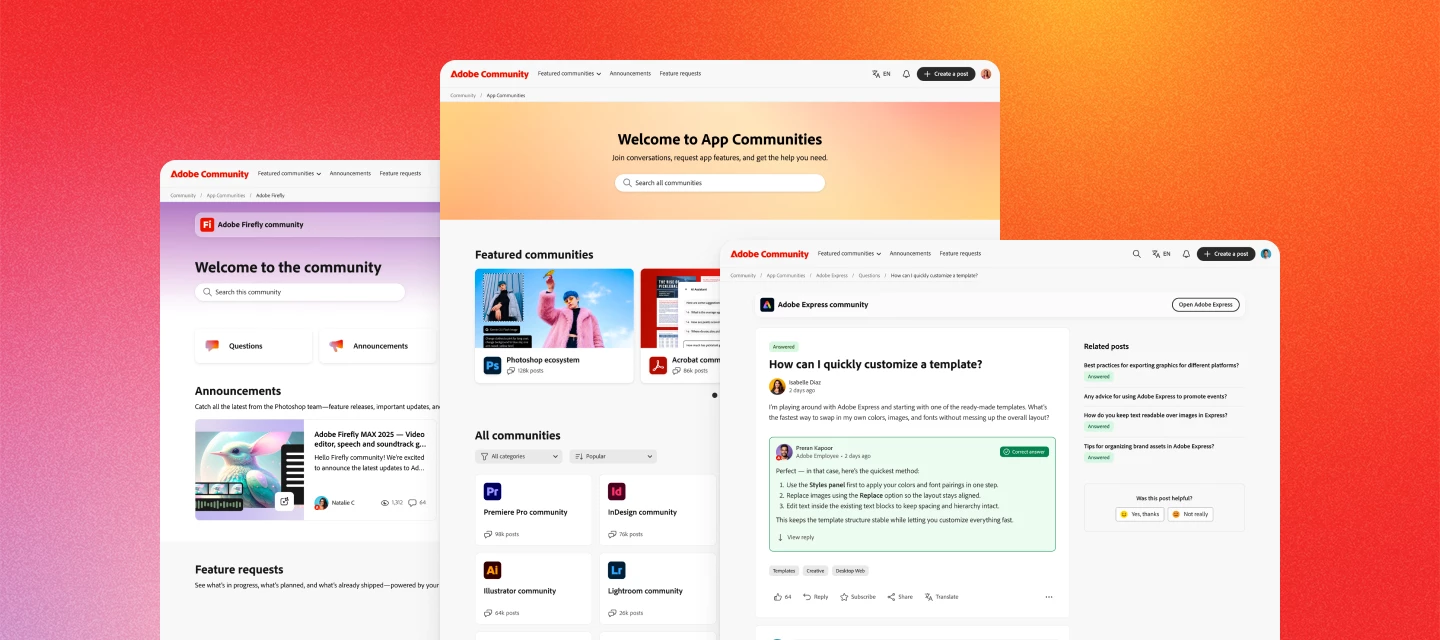
Hi everyone. The new Adobe Community experience is officially live! You’re now looking at a reimagined space designed to make it easier to connect, share feedback, and see how your ideas help shape Adobe products.


What’s new


A clearer way to share ideas and feedback

Feature requests and bug reports now have dedicated spaces, clearer status indicators, and voting—so it’s easier to see what’s gaining traction and what’s already in progress.


Better visibility into what’s happening

You can now track the status of feature requests and bugs as they move from idea → in development → released. When something you’ve voted on changes status, you’ll be notified.


Cleaner navigation, less noise

Discussions, announcements, and product feedback each have their own place—making it easier to find answers, discover what’s new, and focus on what matters most to you.


Richer posts and conversations

Create posts with images, videos, code blocks, and file attachments to share context, examples, and workflows more easily.


Stronger connections with Adobe teams and peers

Your community activity now connects to your Adobe ID, helping us better understand feedback and engage more meaningfully with the people using our products every day.


Your content is still here


All posts, replies, solutions, feature requests, and bug reports created on or before November 16 are already available. Content created between November 17 and launch day will be added soon—no data will be lost, and you won’t need to recreate anything.


Jump in


Explore your product communities, upvote ideas you care about, ask questions, and share what you’d like to see next. This community works best when your voice is part of the conversation.


Thank you for helping make Adobe Community what it is. We’re excited to keep building it with you.


— The Adobe Community Team


    72 replies

    Inspiring
    January 31, 2026

    I can’t find rss-feed links anymore. Are there any and, if so, how can i find them?

    Trevor.Dennis
    Community Expert
    Community Expert
    January 31, 2026

    The Discover Panel is one the best place to find links to quality tutorials.  Remember, these are either made by Adobe, or approved by Adobe, so content you can trust.


    I have just thought that Dave Cross has a Photoshop Summit aimed at beginners and intermediate users that goes live on the 23rd February 2026.  You can watch for free, but with a limited time period, or pay for indefinite access.  These are all instructors that know their stuff, and that you can safely follow via their own YouTube channels.

    Photoshop Virtual Summit Foundations

    Inspiring
    January 31, 2026

    Thanks for the reply, but i am not looking for quality tutorials, but for rss-feed links:

    a very convenient way  to see the thread topics in a reader on my browsers starting page to see if there is something in the forums that might be interesting for me to look into either to learn from or to help.


    Adobe had it, Avid still has:


    johnrellis
    Legend
    January 30, 2026

    @gary_sc where are the personal emails at this point? 

    If you’re referring to “private messages” or “direct messages”, Adobe discarded private messages in the migration process (contrary to their statement that “no data will be lost”). See this reply from an Adobe employee:


    R Neil Haugen
    Legend
    January 31, 2026

    Great ... no private messages? That was extremely useful.

    Everyone's mileage always varies ...
    jane-e
    Community Expert
    Community Expert
    January 31, 2026

    @R Neil Haugen 

    We also lost all PMs when we moved from Jive to Khoros.

    Jane

    R Neil Haugen
    Legend
    January 30, 2026

    @Preran  ... I’ve been a major ‘helper’ on here for years. You might check my posting record ... when you last switched forum software, on the then-scale, I was something above number 10 all-time. So I’ve been around the block a bit.


    I have extensive information links in a Google Docs folder for cut & paste into replies. But I cannot paste the comments and links from them into a reply. This dramatically affects the quality of help I can give your customers.


    And I am not best pleased, to be quite polite and genteel.

    Everyone's mileage always varies ...
    Nancy OShea
    Community Expert
    Community Expert
    January 30, 2026

    HTML option on toolbar: GONE

    Macros and Screenshots: GONE

    Ability to Moderate: GONE


    On the plus side, Code Insertion, Media Embeds and new Emojis are nice improvements. 🙂


    Nancy O'Shea— Product User & Community Expert
    johnrellis
    Legend
    January 30, 2026

    More pluses:


    - The forums are much faster.

    - You can use your browser’s built-in spell-checking.

    johnrellis
    Legend
    January 30, 2026

    [This post contains formatting and embedded images that don't appear in email. View the post in your Web browser.] 

    @Trevor.Dennis Are we really unable to increase the size of our post window beyond seven lines?  

    The reply text box only displays 7 lines, though you can enter as many as you want -- it scrolls automatically.  After the reply is submitted, by default, only the first 7 lines are displayed to readers, though they can see the following lines by clicking the Show more button.


    I agree this is a ridiculous design by a very inexperienced UI designer, which will have real costs to having an effective support community.


    Here’s my clumsy workaround for seeing all the lines of my reply as I edit it.  Bookmark this URL:

    https://community.adobe.com/topic/new?subject=xxxxxxxxxxxxxxxxxxxxxxxxxxxxx&community=Lightroom%20Classic&type=question

    When you go to that URL in a new browser tab, it will start creating a new top-level post, and its text box will grow as large as necessary. When you’re done editing, don’t click Submit -- copy and paste the contents back into the original reply box.  Then close the browser tab.

    johnrellis
    Legend
    January 30, 2026

    And if you use that exact URL, which references the Lightroom Classic forum, then you won’t be able to accidentally submit your edits as a top-level post, as I did several times at first.  The forum was changed yesterday to reject posts in a forum with identical titles.

    johnrellis
    Legend
    January 29, 2026

    @stephenc11105425 What happened to the Post I made a couple weeks ago? 

    Adobe’s post at the top of this thread says:

    Content created between November 17 and launch day [Jan 27] will be added soon—no data will be lost, and you won’t need to recreate anything.


    Adobe Community Manager Preran recently said in a reply buried deep in the nesting below:

    The migration is expected to take 8-10 weeks. We are doing our best to get this done as quickly as possible. If you posted a question after the 16th and are awaiting a response, kindly repost it in the relevant community.

    Participating Frequently
    January 29, 2026

    Not loving this redesign

    stephenc11105425
    Participant
    January 29, 2026

    What happened to the Post I made a couple weeks ago? It appears to have been deleted.

    kglad
    Community Expert
    Community Expert
    January 29, 2026

    @stephenc11105425 


    more recent posts will be ported here in the coming weeks.

    Known Participant
    January 29, 2026

    this site and the search are usless


    kglad
    Community Expert
    Community Expert
    January 29, 2026

    give it a few weeks, at least.

    jackthegiantkiller
    Inspiring
    January 30, 2026

    So how long before I can see critical information from past posts that might benefit your users overall work? This is ridiculous.

    johnrellis
    Legend
    January 29, 2026

    @Andy Baines I now see that my bug report seems to have disappeared.


    Adobe’s post at the top of this thread says:

    Content created between November 17 and launch day [Jan 27] will be added soon—no data will be lost, and you won’t need to recreate anything.


    Adobe hasn’t said what “soon” means -- a community expert posted here maybe end of March?


    … when I check my DMs it says I don’t have any messages. 


    Adobe discarded private messages in the migration process (contrary to their statement that “no data will be lost”). See this reply from an Adobe employee:

    Known Participant
    January 29, 2026

    Thanks John. I do now remember them mentioning the migration issue (thankfully I’m not enormously impacted by the DM deletions). Hopefully ‘soon’ is indeed soon. If the migration takes some time, does this mean Adobe staff will cease assisting those who have raised any issue or bug since Nov 17th? 

    Preran
    Community Manager
    PreranCommunity ManagerAuthor
    Community Manager
    January 29, 2026

    Hi, the migration is expected to take 8-10 weeks. We are doing our best to get this done as quickly as possible. If you posted a question after the 16th and are awaiting a response, kindly repost it in the relevant community.

    GoldingD
    Legend
    January 29, 2026

    Fellow members, perhaps consider looking at, commenting on, and adding to the following:


    Also, this one: