


Open for Voting
Fix the documentation for file-sharing using the CC application
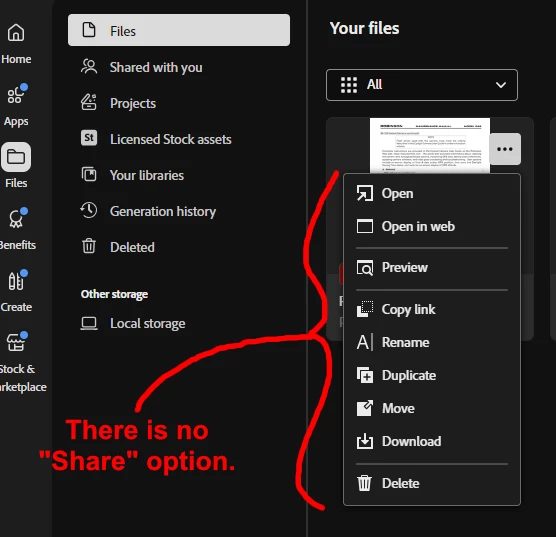
We wasted a lot of time trying to share documents for review at our firm, because the links created by the CC desktop application (in the Files area) don’t work. Recipients of the links get a “You are not authorized to view this file” error. There is no apparent way to authorize anyone, either.
It turns out that there are several problems in play here:
- If the file happens to be a PDF, Adobe just removes the Share option from the menu. This is not correct behavior. If an option exists but is simply not currently available, you grey it out. You don’t just make it disappear. This is UI 101. By greying it out, you show the user three critical things:
A. The function exists.
B. Where it resides
C. Some condition must be satisfied to enable it.
- The documentation at Share cloud documents suffers from a similar defect: It shows you how to share files, but makes no mention of the fact that the steps don’t apply to PDFs. That critical information is off-screen, at the bottom of the page where you have no reason to scroll because you can see all four steps for file-sharing without scrolling. Why? It should be mentioned in the first section by simply saying “Except PDFs; see below.”
- The links created by “copy link” appear to be useless.
 AdChoices