


Premiere audio decode issue causing audio distortions
Before you read, listen to these audio samples first:
Premiere decode (listen to the word "bingo" specifically "go", the noise happens there. )
Clean audio for comparison: Uncompressed Raw Audio (PCM_s16le), Davinci decode
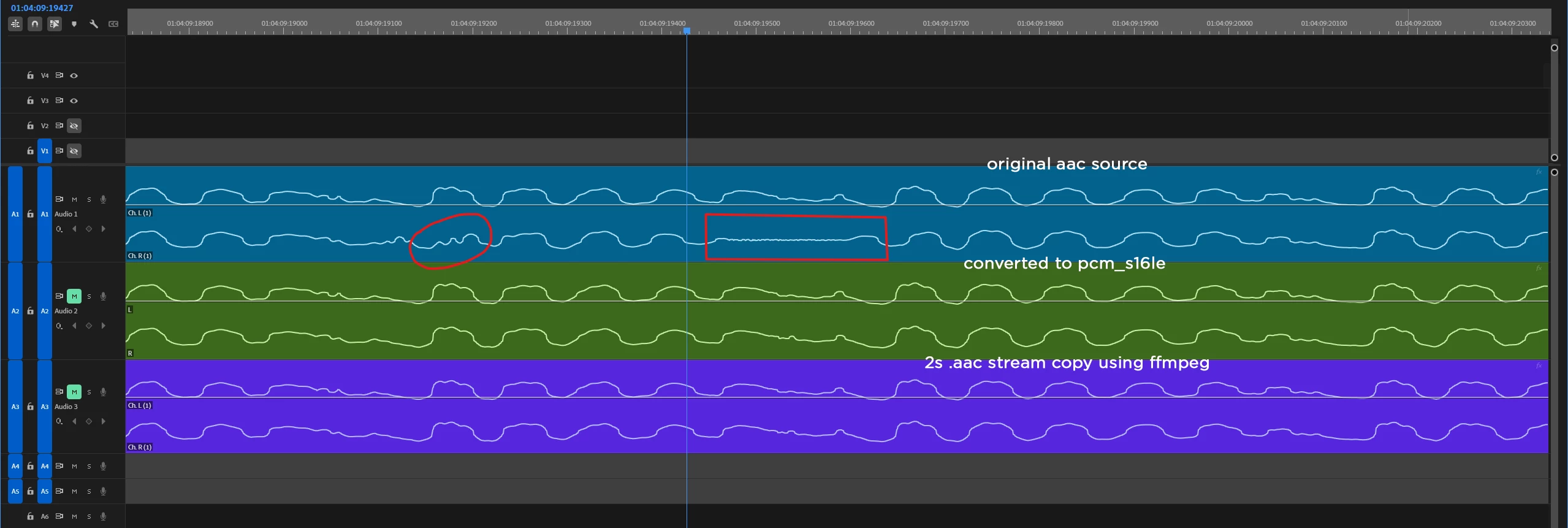
I have been dealing with this issue for 4+ years. Seemingly fine audio goes in Premiere and starts having random audio distortions, it's just a weird noise every several seconds to minutes. The original source sounds completely fine in media players outside Premiere, sounds fine in Davinci too, but inside Premiere it does not, and once it's re-encoded by Premiere it permanently ruins the audio and now you hear that in all the media players, youtube etc.
After tinkering with it for hours I have finally found that it's a bad decoding of left and right channels inside Premiere, making the track dual mono removes that noise. I confirmed it's happening inside Premiere only after importing the source in Davinci and exporting it and it had no such error. I then converted the original untouched AAC source to PCM_s16le (uncompressed raw audio) and imported that into Premiere and that audio did not have that noise, both left and right channels looked normal. I remuxed the entire 3 hour source into a new container using stream copy with ffmpeg, but that still had the issue on all the exact same spots. I then cut out a 2s long segment using stream copy with ffmpeg from the original source, imported that into Premiere and surprisingly it did not have that extreme mismatch between left and right channels and had no noise.
One thing I have noticed is that this happens very frequently when I work with Twitch Vods, not sure if that helps. The audio I have worked with is always AAC that does this and Premiere version does not matter, I have had this happen across every version I have used from 2022 to 2026, this is 26.0.2.
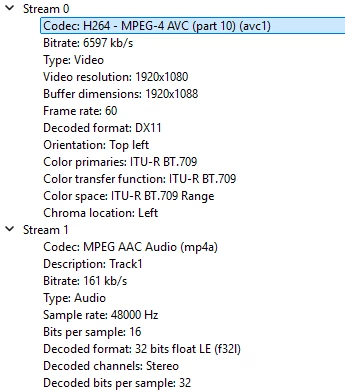
This particular source was not a Twitch Vod, it was an OBS recording.
 AdChoices