
Participant
September 24, 2025

Can't share Adobe Stock Library or download any previews

  • September 24, 2025
  • 9 replies
  • 518 views

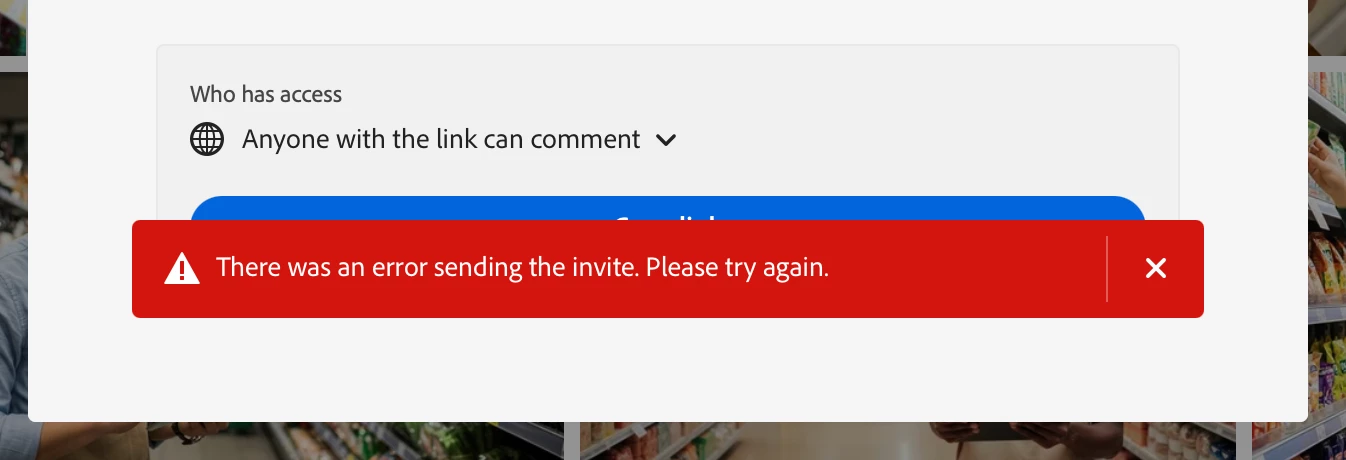
I'm trying to share an Adobe Stock Library with a client and keep getting an error message:

Additionally, when I try to copy the link and share that, I get an "access denied, you don't have permission to access." Finally, I'm also unable to download any preview images. When clicking on download preview, I'm taking to a paywall. I swear I used to be able to download watermarked previews.
 

9 replies

Participant
September 29, 2025

@Liza5C0C Thank you for the update and your team's attention to this matter.

gloriab47278991
Participant
September 29, 2025

Thanks for the quick response.

Community Manager
September 29, 2025

The fix is scheduled to be deployed by the end of today. Thank you for your patience. 

gloriab47278991
Participant
September 29, 2025

Having the same issue preventing me as Owner to share my Adobe Stock library with team collaborators. Also, receiving the same error message. Any updates?

Participant
September 28, 2025

Hi! Any update on this, please? 

Participant
September 27, 2025

Would really appreciate an update on this, just realised the same thing, you could DEFINITELY download previews that were low resolution and watermarked without needing a subscription to Adobe Stock. Without any update I'm just going to assume they intentionally removed this feature to encourage more people to buy a subscription to Adobe Stock on top of their current Creative Cloud subscription which is absolute bull.

Participant
September 26, 2025

Same issue, when I want to download a watermarked preview video for my video draft instead of the usual video resolution selection window there was a paywall asking for Adobe Stock subscription payment. Tried to contact Adobe live support twice since yesterday but somehow nobody knew what was actually going on. One agent even stated that to download a watermarked preview, I should sign up for a free trial to do that. May I know since when that was the case? I just need the preview file...

Participant
September 24, 2025

Thanks for the quick response.

Community Manager
September 24, 2025

Apologies for the inconvenience. We are aware of the issue and are actively working on a resolution.