
Participant
January 24, 2025

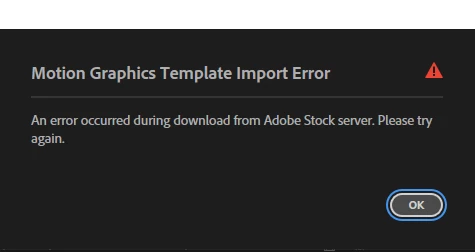
Error occurred during download from Adobe Stock server.

  • January 24, 2025
  • 4 replies
  • 568 views

I get the whole Adobe plan through my university and I have an Enterprise account. Every time I try and download a paid Adobe graphics template this error occurs. The free ones I have no problem with. I logged out and re-logged back in and I still have the same error. Is this a problem on my University's end or is this an Adobe problem? Please help whenever possible. Thank You!
 

4 replies

Participant
January 29, 2025

Thank you for looking into this matter. I have figured out that I can download and use the graphic motion templates if I download them from the website first. Then, I have to drag them into the graphic template in Premiere Pro to place them onto my sequence. I cannot do it directly through the Premiere Pro app. Thank you for the help.

Riya123
Adobe Employee
Adobe Employee
January 28, 2025

Hello , our team took a look and the asset seems to be working fine. 
Could you please try to download from license history or ADP page and see if it works. It could be that there may be some issue with libraries. . To identify the whether the issue is from Library or Stock, you can go to https://asset.adobe.com/libraries . If problem happens there, then it is library problem. 

Riya123
Adobe Employee
Adobe Employee
January 24, 2025

hi @jordan_4794 -I am  sorry that you are facing this. I have informed our team about this and they are looking into this . I will update you once I hear back. Thanks!!

Ann Bens
Community Expert
Community Expert
January 24, 2025

Moving thread from Premiere Pro Adobe Stock forum for better help.