


Participating Frequently
May 30, 2026

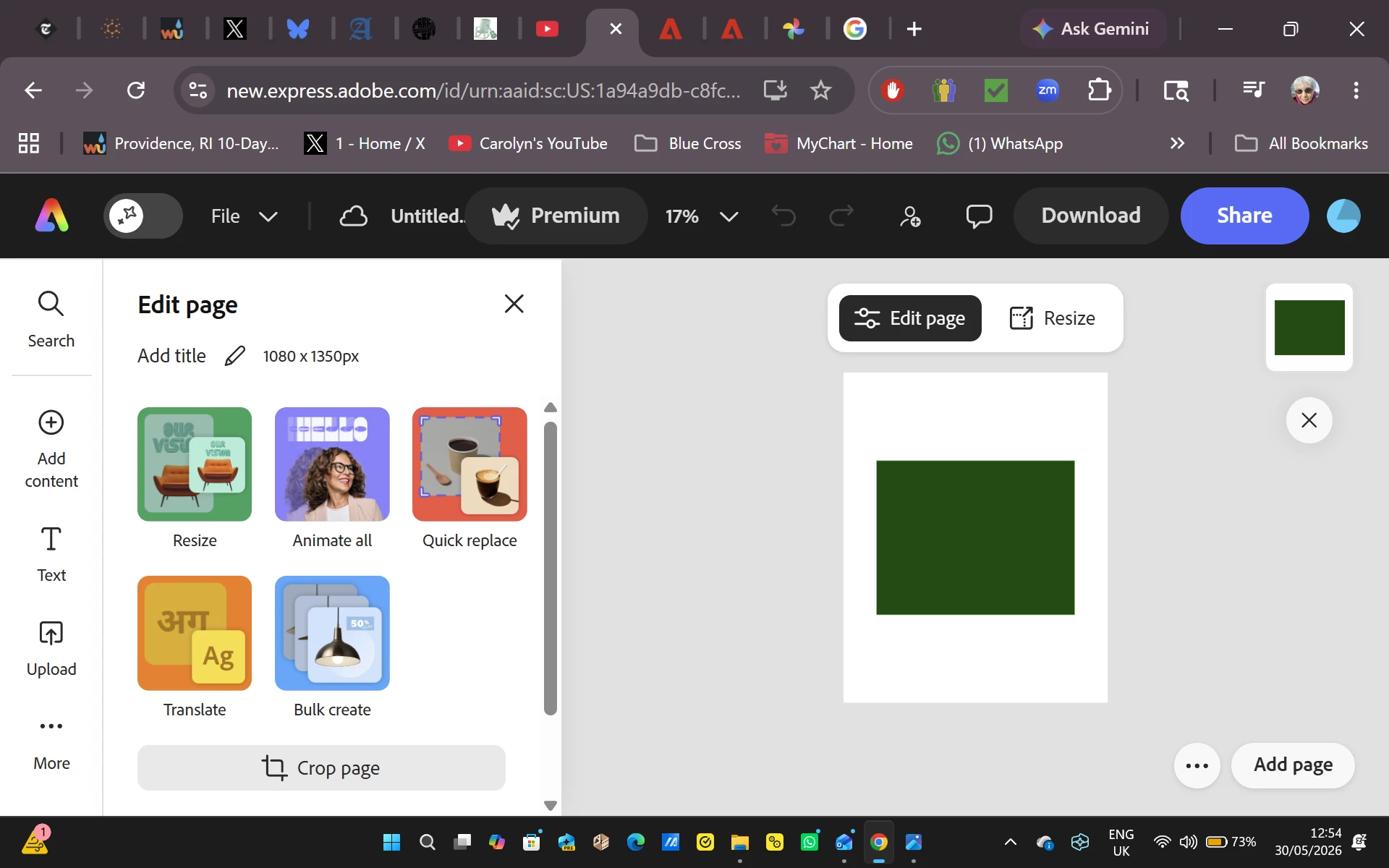
As soon as I start to edit an image, the entire image turns dark green. This is replicated on many images on both the Google Chrome and Microsoft Edge browsers for the past two days.

  • May 30, 2026
  • 33 replies
  • 584 views

I begin a new file, import a photo from Adobe Express, and attempt to work on it.  As soon as I do, the entire image turns dark green.  This began two days ago, and everything I have tried to do since has resulted in a solid green box replacing the image I selected.  To verify that the problem isn’t related to Google Chrome I attempted the same procedure on Microsoft Edge with exactly the same results.  Since I use Adobe Express multiple times a day for projects, this is creating a massive problem for me.


    Pinned Reply By Amitej S

    Hi everyone! 

    Our team is working on this issue and will let you know once the fix is released. Stay tuned to this community thread, we’ll be updating the status here! 

    Thanks!

    33 replies

    tanya@dearstitcher.com
    Participant
    June 15, 2026

    What’s the latest status? I just had to re-create an 8 page brochure in Canva. It was the least fun thing I’ve done in the last few weeks. 

    Participating Frequently
    June 15, 2026

    Rose DV from Adobe responded three days ago.  You can read her post, but, in summary, she told us that we have to turn off Hardware Acceleration if we are using Chrome, and the corresponding function in Microsoft Edge.  I haven’t tried this yet.  I am a bit baffled as to why we were able to work successfully with Hardware Acceleration engaged since the days of Adobe Spark and into the Adobe Express Era.  What has changed on Adobe’s end that created this long lasting green box crisis?

    tanya@dearstitcher.com
    Participant
    June 13, 2026

    Still green for me, too

    Rose DV
    Community Manager
    Community Manager
    June 12, 2026

    Hi everyone!


    Thank you so much for your patience - we know this has been going on for too long and we're sorry for the disruption to your work.


    Our engineering team has been investigating and believes this may be related to how certain devices handle GPU rendering. A fix was deployed on June 10th but unfortunately didn't resolve it for everyone.

    To help narrow this down further, could anyone still experiencing the issue try the following:

    Turn off hardware acceleration in your browser:

    • Chrome: Settings > System > turn off "Use hardware acceleration when available" → relaunch Chrome
    • Edge: Settings > System and performance > turn off "Use hardware acceleration when available" → relaunch Edge


    Then try opening your project and let us know if the green image issue is still occurring.


    It would also really help to know:

    • What device are you on? (make, model, and generation if possible)
    • What OS version?
    • What browser?

    Thank you - every piece of information helps!


    Rose

    @carolynfahm ​@Daniel3867810592ow ​@kristin_0508 ​@Stanley25373514nmfe ​@jennih27140690 ​@sara_8358 ​@Ntash26 ​@Rayen1 ​@olivermyers ​@ltam ​@e-JY987654321 ​@Gert+van+Veen ​@tanya@dearstitcher.com ​@ghuman26 ​@gratitude_to_8835 ​@One_Story1747 ​@LocalMarketer ​@NZphee ​@Tom Welborn ​@gbgbgbgbgbg ​@Vanessa23847244ut58 

    sara_8358
    Participant
    June 12, 2026

    @Rose DV thank you for your message and this seems to be working! I do get the pop up that I should turn on hardware acceleration but will ignore this for now. Please do let us know when we can turn it on again! Many thanks

    Vanessa23847244ut58
    Participant
    June 11, 2026

    Felling frustrated with this.  This has been happening now for 2 weeks+ for me.  Even went as far as to pay an IT professional to try and fix the problem before finding this thread.  

    Participating Frequently
    June 11, 2026

    It would have helped if Adobe had sent out a message to paid users.

    NZphee
    Participant
    June 11, 2026

    Weirdly its only doing it with certain images for me. I have tried re-uploading the graphic and still wont work

    NZphee
    Participant
    June 11, 2026

    I am getting so frustrated with this, I need to use urgently and pay to have this program operational- please can you update with ETA for fix as has been going on for a long time now! I have tried every possible fix on two different browsers and the app itself. 

    gbgbgbgbgbg
    Participant
    June 11, 2026

    same here. if i zoom in its sometimes OK, but as soon as I zoom out a little it turns green. 

    Tom+Welborn
    Participant
    June 11, 2026

    All my images upload in green now. Very occasionally they load correctly, but often will just turn green later. 

    Its beocming more and more frequent:


    Tom+Welborn
    Participant
    June 11, 2026

    On Adobe express, whenever I upload a picture it shows up green. Once I export it, it shows correct. 


    Please help

    e-JY987654321
    Participant
    June 11, 2026

    Doesn't work for me