


Participating Frequently
May 30, 2026

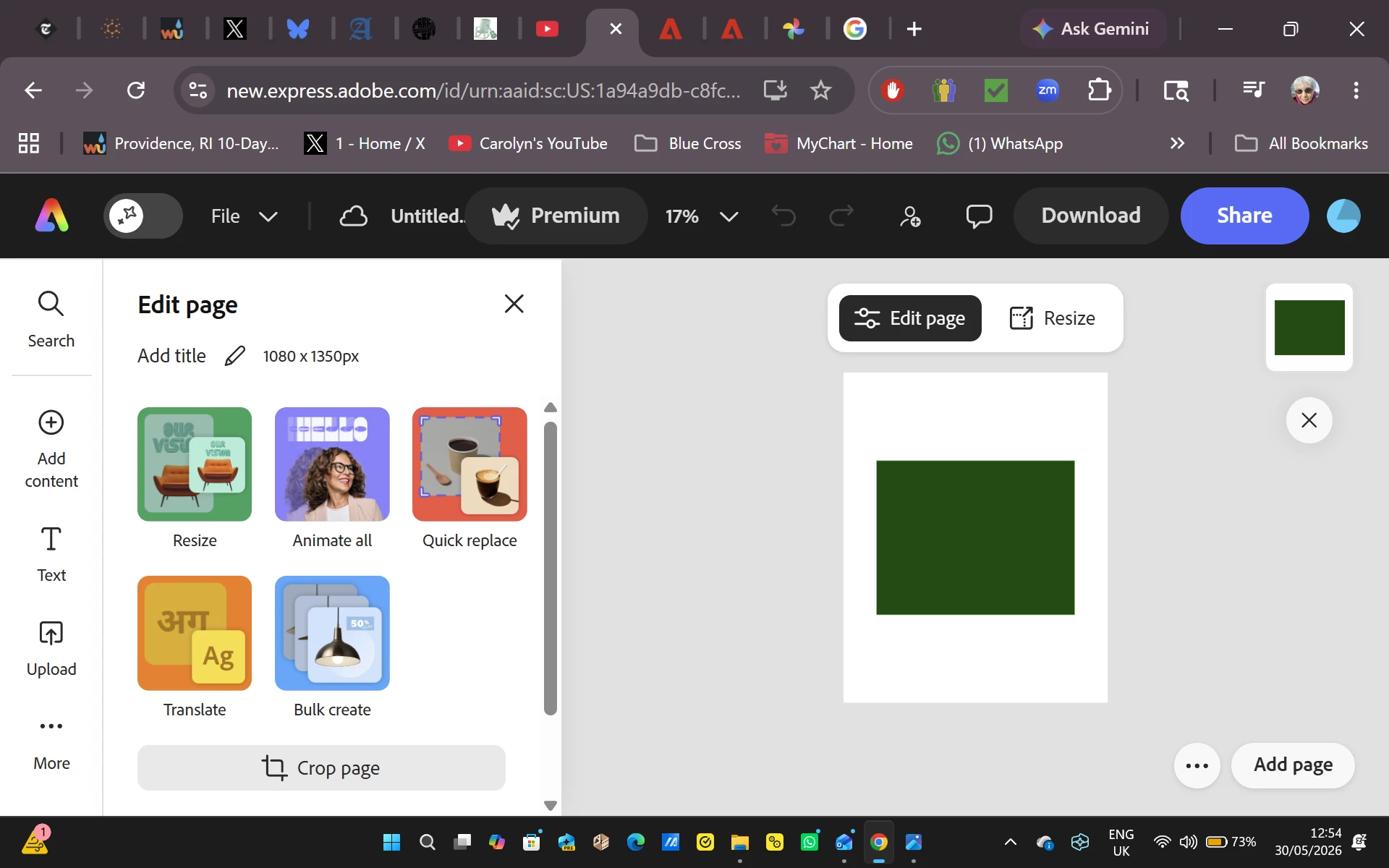
As soon as I start to edit an image, the entire image turns dark green. This is replicated on many images on both the Google Chrome and Microsoft Edge browsers for the past two days.

  • May 30, 2026
  • 33 replies
  • 584 views

I begin a new file, import a photo from Adobe Express, and attempt to work on it.  As soon as I do, the entire image turns dark green.  This began two days ago, and everything I have tried to do since has resulted in a solid green box replacing the image I selected.  To verify that the problem isn’t related to Google Chrome I attempted the same procedure on Microsoft Edge with exactly the same results.  Since I use Adobe Express multiple times a day for projects, this is creating a massive problem for me.


    Pinned Reply By Amitej S

    Hi everyone! 

    Our team is working on this issue and will let you know once the fix is released. Stay tuned to this community thread, we’ll be updating the status here! 

    Thanks!

    33 replies

    NZphee
    Participant
    June 11, 2026

    Following this as have same issue….

    LocalMarketer
    Participant
    June 10, 2026

    I just need to point out that I’ve never had a problem in Canva like this - especially not one that lasted this long. Adobe is a multi billion dollar company, yet they can’t keep up with Canva? Make it make sense.

    Amitej S
    Community Manager
    Community Manager
    June 10, 2026

    Hi everyone! 

    A fix for the issue was deployed. Can you all please retry and confirm if it's working fine for you now? 

    @carolynfahm ​@Daniel3867810592ow ​@kristin_0508 ​@Stanley25373514nmfe ​@jennih27140690 ​@sara_8358 ​@Ntash26 ​@Rayen1 ​@olivermyers ​@ltam ​@e-JY987654321 ​@tanya@dearstitcher.com ​@ghuman26 ​@gratitude_to_8835 ​@One_Story1747 

    sara_8358
    Participant
    June 10, 2026

    Unfortunately still all green...

    jennih27140690
    Participant
    June 10, 2026

    Still doesn’t work. 

    LocalMarketer
    Participant
    June 10, 2026

    When logged in on the Adobe Express Desktop App AND in the web browser, this issue persists. However, it does not happen on mobile. 


    Images in Adobe Express - those pulled from the Adobe library as well as those uploaded from my computer render with a dark green hue. When zoomed in, I can see the correct color values displayed. Howwever, when exporting, they appear darker and redder. 


    Homepage - all images render normally

    ​​​​​
    Once a file is open, this is how it appears


    When zoomed in, the colors appear correctly


    This is the output of the downloaded PNG


    Amitej S
    Community Manager
    Community Manager
    June 10, 2026

    Hi everyone! 

    Our team is working on this issue and will let you know once the fix is released. Stay tuned to this community thread, we’ll be updating the status here! 

    Thanks!

    One_Story1747
    Participant
    June 9, 2026

    The same thing is happening to all of our images. Incredibly frustrating. When will Adobe have a fix? 

    Amitej S
    Community Manager
    Community Manager
    June 10, 2026

    Hi ​@One_Story1747, our team is working on this issue and will let you know once the fix is released. Stay tuned to this community thread, we’ll be updating the status here! 

    Thanks!


    gratitude_to_8835
    Participant
    June 9, 2026

    Hi Jacek,

    I'm really sorry you're dealing with this frustrating issue — a solid dark green box replacing your imported images in Adobe Express. This started suddenly for many users a couple of days ago and appears to be a temporary bug on Adobe's side (it happens in both Chrome and Edge).

    Quick things to try while Adobe works on a fix:

    • Clear your browser cache completely.(or try Incognito mode)
    • Log out of Adobe Express and log back in
    • Try uploading a different image format (e.g., JPG instead of PNG)
    NZphee
    Participant
    June 11, 2026

    Just to save anyone else the bother- none of these things work

    ghuman26
    Participant
    June 9, 2026

    This is happening to me as well, on my Pc, it seems to be fine when you use it on your mobile, but I need it to work on my laptop, as it's incredibly hard to edit lots of graphics on your phone. 

    tanya@dearstitcher.com
    Participant
    June 8, 2026

    same here, in different browers, different file types


    Gert+van+Veen
    Participant
    June 8, 2026

    Same problem here in different browsers