



Jennifer33605755onq5
Participant
November 2, 2024

Consistent Issues for Past 2 Days With Uploading Media to Posts

  • November 2, 2024
  • 38 replies
  • 6171 views

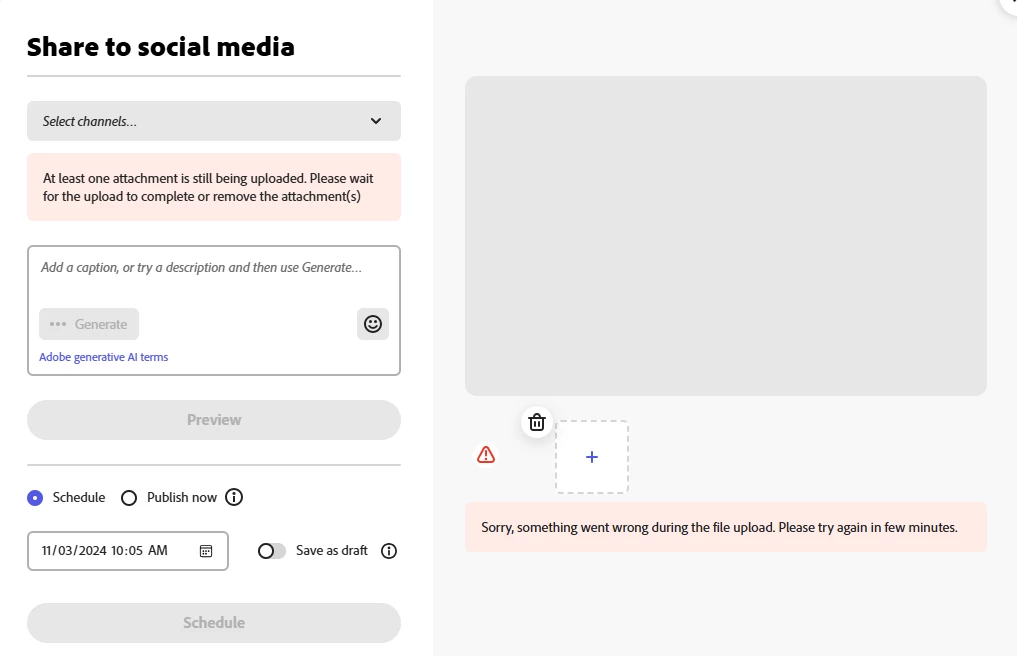
I have been receiving the error shown in the screen shot below for the last two days every time I attempt to upload media to a post in the Adobe Express Scheduler.


It is taking 7-10 attempts before the media will upload successfully. I have closed/reopened the website, cleared cookies, rebooted - none of these steps has any effect on the issue.


The issue is also occuring on my iPhone Adobe Express app.


I have never encountered this issue before. This is having a negative impact on my posting schedule and becoming very time consuming. 


Is something broken? Please advise and resolve. 
38 replies

Participant
November 4, 2024

Apparently engineers are working to fix and will let us know when the feature is working 👍

David__B
Adobe Employee
Adobe Employee
November 4, 2024

Our developers are aware of the issue. They are working on a fix. Please try refreshing the Adobe Express page and try again and see if that helps.


Thanks,
Dave

Participant
November 4, 2024

Yep. Having the same issue. After an hour online with a tech, they still weren't able to correct the problem. Glad to know it's not a "me" problem.

dacreativegenius
Community Expert
Community Expert
November 4, 2024

I thought I was going out of my mind! lol

same issue with me on Mac App, Chrome on PC, laptop, mobile on my phone, on wifi and data. I cannot upload a file and set up my scheduled posts. Very frustrating to not hear anyone in the team to chime in with an answer. 

Participant
November 4, 2024

 it is now Monday morning and this is still not working. I'm fairly new to using Adobe Express (literally started on like Wednesday) and the fact that has not been working the majority of the time I've been using it is very discouraging. 

Inspiring
November 4, 2024

I posted this same issue in another thread. I've tried the troubleshooting tips and it still doesn't work for me. 

Participant
November 4, 2024

I am having the same issue right now. Tried laptop and mobile app.

ssteachey
Participating Frequently
November 3, 2024

I have not been able to upload images to Adobe Scheduler since November 1. All was fine that day. Since then I keep getting a message that there is a problem with the image. I've tried logging out and loggin into Express, 3 different browsers, cleared history and cache, two different computers, different times of day and rebooted my computer a few times. I've also tried drag and drop as well as browse and upload from my computer.


All worked on November 1. No new updates or changes on my system have been made either.

This is a critical part of my business that I rely on. Please help. I'm losing my mind.

thejanebradbury
Community Expert
Community Expert
November 4, 2024

Hello @ssteachey  there are a lot of reports of this, so I've moved your post into the same thread.

Participating Frequently
November 4, 2024

Having the exact same issue and ive done everything I can to try resolve it myself (cleared cache and cookies, different browsers etc) without any luck. Very frustrating 

Participating Frequently
November 4, 2024

yeppers ... same issue, no solution after trying all that's listed.

Help

Moose

Participant
November 4, 2024

I'm glad I'm not alone on this issue. I've been having this exact issue with the scheduler the last few days and have tried all the same trouble shooting steps, except I couldn't get the photo to take even if I kept reuploding. Super frustrating. 


Is yours working today? Mine wasn't this morning. 

Participant
November 4, 2024

Still not working 😞