



Participant
September 15, 2023

Missing images from pdf download in Adobe Express

  • September 15, 2023
  • 16 replies
  • 2866 views

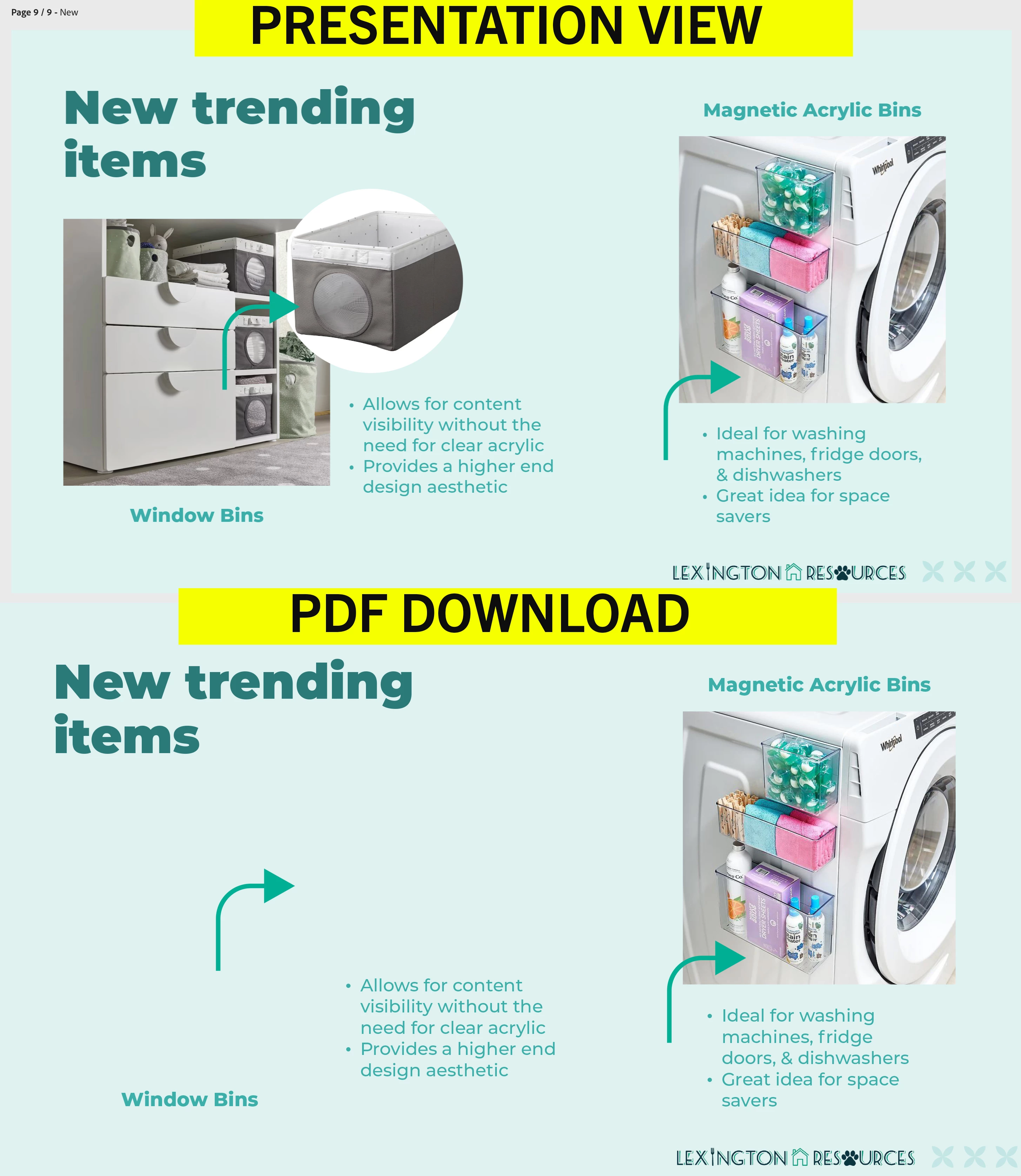
I can't figure out why some of my images are not visible when I download my presentation from Adobe Express? It downloads fine as a video and png. But I need it in pdf format. They are my own images, not licensed stock. How can I fix this?
 

16 replies

Participant
November 6, 2025

I am having the same issues as everyone else. I can download as PNG just fine, but when downloading as PDF, all uploaded images on the document do not show.

Tarun Saini
Community Manager
Community Manager
November 6, 2025

Hi @joe_4110,


Thanks for reaching out! Could you please share the document with me via private message to investigate further?


Regards,

Tarun

Participating Frequently
November 4, 2025

Hello Tarun, 


Thank you!

I have sent you the link with edit rights on private messaging.

Tarun Saini
Community Manager
Community Manager
November 4, 2025

Thanks for sharing the document @LeeB3514,


I have sent you a private message. 


Regards,

Tarun

Participating Frequently
November 4, 2025

I also haeve this issue, All images in 7 page pdf downloads but one that is simply empty. 

Tarun Saini
Community Manager
Community Manager
November 4, 2025

Hi @LeeB3514,


Thanks for reaching out! Could you please share a screen recording of the issue you are experiencing? Also, Can you share the document with me via private message with edit rights to investigate further?


Private messages should be accessible from the envelope in the top right corner. This should be the direct URLhttps://community.adobe.com/t5/notes/privatenotespage


Regards,

Tarun

Participant
September 30, 2025

I seem to be having the same issue.. I'm using my own jpeg photos on a booklet I'm putting together. I can download individual pages as PNG and JPG but some of the photos turn into black squares when I download it as a PDF.  

Amitej S
Community Manager
Community Manager
October 1, 2025

Hi @katherine_9604, thanks for reaching out! This shouldn't be happening. Have you tried replacing those images with others to see if that resolves the issue?


To investigate this, we'd need edit access to your project. You can share the project URL with us via community DM, and then we can request access to the project through our test account. 

Let me know if that works for you.


Best!

Participant
August 26, 2025

Hi @chaimaa.7, I have not yet received an update regarding this issue. Is there any news?

Tarun Saini
Community Manager
Community Manager
August 26, 2025

Hi @demi_2313,


I'd like to inform you that our product team is looking into the issue. Once we hear from them, we will keep you posted.


Regards,

Tarun

Participant
August 11, 2025

Good morning, August 2025 and same issue.

File format is a JPG and it is an image from my files. The image is 100% visible on the Adobe Express platfrom and visible when downloading as PNG and JPG. Disappears when downloading as PDF.

I tried the "Resize Image" feature in Adobe Express and then replaced the image file on the artboard with the newer resized one. This has not resolved the issue. I even attempted replacing the file with a stock image from Adobe Express and still have the same issue.

No error messages. This has never happened to me before. Tried this on different computers and using different Internet browsers (Edge, Chrome, Firefox) all with the same result.

chaimaa.7
Community Manager
Community Manager
August 11, 2025

Hello @demi_2313. Thanks for the detailed description, it really helps us understand what’s going on. Could you please DM me the project link so we can directly inspect the file and reproduce the issue?

We’ll follow up as soon as we have an update.


Thanks,

Chaimaa

Adobe Employee
May 1, 2025

Hi @MWW22 


Please send me a DM so we can set up file sharing.

We'll need your Express file to investigate.


Thanks

Abhi G

Participant
May 1, 2025

I'm having the same issue and I am using Adobe images & icons/drawings. Need to download in pdf format

Adobe Employee
April 15, 2025

Hi @Zesty_soul1867 


Sorry to hear you are running into this issue.
Please send me a DM so we can set up file sharing.

We'll need your Express file to investigate.


Thanks

Abhi G

Participant
April 15, 2025

I am having the same issue (April 15 2025).  I have swapped the offending images from png to jpg, and have swapped the Adobe-provided photos to no avail.  I have cleared cache, cookies, and images from the browsing data, logged out and logged back in.  I still have 3 of the 6 impages in my project either not showing up at all or they are getting aligned out of position.  It is only happening with the pdf download, not the jpg download.