


Inspiring
May 1, 2024

Can't Switch Web App Language Back to English

  • May 1, 2024
  • 3 replies
  • 1535 views

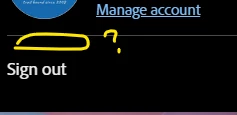
I tested the language switcher on the Firefly web app by temporarily changing it to Simplified Chinese. However, the "Preferences" link is now missing from the page. Any idea how else to change the web app language back to US English?


ADDED: I also tested the rest of the languages in the dropdown, but it only happens in Simplified and Traditional Chinese languages. English is the only language listed in my settings.


OS and version: Windows 11 Home

Browsers:

  • Google Chrome Version 124.0.6367.63 (Official Build) (64-bit); FireFox 125.0.3 (64-bit)
  • FireFox 125.0.3 (64-bit)
  • Edge Version 124.0.2478.67 (Official build) (64-bit)


Here are the steps I got from the Firefly FAQ page to make the change. NOTE: I don't recommend changing the language unless you know how to switch back first. Otherwise, you'll be in the same boat as me.


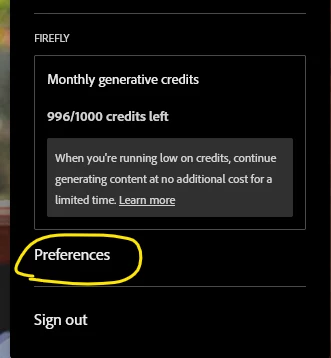
  1. In the Firefly web app, select the Profile icon in the upper-right corner and select Preferences.
  2. Select your preferred language from the dropdown menu and confirm to apply the changes.


Dropdown in English:
Dropdown after switching to Simplified Chinese; missing Preferences.
 

Thanks!

3 replies

droopydog500
Community Manager
Community Manager
May 2, 2024

For clarity for the Adobe folks reading this, I was able to reproduce this problem in Chrome on a Mac.


MacOS: 14.4.1

Chrome: 124.0.6367.92 (Official Build) (arm64)

Adobe Community Expert (not an Adobe employee)
Inspiring
May 2, 2024

Thanks for the reply. I logged out, cleared the cache, and deleted cookies; the same result was obtained in all three browsers (public and incognito) noted above. I posted to Discord last night hoping for more input: https://discord.com/channels/1076190214369853510/1235390098753978418.

droopydog500
Community Manager
Community Manager
May 2, 2024

Hi @onehikeaweek, that setting appears to be browser instance specific, not stored centrally. Dumb thought, have you tried to log out and back in again?


Worst case, you can probably delete cookies and try again, but that would probably wipe out any favourites you have saved. If you saved no favourites, that is what I would try next. There might be a better non-destructive solution.


Any future testing should be in incognito mode. 😂

Adobe Community Expert (not an Adobe employee)