


Bill38142892b2ri
Participant
June 18, 2026

Dark mode UI fail in Firefly Production

  • June 18, 2026
  • 1 reply
  • 9 views

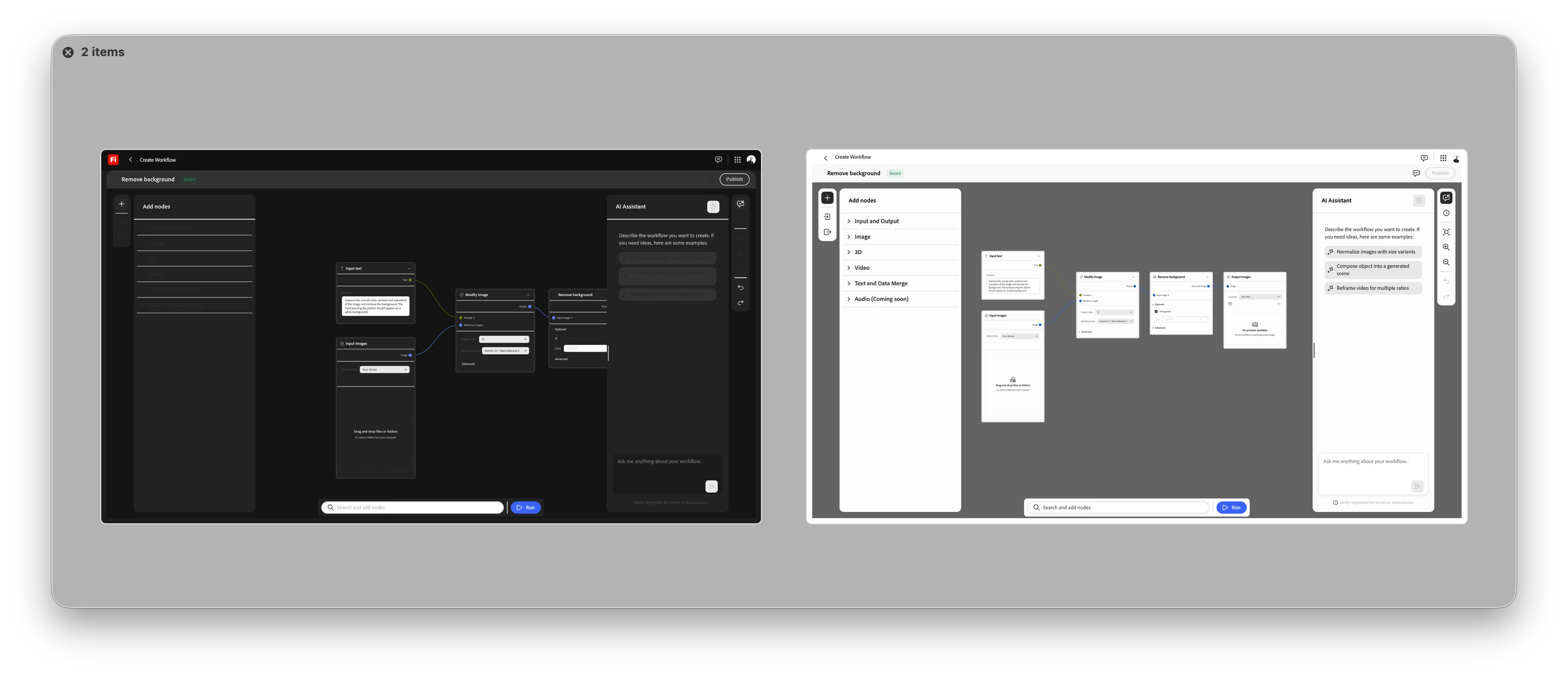
Dark mode UI in Firefly Production fails. When changing to Dark Mode under my Adobe account preferences, this renders all menu UI items unreadable. 
 

    1 reply

    Hajar Toutsi
    Community Manager
    Community Manager
    June 18, 2026

    Hi Bill38142892b2ri,

    Thanks so much for the report and the screenshots, they made this really easy to track down.
     

    I was able to reproduce the issue on my end. It happens specifically when your browser’s display theme doesn't match the theme you've selected for Firefly in your preferences (for example, your system set to Light while Firefly is set to Dark). When those two are out of sync, the text and some sections end up rendering in a color similar to the background, which is why it looks “blank”.
     

    As a quick workaround for now: set your browser or system appearance to match whatever theme you've selected in Firefly (Light + Light, or Dark + Dark). That should restore the text immediately.
     

    I've flagged the mismatch to our product team so it can be fixed properly rather than relying on a workaround. 

    Thanks again for taking the time to report this, really helpful!
     

    Hajar
