


Participant
March 21, 2025

Firefly images won't generate, upscale doesn't work.

  • March 21, 2025
  • 6 replies
  • 742 views

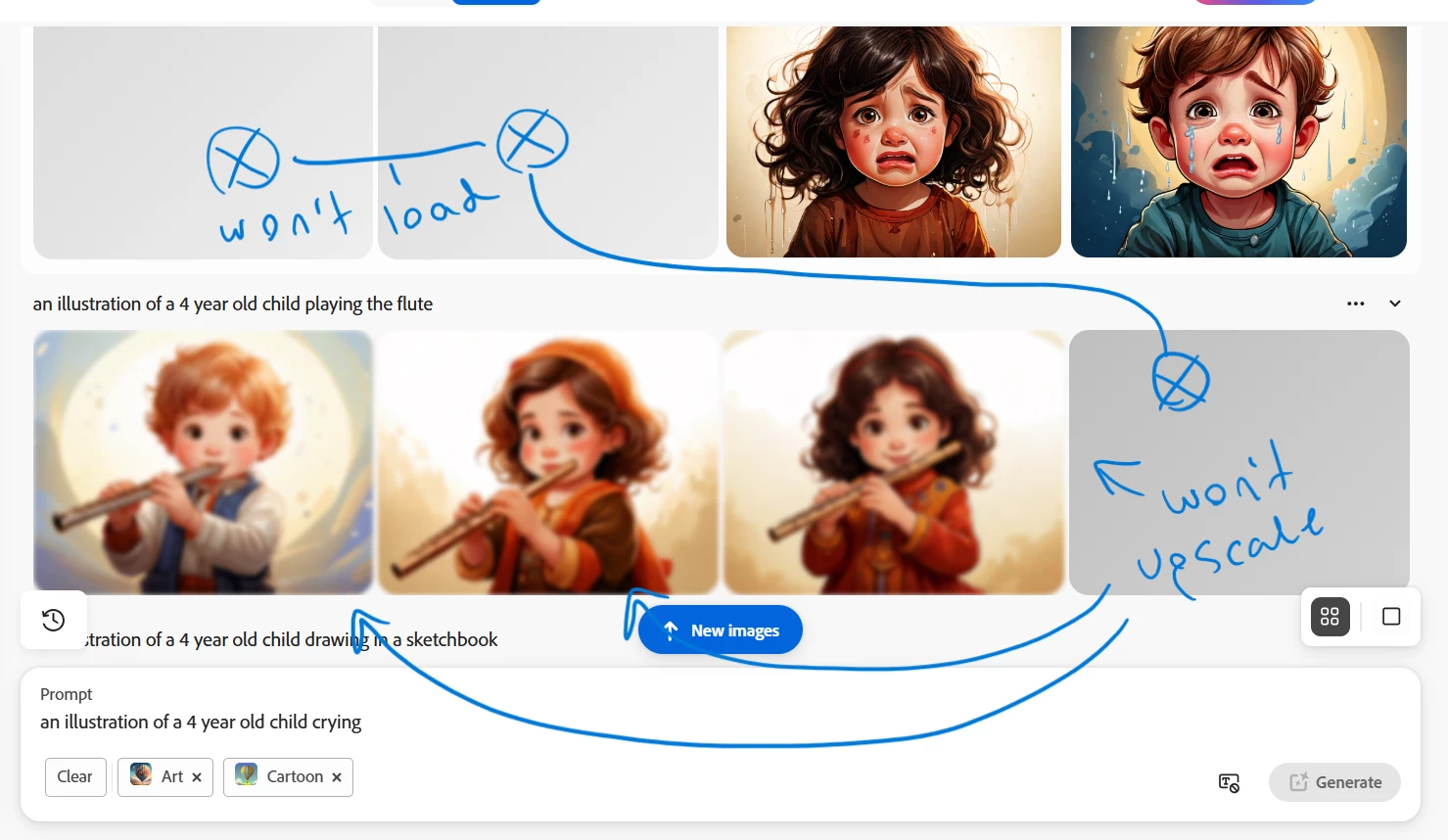
Hello, I've been using adobe firefly for quite some time now but for the past few weeks I've been facing a problem. After putting in the prompt only a few images generate, maybe 2 or 3 when usually its suposed to be at least 4. The empty boxes look as though they're loading but they never do. In the rare case that 3 or 4 images generate and I use the upscale feature, again it looks as though its loading but it never does. 

I'd like all images to generate and be able to upscale.

I'm currently using the latest version of the app. I'm using Firefly on a web browser, Microsoft Windows 10 Pro. 
6 replies

Participant
April 7, 2025

I'm getting the same issue in  Chrome browser Version 134.0.6998.166

Participant
March 23, 2025

Hi, sorry for the inconvenience, here's what I was talking about.  I tried using Firefly in Google Chrome and Microsoft Edge. The same problem recurred.

Thanks


Kartika Rawat
Community Manager
Community Manager
March 25, 2025

I'm sorry to see that. I tried your prompt to generate images, and Firefly is showing all four images. Could you let us know your browser version? 


Thanks,
^KR

droopydog500
Community Manager
Community Manager
March 22, 2025

I am sorry, images sent via an email response are stripped out and not posted.  Please upload them on the web site.


    droopy

Adobe Community Expert (not an Adobe employee)
droopydog500
Community Manager
Community Manager
March 22, 2025

Hi @its.gulgul,


Can you please try another browser as a test and see if you still have the same problem?


Thanks,

    droopy

Adobe Community Expert (not an Adobe employee)
Participant
March 22, 2025
Hi, I tried it in Google Chrome and Microsoft Edge. The same
problem recurred. Here are the screenshots.
Thanks

[image: Screenshot (2584).png]
[image: Screenshot (2585).png]
March 22, 2025

Hey @its.gulgul 

Couple of things could be happening:

1) you hit a "bad seed"
In that case, open up a new tab and start over, change your prompt a bit.

2) you may need to turn off your computer and wifi. 

I find it helps. 
a) Start over.

A few tips before you close out your tabs/ turn off your computer.
Copy the links to images that you do like and save them to a seperate document with a screenshot.

i) you save credits
ii) you have a starting point

Cheers

O. Nate

March 21, 2025

Hey @its.gulgul 

Just wondering are you using "Slow mode" by chance? If you are using "Slow Mode" you don't need to upscale.


helpful tip. 
Turn off "Fast Mode" and you save your credits.
Cheers

O. Nate

Participant
March 22, 2025
Hi

After seeing your reply I tried using firefly with both slow mode and fast
mode, but I keep facing the same problem.

Thanks
@its.gulgul