


Generic “Something went wrong” error may be caused by prompts over 1,000 characters
I recently encountered the generic “Something went wrong. Please try again later.” error in Adobe Firefly. I noticed that several users have reported the same message in the community, but the interface does not provide any useful information about what actually caused the error.
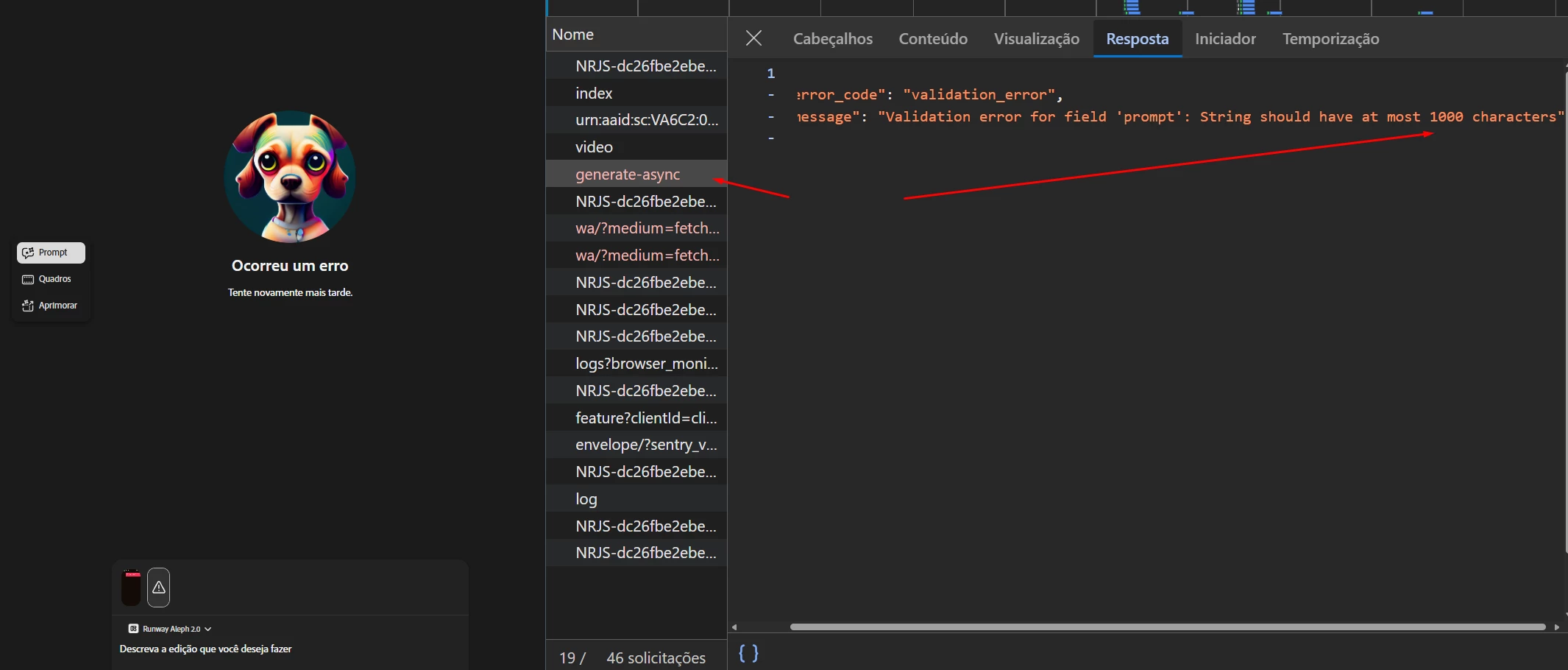
In my case, the problem was that the prompt exceeded the 1,000-character limit. I only discovered this by opening the browser’s Developer Tools, checking the Network tab, and inspecting the response from the generate-async request. The API returned the following validation message: “Validation error for field ‘prompt’: String should have at most 1000 characters.”
After reducing the prompt length, the request worked. Adobe Firefly should display a clear validation message or a character counter before submitting the request, instead of showing a generic error. This would save users a lot of time and make the issue much easier to diagnose. For anyone experiencing the same generic error, checking whether the prompt is longer than 1,000 characters may help.
 AdChoices