
Participant
July 21, 2026

I asked the program to animate the image. Instead it created a new image, which looked nothing like the original and animated that. So far, my experience with Firefly has not been good.
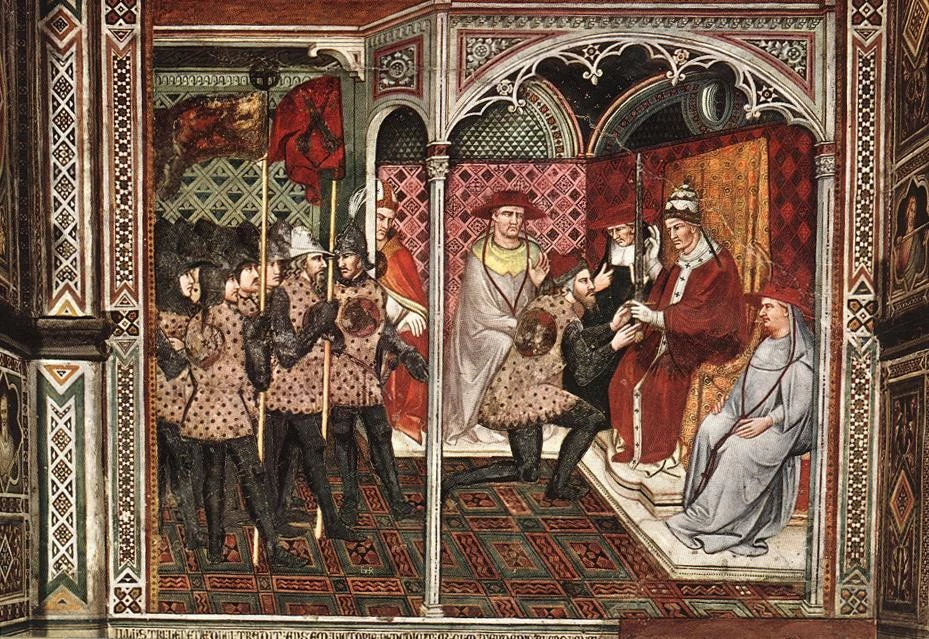
I uploaded this image, and it created a completely different image and animated that. I can’t use it. 

    返信数 3

    July 21, 2026

    Hey ​@marcuskolga 

    Just to add to what ​@Trevor.Dennis  mentioned. This image also has a lot of similar colours. Something I consider is that AI is slightly visually impaired. Clear characters on clear backgrounds helps a lot.

    Cheers

    Nate


    Trevor.Dennis
    Community Expert
    Community Expert
    July 21, 2026

    Yes.  Zooming in with the original ultra busy image shows just how complex it is.  The two versions below are zoomed at 300% (if you click to expand).  The original on the left, and the right was reduced to just 16 colours by using Index Mode (you get a choice from 256 downwards halving each time).  Look how smooth the monk in the grey robe has become. His skin and clothing are almost cartoon-like.

    Note: If you use this trick, once you have reduced to a colour depth that will work for you, you need to go back into Image > Mode and set it back to RGB.  The lost colors will stay lost of course.


    Trevor.Dennis
    Community Expert
    Community Expert
    July 21, 2026

    Expanding on the above, it would be very helpful to have a last frame for the video to aim at and removing the people is a good start on that.  Having Removed Background on one layer, we can Ctrl click to load that as a selection, and expand the selection a couple of pixels.  I then used Firefly 5 to fill that selection in Photoshop.  That doesn’t even use any credits if you have a full CC subscription. Still so work to do, but the Ai will help you with that.  The thing to take on board is that a difficult project is going to be a multi stage process.


    Trevor.Dennis
    Community Expert
    Community Expert
    July 21, 2026

    You really do need to put almost as much effort into telling it what NOT to do as positive instruction.  This would be a super hard image to animate because of how busy it is.  I put a fair bit of preparation into an image I want to make into a video or frame animation, and that will usually involve Gemini 3.1 NB2 to create the first frame.  I used this prompt with Gem3.1  Note: the last sentence is likely to be wishful thinking, but it gave me a reasonable result.  

    simplify the image making it less busy. make it somewhere between a photograph and a cartoon. It should be and image that can be used to make an animation.


    You could also think about animating the people against a white background.  That depends on what video editing software you own, but with Premiere Pro you could knock out the white background by setting the video layer’s blend mode to Multiply

    This is a simple Remove Background with Photoshop.  Better, but even with the simplified colours and white background it would still be a bugger to animate.  What sort of movement are you aiming for?