

Participant
January 21, 2025

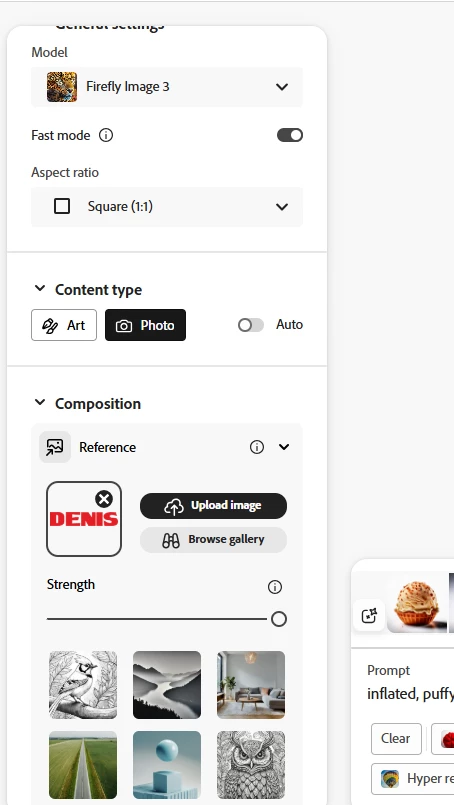
I don't have a structure menu - i cant Generated Effects for Text

  • January 21, 2025
  • 6 replies
  • 302 views

I don't have a structure menu -

And i can't  Generated Effects for Text
 

6 replies

DenisAdiAuthor
Participant
January 23, 2025

Thanks,
The problem was in the logo. I export it as a jpg from Corel. As soon as I did it from photoshop it worked.

droopydog500
Community Manager
Community Manager
January 22, 2025

Hi @DenisAdi,


You mean like the "DENIS" logo?  

The word "DENIS" in black toothpaste with toothpaste trail, white background 


This was just after two iterations, so I am sure it can be improved upon.


Note, the white circle thing in the upper right is because I copied your composition reference from your imnage with the "X" in a circle. You would not see that in yours.


My best,

    droopy

Adobe Community Expert (not an Adobe employee)
DenisAdiAuthor
Participant
January 22, 2025

Ok whit one single letter is OK

But I wan't to make some logo or different text in Illustrator and then make it like black toothpast or something else. Not one letter. 

I wach a lot of video. But why it doesn't work for me. I have a paid plan.

droopydog500
Community Manager
Community Manager
January 22, 2025

Hi @DenisAdi,


Try saying in the prompt what you want the text to be, as I have done here using your first composition image:

The letter "S" in black toothpaste with toothpaste trail, white background 


My best,

    droopy


Adobe Community Expert (not an Adobe employee)
DenisAdiAuthor
Participant
January 22, 2025

Hello Thank you for help.

I want to make text look interesting.
My text is jpg. I tried png with black letters and it still doesn't work

the image does not follow the shape of the text


droopydog500
Community Manager
Community Manager
January 21, 2025

Hello @DenisAdi,


"Structure Reference" was renamed to "Composition Reference" some time ago. It is the same function.  I see in your photo you have an image in the Composition Reference. Is that image not working? Can you please show us the rest of the screen so we can see the full prompt and the results?  Is the composition reference a transparent image?


My best,
    droopy

Adobe Community Expert (not an Adobe employee)
