



geophrian
Known Participant
Nov 8, 2026 6:49 PM UTC
Question

It's useless.

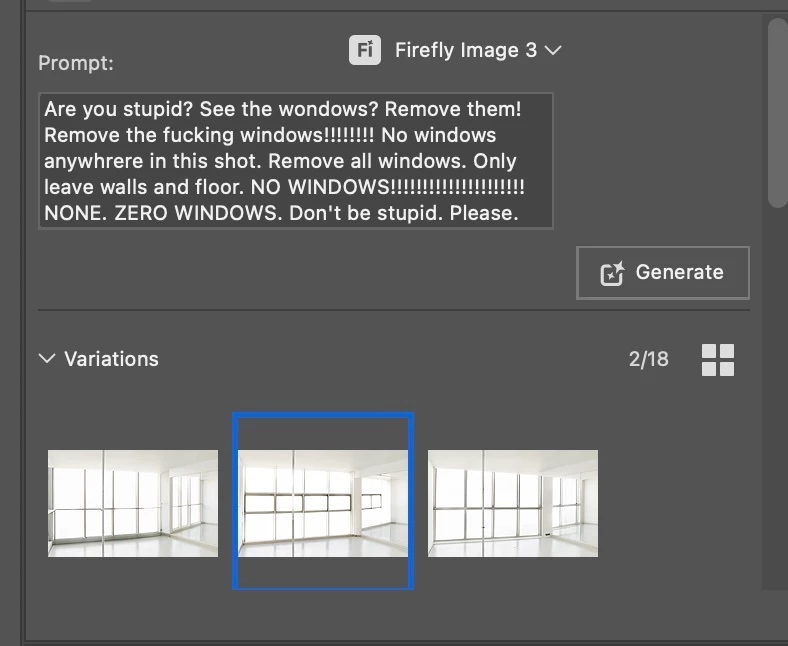
It doesn’t work. I was being lazy so decided to use generative fill to remove windows from a photo. After numerous attempts simply prompting “remove windows from shot” and “remove windows and replace with bare white walls” all resulted in Firefly generating multiple options of different windows only I tried prompts like “NO WINDOWS PLEASE!” and “REMOVE ALL WINDOWS FROM THIS SHOT. NO WINDOWS. ONLY BARE WALLS.” and still Firefly only generated more windows. I’ve attached the screenshot of the last frustrated attempt. Seriously, I’ve used Runway for this stuff and it usually works fine. First time using generative fill in Photoshop for any major image change and it’s totally useless. Just gonna spend a few minutes removing them manually but thought you should know your AI is terrible. 
 

    1 reply

    droopydog500
    Community Manager
    Community Manager
    Nov 8, 2026 7:10 PM UTC

    Hi ​@geophrian,

    I am sorry this is proving so frustrating. To help us understand what you are using, could you tell us where you are doing this? For example, Photoshop on the desktop, Photoshop on the web or iPad, or the Firefly website. If it is Photoshop, please also tell us the version, which you can find under Photoshop > About Photoshop. A screenshot of the whole window would also help.

    In the meantime, a couple of tips. In my experience, Firefly Image 3 does not handle negative prompts well. When a prompt says "No windows", the model tends to ignore the "No" and generate windows, so the more you repeat the word, the more likely windows are to appear. It usually works better to describe what you want to see, for example "plain white wall", and to leave out what you do not want. Selecting the window areas precisely, and keeping the prompt short, will also help.

    It may also be worth trying a different model, such as Nano Banana, if it is available in your version. Some partner models follow editing instructions better than Firefly Image 3 and could give better results for this kind of edit. Please note that partner models use more generative credits than Firefly's own models.

        droopy

    Translate
    Adobe Community Expert (not an Adobe employee)