


Participant
August 28, 2026

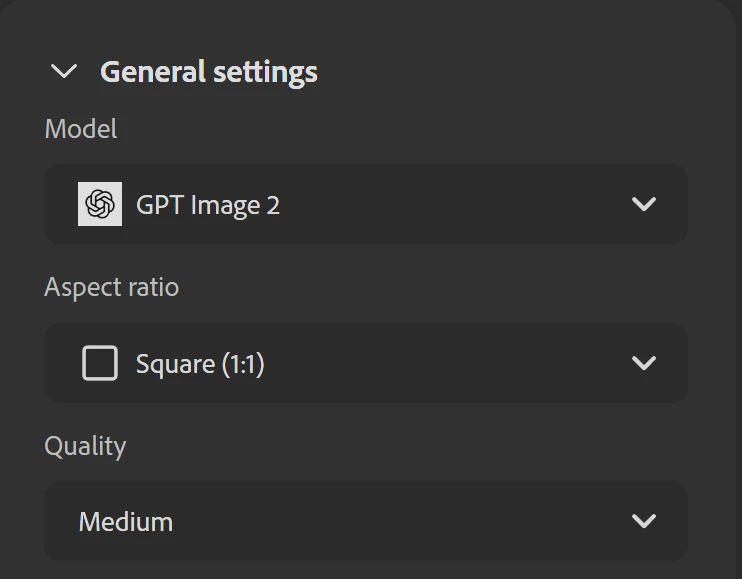
Major GPT2 image generation bug. Wasting credits and money!
  • August 28, 2026
  • 2 replies
  • 32 views

Generating an AI image with GPT image 2 on low, medium and high quality gives the same 1k output. For example 1024px by 1024px. This is a huge bug and I can't believe it's still live in the app. This is quite a big credits price difference for the same output and is completely disingenuous. 

    2 replies

    August 28, 2026

    Hi Astonished_worldview20ee,

    Thank you for bringing this up. It is understandable that this feels confusing, especially when the different quality settings can result in the same output dimensions.

    With GPT Image 2 in Firefly, the "High" quality setting does not determine the image resolution. It is an OpenAI API parameter that affects the quality of the generation, including details, textures, and how closely the result follows the prompt.

    Resolution is controlled separately, and that setting is not currently exposed as a user-controlled option in Firefly.

    So, when you select "High," you are getting a higher-quality generation at the same output dimensions, rather than a larger image.

    This distinction is also explained in OpenAI's Image Generation Documentation


    The difference in credit cost for the High setting is related to the additional compute required for that higher quality level, rather than an increase in resolution.

    That said, I agree that the current Firefly UI does not make this distinction particularly clear, which can understandably lead to the impression that "High" should mean a higher-resolution output. I appreciate you calling this out.

    Thanks

    Matt

    droopydog500
    Community Expert
    Community Expert
    August 28, 2026

    Hello ​@Astonished_worldview20ee,

    Thank you for raising this — it is a genuinely confusing aspect of how GPT Image 2 works within Firefly, and the frustration is understandable.

    The "High" quality setting in GPT Image 2 does not control output resolution. It is an OpenAI API parameter that controls generation quality — specifically detail fidelity, texture rendering, and prompt adherence. Resolution is a separate parameter entirely (which is not exposed as a user controlled parameter in Firefly). This means that selecting "High" produces a more detailed and accurate generation at the same output dimensions, rather than a larger image.

    This is documented in OpenAI's own image generation documentation: https://platform.openai.com/docs/guides/image-generation

    The higher credit cost for the High setting reflects the additional compute required to generate at that quality level, not an increase in output resolution. Adobe's UI does not currently make this distinction clear, which is what leads to the reasonable but incorrect assumption that High means higher resolution.

    My best,

        droopy

    Adobe Community Expert (not an Adobe employee)