Participant
November 7, 2024

Options interface not showing

  • November 7, 2024
  • 9 replies
  • 585 views

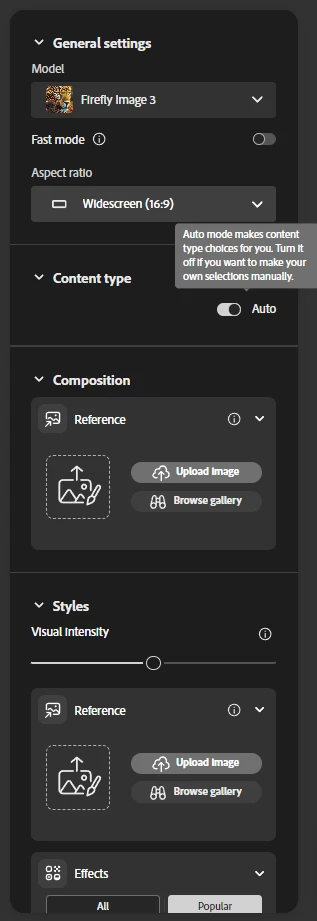
the options interface on the right side of the screen lacks all the options, there is no photo/art no effects, no settings.

This happens under Windows 11 / Edge browser (Version 130.0.2849.68 (Official build) (64-bit))
Under MacOS - everything is there and working.


9 replies

droopydog500
Community Manager
Community Manager
November 11, 2024

We have seen cases where the windows firewall was blocking connexions to Adobe and resetting the firewall back to the defaults fixed the problem. In most reported cases, that was impacting generations (resulting in an error) but not impacting the UI.


    droopy

Adobe Community Expert (not an Adobe employee)
Community Expert
November 11, 2024

Good to hear you found the cause.

I could see why the Firewall may have prevented Firewall from functioning. I would not have thought it would have impacted the UI.  

Participant
November 11, 2024

UPDATE: After cross checking the issue with alternative browser (Chrome - no change), we tried different network connection and... bingo! the menu showed up correctly! So this looks more like firewall issue (how strange). 

Do you think that security settings associated with local network might influence the content of the menu showing/not-showing? 

Participant
November 11, 2024

I am using FF on desktop workstation. No stylus/pen. Just a trackball. 

Participant
November 11, 2024

Updated Edge to latest version. Situation hasn't changed. No UX options on the left hand menu. 

droopydog500
Community Manager
Community Manager
November 9, 2024

@Mike Lubay, are you using a pen or stylus?  If you position your cursor over the left panel and use the track pad to scroll up, does that work?


    droopy

Adobe Community Expert (not an Adobe employee)
Community Expert
November 9, 2024

The Windows Edge browser should be supported. You could try on Chrome on Windows to see if that works. If so, it would be something Edge related. You could also update Edge to Version 130.0.2849.80 (November 7, 2024) and see if that works with Firefly.

Participant
November 8, 2024

Kevin, 
The problem is - there NOTHING there. Just two buttons which produce nothing after clicking on them.


Kevin Stohlmeyer
Community Expert
Community Expert
November 7, 2024

@Mike Lubay Scroll down - I can see them under "Effects"