


NeroTrident
December 4, 2025

P: popup does not close (multiple Firefly Functions)

  • December 4, 2025
  • 12 replies
  • 915 views

I am trying to use Adobe Firefly's "text to sound effects" feature, however whenever I open the webpage I am greeted by a popup which explains the usage of generative credits.
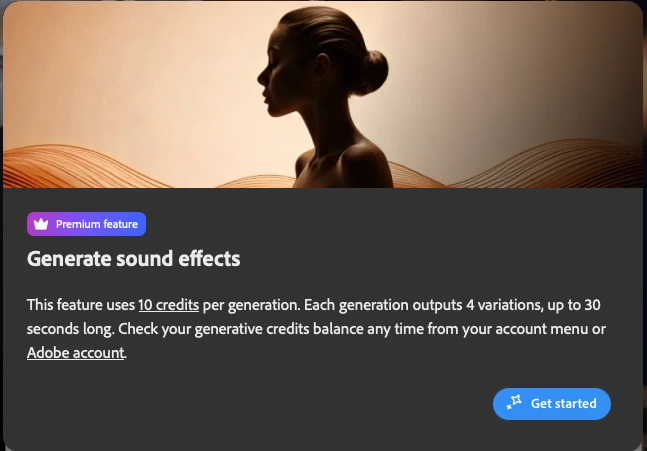
Screenshot 2025-12-05 at 15.35.35.png


The button "Get Started" does not do anything when clicked. This has rendered the "text to sound effects" webapp currently unusable. 


I am running Safari Version 26.0.1 (20622.1.22.118.4) on a Macbook running macOS 15.6.1 (24G90).


I have also tried to utilise the application on Google Chrome version 142.0.7444.176 (Official Build) (arm64), but that is yielding the same results. I have also tried running both of these browsers with the incognito version, but once again, this does not solve the issue.


Any help would be much appreciated.

12 replies

NeroTrident
December 11, 2025

Hi Kartika, thanks for reaching out. I'm currently not able to reproduce the issue myself anymore, however a fix I found at the time was to press the ESC key. 


My account is a Creative Cloud Pro account for Students. Sorry for not being of any more help. I have not changed anything on my end since I last encountered the issue.

Kartika Rawat
Community Manager
Community Manager
December 10, 2025

Hi all! Thanks for bringing this to our attention. We're not able to reproduce the issue. Could you please share the subscription/account type? As I'm assuming, if it's affecting a specific type of accounts


Let us know. Happy to investigate the issue.

KR

Comninellis
Inspiring
December 9, 2025

I am on Windows 11. I first tested this in Chrome Version 142.0.7444.164 (Official Build) (64-bit). Then I tried it in the most recent version of Microsoft Edge, which had the same error.


The "Esc" key does remove the popup, but the design issue remains a problem.

droopydog500
Community Manager
Community Manager
December 9, 2025

Hi @Comninellis and @manuelmor,


Thanks for your reports. Can you please tell us what OS and browser you are using and their versions? If you try another browser as a test, does it have the same problem?


Thanks,

    droopy

Adobe Community Expert (not an Adobe employee)
droopydog500
Community Manager
Community Manager
December 9, 2025

Hello @Lorenzo29499528awq9,


No, he definitely was not suggesting that. Can you please tell us what OS and browser you are using and their versions. If you try another browser as a test, does it have the same problem?


    droopy

Adobe Community Expert (not an Adobe employee)
droopydog500
Community Manager
Community Manager
December 9, 2025

Hi @???????_????????4599,


What OS and browser are you using and what are their versions?


@NeroTrident, if you try Chrome or Microsoft Edge, do you have the same problem.


    droopy

Adobe Community Expert (not an Adobe employee)
December 5, 2025

When I go into the sound effects creation function, a pop-up appears that I can't close.

December 5, 2025

Need click ESC...

NeroTrident
December 5, 2025

There is a fix - if you press "Esc" on your keyboard then it closes the popup. The button is still broken, however.

Kartika Rawat
Community Manager
Community Manager
December 5, 2025

Thanks for writing in. Could you share the screen recording, as we're not able to reproduce this issue?


Let us know.

^KR

December 5, 2025

video translate page is not working. the pop-up window makes it impossible to work with it, both with chrome and safari, it seems impossible to navigate the page from my computer


Inspiring
December 5, 2025

Hi @Lorenzo29499528awq9


Thanks for reaching out. Could you share a screenshot of the pop-up you are getting?  If it's "Get Started," you can click on the button, which disappears. 

^Sam
December 5, 2025
[image: Screenshot 2025-12-05 alle 14.45.56.png]
Are you suggesting I'm stupid, SamarthS? That speaks a lot about your
intelligence.
The button "introduction" is unclickable, no matter the browser I use. The
rest of the page is not usable because of this problem, as the pop-up stays
on screen and the interface is not usable. There is not even a "get
started" button. I'm reporting your attitude.
Many thanks for not solving anything while suggesting I'm an idiot: what a
great job.
Comninellis
Inspiring
December 4, 2025

I am experiencing a bug when using the Firefly pages for generating vectors and audio. When I go to each page, a pop-up modal appears which explains what the tool does. In the bottom right, it has a button labeled "Get Started". However, when I click this button, nothing happens. The modal remains in place, and the page remains inaccessible. Other pages, such as the pages for generating images and video, have the same pop-up modal, but when the "Get Started" button is clicked, the pop-up disappears, and the page is usable.

Could this be fixed, please? I am excited to use these new tools, and I imagine this was a simple technical oversight.


Thanks so much. Adobe is a wonderful product! I am so thankful to have so many amazing tools at my fingertips.