

Participating Frequently
May 10, 2025

Reference items not visible

  • May 10, 2025
  • 10 replies
  • 636 views

Hi, 3 days ago when I tried to select a reference style, most of the samples are not visible anymore. Please fix it!
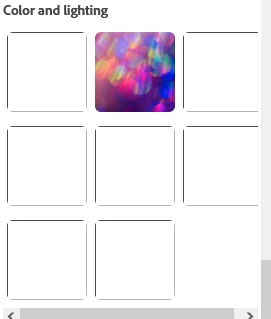
 

Thanks in advance

10 replies

Participating Frequently
May 25, 2025

haven't hear since 10 days ago

Participating Frequently
May 25, 2025

already news from the western front, in this case the support team to which it was escalated 10 days ago?

Participating Frequently
May 16, 2025


see what i mean? i tried to update it from Creative Cloud Desktop, everytime it's the same, update failed. quite annoying, but maybe that's the new strategy of Adobe?

Kartika Rawat
Community Manager
Community Manager
May 16, 2025

Sorry about that. It should not happen. I'll share it with the product team to review the case


KR

Participating Frequently
May 16, 2025

In Chrome it doesn't work at all. Not a single image was produced. Is it maybe because I have to change mu subscription? So far I have one of the cheapest subscriptions, and probably your company don't like that. I know this kind of tactics from certain companies, but I didn't expect it from Adobe. Correct me if I'm wrong.

Participating Frequently
May 16, 2025

Hi Kartika,

Yes, in Google Chrome the same result

Participating Frequently
May 15, 2025

Kartika Rawat
Community Manager
Community Manager
May 15, 2025

Thanks for sharing the system details. Could you confirm if it's happening with other browsers as well?


Let us know. Happy to help.

KR

droopydog500
Community Manager
Community Manager
May 13, 2025

Sorry one more question. Can you please tell me what operation system (OS) and browser you are using along with their version numbers.


Thanks,

    droopy

Adobe Community Expert (not an Adobe employee)
Participating Frequently
May 13, 2025


droopydog500
Community Manager
Community Manager
May 12, 2025

Hi @default29907679tjssma,


I am sorry, when you reply by email, images are stripped out. You need to upload imnages when posting on the community.adobe.com web site.


    droopy

Adobe Community Expert (not an Adobe employee)
droopydog500
Community Manager
Community Manager
May 10, 2025

Hello @default29907679tjssma,


Can you please show us a screen shot of the whole browser window?  Was it just that section that had missing images, or all of the sections?  Are they still missing if you for a force reload (<SHIFT> + Page Reload Button).

My best,
    droopy

Adobe Community Expert (not an Adobe employee)
Participating Frequently
May 12, 2025
Hi Droopy, here you go:
[image: image.png]
Thanks in advance for let me know what the problem is...