Participant
July 5, 2024

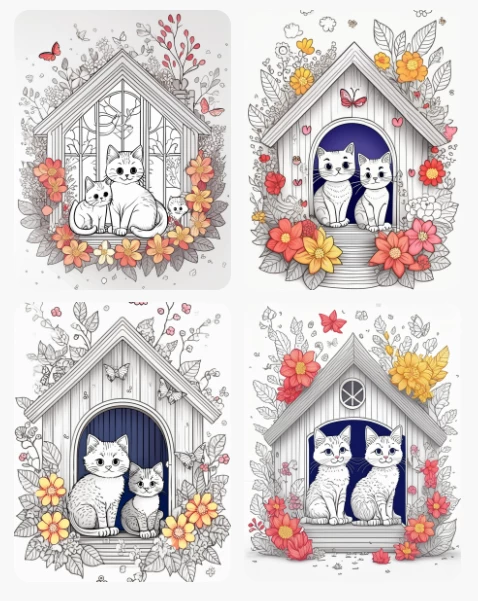
This is what my prompt returned

  • July 5, 2024
  • 2 replies
  • 443 views

This is one example.  

Effects set to black and white yet I always get color.

cute fluffy kittens in house, white background, well composed, clean line and spaces, coloring book page, No dither, no gradient, strong outline, No fill, No solids, vector illustration, adult coloring book concept, no grey, no red, no colors, no designs, white background.

2 replies

droopydog500
Community Manager
Community Manager
July 5, 2024

Hello@EkahiDesign,


Thank you for your message. I am sorry you are having this problem. 


The model does not understand the concept of a word being negated by the word in front of it. So using "not [X]", "no [X]", and "without [X]" does not work. As you observed, it ignores the negation word and add to the image the thing you are trying to avoid. In your case, "no red", "no colours" adds what you are trying to remove.


You basically need to find "positive" words and phrases telling the model what you want to see rather than telling it what you do not want to see.  Such as "flat land" rather than "no mountains".  If I am not sure how to describe something I want to exclude in a positive way, I will ask Google Gemini or ChatGPT for ideas.  Just be aware that when they give prompts, they are usually too wordy and conversational, so you have to edit them, but they are good for ideas.


These are some of the styles I use when I am trying to get what you are looking for:

Those styles were used for this:

huge tall skyscrapers on cityscape horizon 


Hope this helps. Let us know if you need more assistance.

My best,
    droopy

Adobe Community Expert (not an Adobe employee)
Community Expert
July 5, 2024

Did you have 'black and white' in your prompt text? If so, it is something that Firefly does not get 100% right in making the entire image those colours.