



Adobe Media Encoder 2026 renders blend modes incorrectly on Apple Silicon
Adobe Media Encoder 2026 renders blend modes differently than Premiere Pro 2026, resulting in incorrect export output. The issue does not occur when exporting directly from Premiere Pro.
**Steps to reproduce:**
1. Create a sequence in Premiere Pro 2026 with clips using blend modes (e.g. Hard Light) and opacity adjustments
2. Send the sequence to Adobe Media Encoder 2026 via File → Export → Queue
3. Export in H.264 or any format
4. Compare the exported file with the Premiere Pro timeline output
**Expected result:**
The exported file from Media Encoder should look identical to what is displayed in the Premiere Pro timeline.
**Actual result:**
Blend modes and opacity are rendered incorrectly in Media Encoder. The export appears washed out
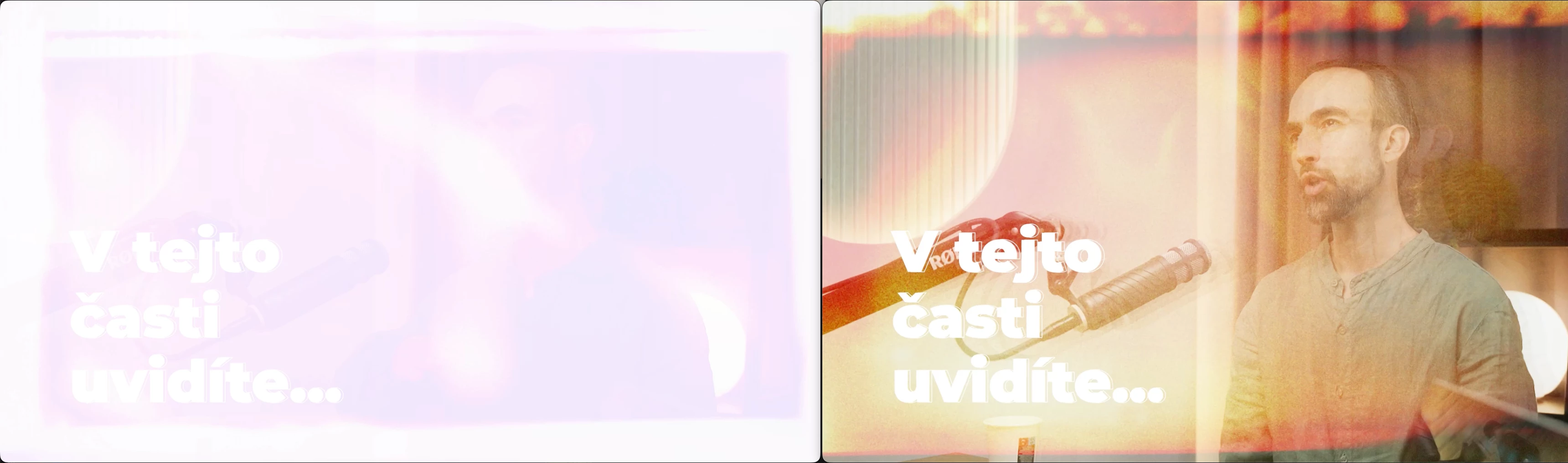
(left Media Encoder 26.0.2; right Premiere Pro 26.0.2)
 AdChoices