


Cameron W
Known Participant
May 29, 2024

Export to ME failing to add burnt in captions

  • May 29, 2024
  • 22 replies
  • 1770 views

Since recent updates (can't remember exactly what version) I have an issue sending files to Media Encoder from Premiere.

When sending to Media Encoder a custom preset isn't working correctly and captions are consistently not being burnt into exported files.


If I export directly from Premiere with our preset I have no issue, but when sending multiple files to media encoder captions are either not burnt in at all, or one file will be burnt in but remaing files won't.

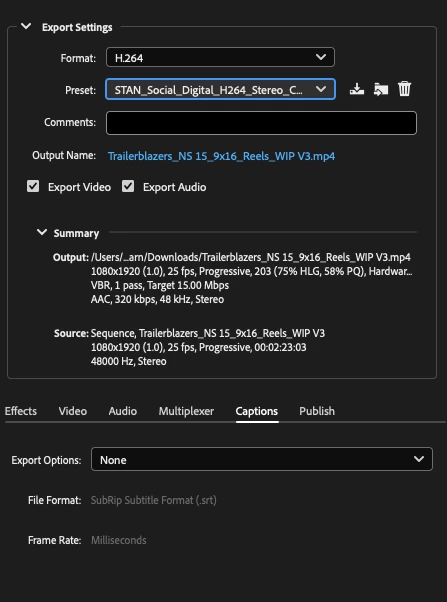
Preset selected to send to ME from Premiere. As shown, captions are selected to be burnt in, and if I export with this they appear as expected.
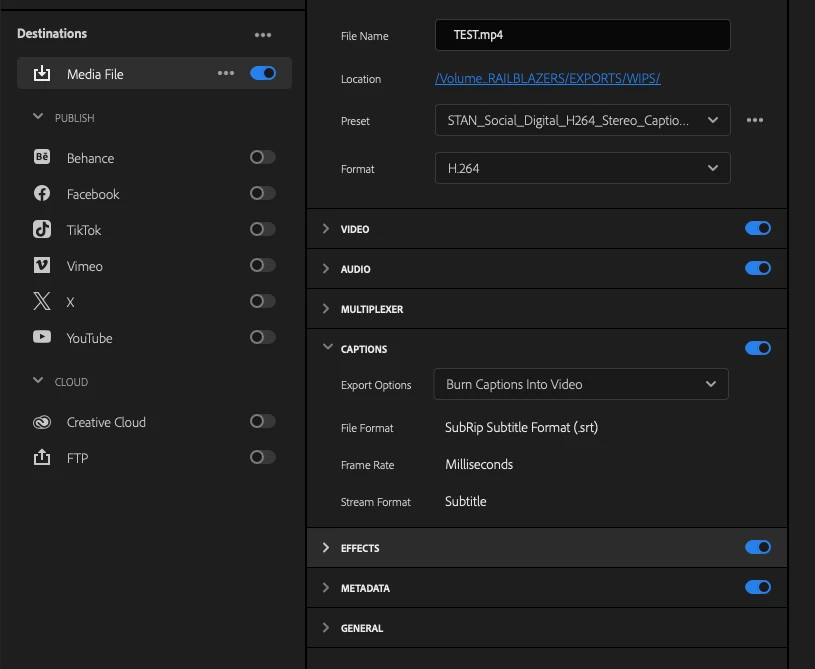

Preset once sent to ME.  "Burn captions into video" selection has been lost (no longer selected), and even if I manually select it at this point it generally still won't burn them in either.
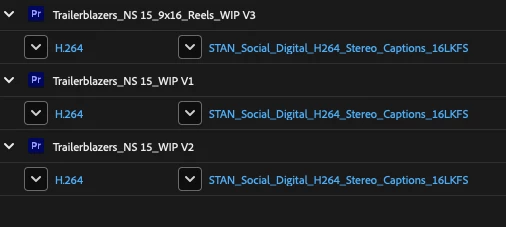
  

I've tried re-creating the preset but this is also has no effect, nor has re-installing software from a completley clean OS install either.

Due to this I'm exporting files one by one, which is a bit of a time waster as can't continue working while Media Encoder exoprts anymore.

I tried adding the preset to this post but it won't accept the file type...

Syste specs are:
Premiere 24.4.1 (build 2)
Media Encoder 24.1.1 (build 2)
OS Sonoma 14.5
MacBook Pro 16 M1 Max and Intel Macbok Pro 16 i9


22 replies

Known Participant
October 15, 2024

In answer to your questions:

  • Did you try to clear the caches? - Yes
  • Did you also try in newer versions of PPro & AME, and the betas? Yes, I have tried every version above 24.2.1, including the betas and all of them have the same issue. Only rolling back to 24.2.1 sorts things.
  • Did you try hardware vs software rendering? No, I've only tried software rendering, but that's because our workflow needs that. The hardware h264 encoder on M1 chips is quite poor and produces noticable artefacts and we need consistency across all hardware, both Mac and PC. Only software encoding can achieve this. I am happy to try using hardware encoding just to see what happens.
  • How much memory does your machine have? 128GB (M1 Ultra MacStudio)

I will also try on a MacBook Pro that hasn't had Premiere/AME installed on it before and see what happens. But we have seen this same problem on multiple computers. 

EckiAME
Community Manager
Community Manager
October 15, 2024

Thank you very much for putting so much effort into this.

I downloaded your project and was not able to reproduce the issue on my MacBook 16" (2021, M1 Max, 64 GB RAM, macOS 14.6.1) using the last two stable releases. Just retried in latest Adobe Premiere Pro 25.0.0.61 and Adobe Media Encoder 25.0.0.54.

Here are a few questions:

  • Did you try to clear the caches?
  • Did you also try in newer versions of PPro & AME, and the betas?
  • Did you try hardware vs software rendering?
  • How much memory does your machine have?
Known Participant
September 19, 2024

After a spell back in v24.2.1 where it worked fine, I decided to try the current version - v24.6.1. Unfortunately this still has the same bug. I have however managed to replicate the problem in a test project. What I've found is that if you export a load of timelines through AME, let them finish, then add more to be exported, you'll then get failures. Restarting AME seems to fix the problem for a little while, then it comes back again. It's also possible that a mixture of timelines with and without captions is what's tripping things up. I've shared the test project with Adobe and I'll report back any findings. 

Participant
June 25, 2024

i am having the exact same issues, some things are rendering with and some without. also started to get black frames and the video cutting off half way through for no reason. Its very frustrating. I've resorted to rendering straight from premier or after effects and having less control over the settings as i cant waste time working it out

Known Participant
June 5, 2024

I can't share the current project thanks to NDAs but once I get a break later this week I'll make a test project which will hopefully demonstrate the problem. Yes, pelase PM me the instructions.

EckiAME
Community Manager
Community Manager
June 4, 2024

Would you be able to share your project? I haven't reproed up to now. I can private message you the instructions in this forum if this is possible.

Known Participant
June 4, 2024

I've now rolled back to 24.2.1 and captions are now being reliably burnt into exported videos. I have changed nothing else - same project, same export presets. 


M1 MacStudio, Sonoma 14.5

Known Participant
June 4, 2024

I'm having the same problem. If I export say ten timelines, all to h264 with burnt in captions, then some files will have captions and some will not. They're all using the same export preset and are queued at the same time. If I then manually export these timelines one at a time directly from Premiere then the captions are correctly burnt in.


I first saw this in v24.3 so updated to 24.4.1 in the hope things would then work, but the problem has persisted. I have tried the usual things like emptying the cache but that didn't help. If you want to try and replicate the problem then I would make ten test timelines, (they can all be the same), then batch export the lot and see what happens.

EckiAME
Community Manager
Community Manager
June 3, 2024

I just transcoded MPEG-2 to MP4 using transcribed captions, and in Premiere Pro's Export Panel, I chose "burn in." I sent the sequence to AME for transcoding and pressed "play" in AME. Everything worked as expected. Can you retry using the available system presets? Your preset may be messed up. Can you try a simpler version of burn-in to find out if that part is failing or if there is some special case in your preset?

EckiAME
Community Manager
Community Manager
May 31, 2024

I will take a look. Bear with me.