

Stu__G
Participant
October 10, 2024

Adobe Font not displaying correctly in After Effects

  • October 10, 2024
  • 3 replies
  • 446 views

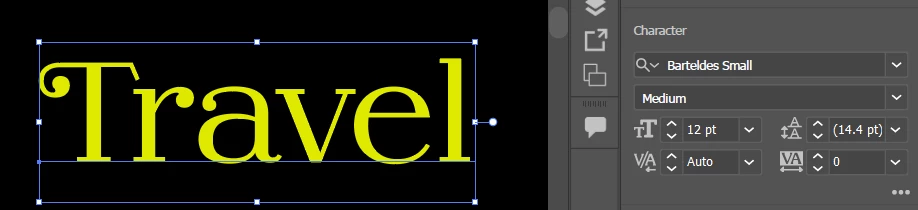
Barteldes Small is from Adobe Fonts, it displays correctly in other Adobe programs but not in After Effects.  Here is what it is supposed to look like in Illustrator:
 

Here is what it looks like in After Effects:
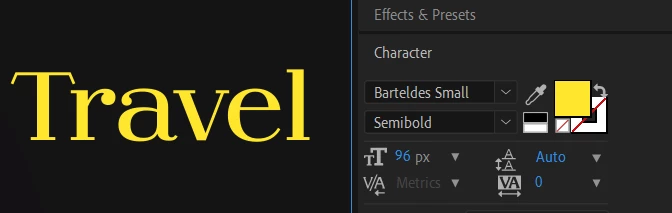
 

It looks like only the capitatal letters are being effected. I hav tried removing and readding the font family back again, and I do not have any other fonts named Barteldes on my computer, also it is an Adobe font.  Not sure why this is happening.


Thanks!

This topic has been closed for replies.

3 replies

Warren Heaton
Community Expert
Community Expert
October 13, 2024

@jenkmeister17177426 @JohnColombo17100380 

Any chance this can turn into a Feature Request for a Glyph Panel in After Effects to insert alternate glyphs (matching Photoshop), or better yet, a Glyphs Panel and On-Comp Alternate Glyphs (matching On-Canvas Alternate Glyphs in Illustrator)?


JohnColombo17100380
Community Manager
Community Manager
October 11, 2024

@Stu__G As a workaround for now, try copy/pasting the text from Illustrator to After Effects. That should preserve the special glyphs/swashes on the capital letters.


Cheers,

- John, After Effects Engineering Team 

October 10, 2024

I can reproduce what you are seeing, but I have no idea why. We'll have to take a look further.