



AE 2026 (26.5): Effect Point parameter crosshair clicks outside the layer's bounds select another layer and throw "invalid index in indexed group"
Since AE 2026, the crosshair button on effect Point parameters is broken. If I click the crosshair and then click anywhere outside the bounding box of the layer the effect is on, AE doesn't set the point. Instead it selects whatever layer is under the cursor (or above it), and usually throws "internal verification failure, sorry! {invalid index in indexed group}". Sometimes on the first click, otherwise within a few tries.
Clicking inside the layer's bounding box works fine. In AE 2025 the same thing works anywhere in the comp.
It happens with the built-in Point Control and with my own native plugin, so it isn't specific to one effect.
Steps to reproduce:
1. New project, import any footage and create a comp from it or add a full-frame solid.
2. Add a small text or shape layer on top.
3. Apply Effect > Expression Controls > Point Control to the text/shape layer.
4. Click the crosshair next to the Point value.
5. Click in the comp somewhere outside the text/shape layer's bounding box.
6. Repeat a few times if the error doesn't pop up right away.
Same thing if you put a solid above the text layer: the crosshair click selects the solid on top.
Expected result
The point gets set where I clicked and the selection doesn't change, like in AE 2025.
Actual result
The layer under (or over) the cursor gets selected, the point doesn't move, and this error shows up:
After Effects error: internal verification failure, sorry! {invalid index in indexed group}
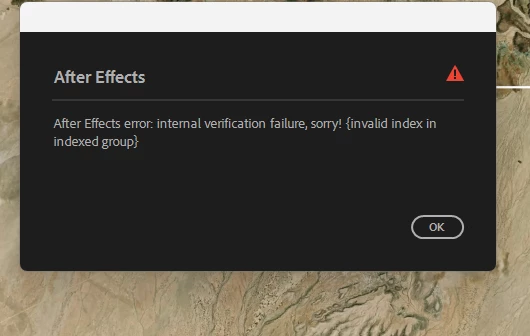
In one comp I also got this one, where AE seems to grab an effect from the wrong layer:
After Effects error: internal verification failure, sorry! {stream at index matchName="AWAC SmartLabel" (mismatch with resultP, expected "ADBE Fractal Noise")} ( 29 :: 0 )
With a debugger attached it occasionally ends in an access violation in AfterFXLib.dll (0xC0000005 reading 0x00002D002D00EC28). The call stack is all Adobe modules.
Adobe After Effects version
26.5. Works fine in 2025.
Operating system
Windows 11 Enterprise 25H2 (build 26200)
GPU driver version
NVIDIA RTX A4000, driver 596.71
Video format
Not related. Happens with an .mp4 underneath or just a plain solid.
Comparative information
- Not every effect is affected. Fractal Noise on a shape layer works: its Offset Turbulence crosshair sets the point fine even when I click outside the shape layer's bounds. Point Control and my own plugin's Point parameters fail in the same setup.
- Happens in any comp where there's another layer to "accidentally" select under or above the click.
- Doesn't happen if I lock the other layers, hide the layer underneath, or if the effect is on a full-frame layer.
- Reproduces in brand-new projects.
- Started with AE 2026. Fixed in BETA AE 27.1.0 (Build 36)
Workaround
Lock the other layers before using the crosshair, or drag the point's handle in the comp viewer instead.
 AdChoices