


Participant
October 29, 2024

AE 25.0.1 Save project and save settings causes dialogs that never go away and on quit AE crashes

  • October 29, 2024
  • 4 replies
  • 758 views

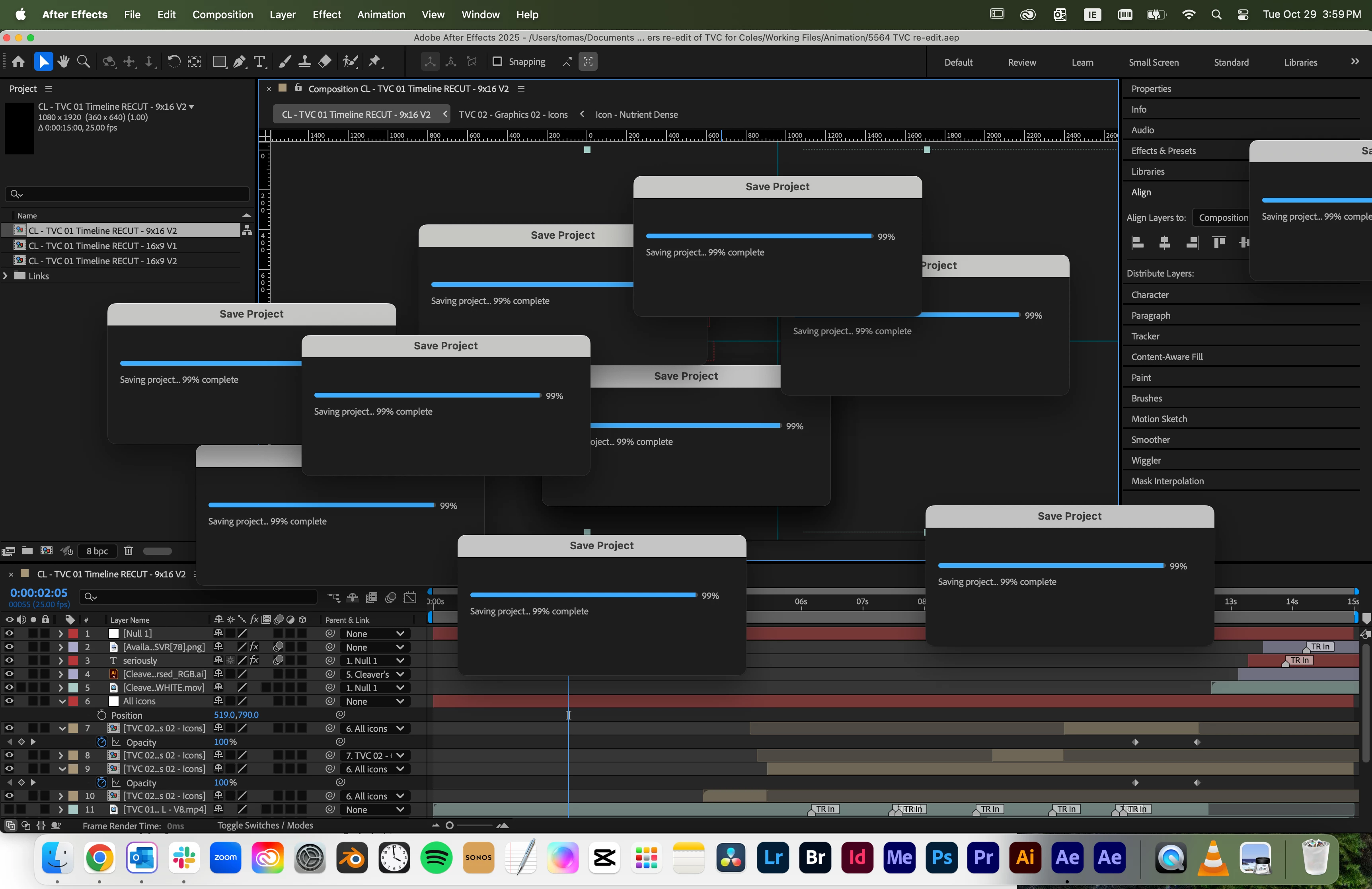
I am having the below issue (among others).

Whenever I save a project or save the settings, the window that pops up never goes away. When I try to quit AE it crashes. It's also way slower than the last 2024 version. It will also slow to the point of crashing during normal work.


I have tried resetting all preferences, disabling plugins, uninstalling + reinstalling, starting in safe mode. I am running AE 25.0.1 on a mac OS Sequoia 15.1 (24B83). I had no issues before the jump to AE 2025.


If anyone can help me that would be amazing.
 

This topic has been closed for replies.

4 replies

Participant
December 11, 2024

I'm experiencing this very same thing.

nishu_kush
Legend
October 30, 2024

Thank you for sharing the details.

I’ve seen instances where non-Adobe applications or fonts interfere with After Effects or other Adobe apps. Have you recently installed any new software or fonts? If so, please try removing them to see if it resolves the issue. Additionally, comparing your computer with your colleague’s to identify any differences in installed applications might help pinpoint the problem.

If that's not the case:

  • Are you changing the After Effects installation location?
  • What are your system specs (CPU, RAM)?
  • Can you create a new user account on your computer and test After Effects on it? This will help us determine whether the issue is user account-specific.

Looking forward to your response.


Thanks,

Nishu

Participant
October 30, 2024

@Jessica McMillan 


1- No, not always. It happens whenever I try to quit AE.

2- AE will freeze weather or not I save the project. 

3- The behavior is the same except it's the settings window as opposed to the save project window. The settings I was changing was emptying the cache. The windows don't go away even when I leave after effects. So for example, if I flick over to look at chrome or the desktop, the settings box will still be sitting there on top of chrome/the desktop. 

4- Usually the preview stops updating as I edit. Then my cursor becomes the rainbow wheel and AE totally stops responding. Sometimes I can keep moving the playback head when the preview stops updating.


For further context, I have a coworker that works beside me, with an identical MAC on the exact same OS version, running the same AE session on the same version of AE who does not get these problems. I suspect the issue has got to be with the new version of AE since I have been working fine on AE2024 for a year. 


Hope that answers your questions. Any help you could provide would be amazing. 

Community Manager
October 29, 2024

Hello @Angela27010244fjgp 

I have moved your post to a new thread on the forum as your issues are not the same as the other post and it is easier for tracking internally to have individual issues separated into their own threads.


  1. Are the crashes that happen when you close AE after you have these save dialogs that won't close?

  2. Does saving the project consistently cause this issue or is it specific to a project?

  3. For save settings does it look similar or is the behavior different and which settings are you saving?

  4.  In what ways do you experience a slower experience in 2024? Interaction, playback, rendering, other?

    Thanks for taking the time to post about the issues you are seeing. Please feel free to adjust the title of the post since I adjusted it after migration.

    All the best,
    Jessica
    AE Engineering
All the best,Jessica McMillan - AE Engineering