

AE Render output names issue
New project. Select multiple compositions, ctr-m for export.
Select "Output modules" to set render preset. (having all the comps in the queue selected)
Select Output To: new directory path. (having all the comps in the queue selected)
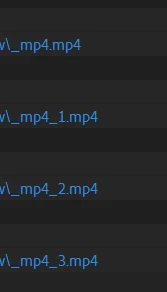
Result:
One comp has the right name. All the remaining comps loose their names to _mp4.mp4, _mp4_1.mp4, etc.
Current solution:
Remove the projects from Render Queue and then add them with ctr-m again.
Now the comps will have the right output directory path and they will keep their names.
System: Windows 10 Pro with updates
AE: 24.3.0 (Build 42) (Beta) but it's been like this throught recent versions.


 AdChoices