


UON VISUALS
Known Participant
April 7, 2025

After Effects 2025.2 - LUMETRI SCOPES INACCURATE

  • April 7, 2025
  • 18 replies
  • 890 views

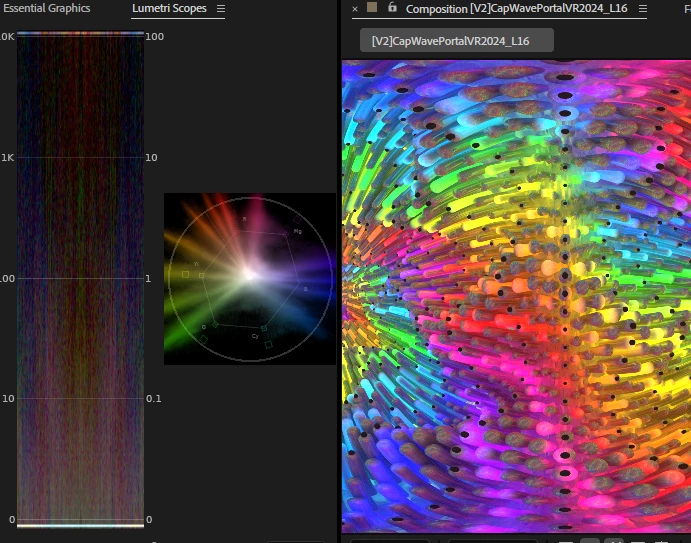
I just updated AE to 2025.2 and opened my project, the lumetri scopes now interpret my footage with WAY overblown values. I render/composite/output in HDR on an SDR monitor and rely on the scopes to work on my content, now it is useless:
 

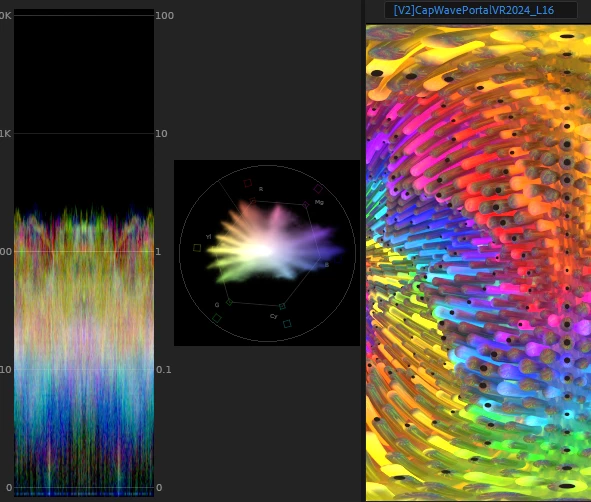
I've tried changing all the settings to try and get it to display the accurate data. For the record, this is how the Lumetri scopes is supposed to interpret the same file, from AE 2024:
Please fix this, I absolutely need to get this to be working right again.

18 replies

Adobe Employee
April 7, 2025

Thanks!

UON VISUALS
Known Participant
April 7, 2025

Here's the media's color page settings:


@uon.visuals on IG & youtube.com/@UON
UON VISUALS
Known Participant
April 7, 2025

By default I always have it set to HDR rec2020, in the new version no matter whish setting I select the ranges are well past the charts

@uon.visuals on IG & youtube.com/@UON
Adobe Employee
April 7, 2025

Could you go to Interpret Footage dialog, Color tab and post screenshot of media color space settings? Thanks!

UON VISUALS
Known Participant
April 7, 2025

1) 32bpc Rec2100PQ Linear


2)Footage: Prores 4444 (XQ and non-XQ) 16-bpc rec2100PQ

3) Lumetri Scopes: HDR, rec2020 color space

4) No issues with Premiere Pro, lumetri scopes there work exactly the same way they did before

@uon.visuals on IG & youtube.com/@UON
Adobe Employee
April 7, 2025

Just to follow up on what Paul is asking, could you please provide a saved project with a footage that demonstrates the issue. At least, directions on how to reproduce it with suggestions as to what footage to use. Does the issue happen in 25.2 only or did it start earlier? If you use 25.1, do you see this issue with the same project and footage?

April 7, 2025

Can you click on the wrench/settings icon in the Scopes panel and see what your Color Space settings is configured for. If you're set to Rec. 709, that may be forcing the range incorrectly. Try using Automatic.


Community Manager
April 7, 2025

We're looking into this.

As a first step:
1. What are your Project color settings?
2. What is your footage type and what are its color settings?
3. What are your Lumetri scopes settings?
4. What scopes behavior are you seeing in Premiere for this same scenario?