



After Effects 2025 & 2026 ERROR with imported mp4, mov and swf files
Dear Adobe Team,
I'm writing to report an ongoing issue that's frustrating many motion designers, including myself.I originally reported a similar problem back in 2023 (
), and unfortunately, it was never fully resolved. I managed to work around it by juggling older versions, installing and uninstalling as needed, but it's unbelievable that we face these kinds of problems with such an expensive Creative Cloud subscription.
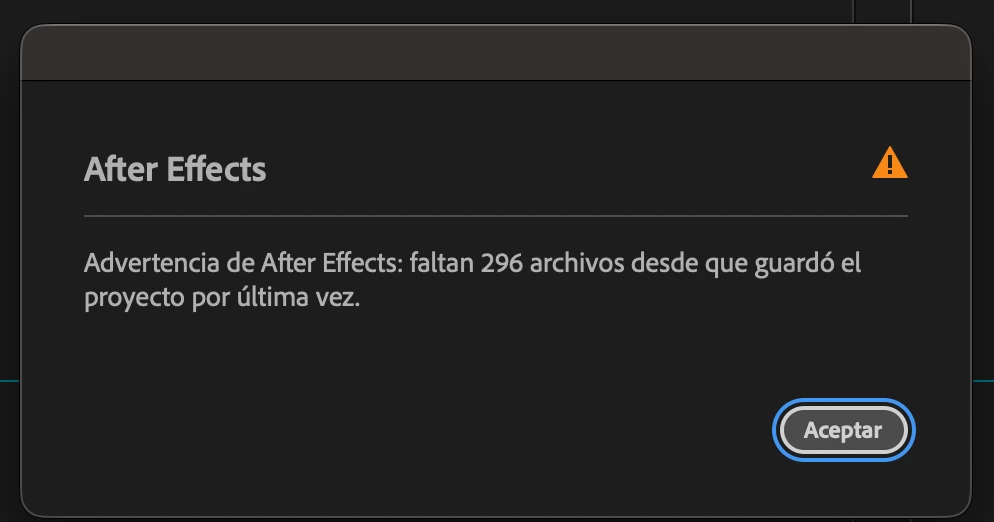
The situation has become much worse with the latest 2025 and 2026 updates.I regularly work on large projects with 500+ assets (PNG, JPG, SWF, audio, video files, etc.). I collect files properly, start working, and everything seems fine at first. But the next day, or after a few days, when I reopen the project, many MP4 and SWF files appear as "missing," show compatibility errors, or fail to display correctly.
This isn't a one-time or occasional glitch; it's now my standard workflow. I've wasted countless hours reinstalling software, restarting, and even re-rendering files just to relink them.This is severely impacting productivity and causing major frustration across the community. I've spoken with other designers experiencing the exact same recurring problems, and it seems to be getting worse with each update.Here are the most common issues we're facing right now:
- Files are not damaged before importing. They usually work perfectly on first import and for several days, then suddenly "crash" or become missing — almost as if the software itself is corrupting or breaking the links.
- SWF files: same problem as with the videos, they work correctly for a certain period of time and suddenly crash, showed as missing and when I try to relink there is a compatibility problem - sometimes I had to transform my swf in image sequences in Animate to be able to import my animations
- Imported MP4 files sometimes glitch, play incorrectly, or render as a completely black layer.
Please prioritize fixing these issues as soon as possible.
We're running out of patience with a tool we rely on professionally every day. Thank you for your attention. I hope to hear back soon.
Best regards,
Alba
 AdChoices