Participant
September 10, 2025

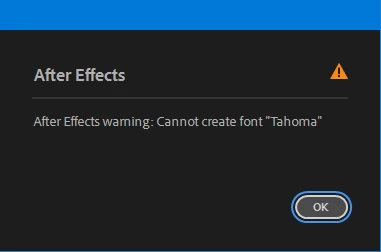
After Effects 3d layer error

  • September 10, 2025
  • 3 replies
  • 156 views


While activating 3d option on layer, the above warning appears. If someone fimiliar with issue, please help me. It is very frustrating. After the new Adobe subscription, this begins. 

3 replies

David.Arbor
Community Manager
Community Manager
September 16, 2025

Hey @Silver bell38936293usyl, sorry for the delay; I was out of town for a few days. Which version of Windows are you using? Tahoma should be included in Windows by default, and it's required to render certain elements you'll encounter when taking the 3D rendering pipeline (which starts as soon as you make a single layer 3D).


So could you try two things for me, please:

  1. From the Start menu, search for "Fonts" which will let you open the Windows Font manager that lives in the Control Panel. Search for "Tahoma" above the list of fonts to see if it's there. Let me know if it is or isn't, or if it is there and shows an error.
  2. Go back to the Adobe Fonts link I sent and try installing Tahoma with AE closed, then see if the error goes away when you make a 3D layer.


Thanks,
- David, After Effects Engineering Team

Participant
September 11, 2025

But I don't have this font installed in the system. The issue occurs with 3D especially, and I am unable to work on 3D in AE. Please do something.

David.Arbor
Community Manager
Community Manager
September 10, 2025

Hi @Silver bell38936293usyl , sorry you're having issues. I'm wondering if you're encountering a duplicate font issue. Perhaps Adobe Fonts has Tahoma synced and it's already on your system?


While logged into your Adobe account, can you please go to https://fonts.adobe.com/fonts/tahoma and see if the button at the top-right says "Remove" or "Add Family?" If it says "Remove," make sure AE is closed, remove the font, then relaunch AE to see if that solves the problem.


Alternatively, do you have any third-party font managers installed? 


Thanks,
- David, After Effects Engineering Team