
Known Participant
June 6, 2024

After Effects Error: Frame buffer slice name cannot be an empty string. 0 :: 9997

  • June 6, 2024
  • 3 replies
  • 659 views

I'm working with a multi-layered EXR file from Maya 2025 and V-Ray 6, I get this following error when importing the file.
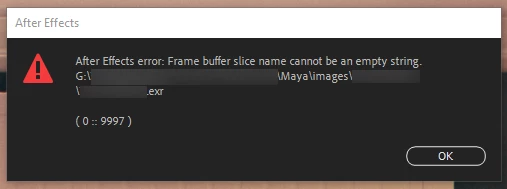


The file does then open in AE and all of the passes unhighlighted below open fine, but then nothing is visible in my light mix passes that hold each individual light pass.
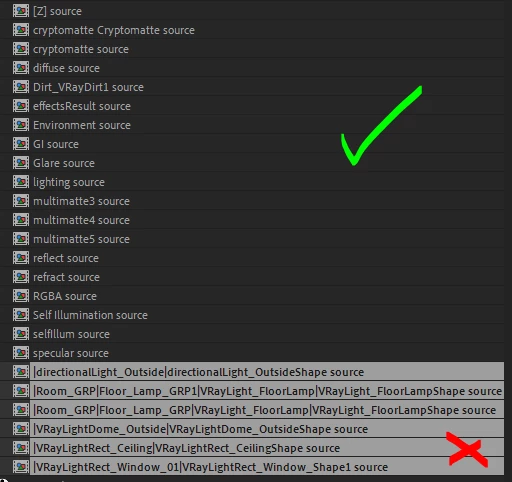


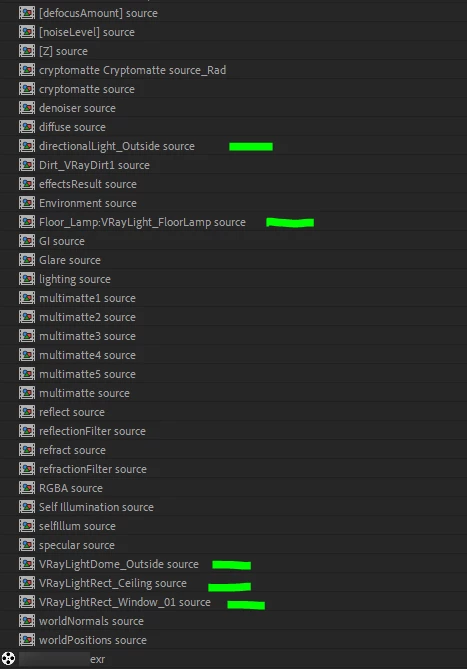
I had created a render a couple of days ago from the same scene (although using a different PC) that worked fine in AE. The only difference I can see is with the naming of the layers that come with the file, on the file that worked those light passes have much simpler names compared the lengthy ones above that show Maya's groups, transforms, and shape nodes. Any idea what might be going wrong here?
 

This topic has been closed for replies.

3 replies

SebABFAuthor
Known Participant
June 14, 2024

For anyone else who is having this issue, I managed to find out the reason why it was happening.


I had two lights set up in Maya that had identical names. As V-Ray's Light Mix element uses each light's name for splitting out each light to a seperate pass, it took each light's group/transform/shape naming to make each one unique, which then made each element's name too long for AE to handle.


I gave each light a unique name and it works perfectly now.

JohnColombo17100380
Community Manager
Community Manager
June 13, 2024

Hi @SebABF,

Thank you for providing the EXR file; using that, we are also able to reproduce this issue. It appears to be a potential bug with the EXtractoR plug-in. We will keep this thread updated if a fix becomes available in the Beta builds for you to try out.


Thanks again,

- John, After Effects Engineering Team 

JohnColombo17100380
Community Manager
Community Manager
June 6, 2024

Hi @SebABF,

Thank you for reporting this issue. Would you be able to share the EXR file with us so we can investigate how it is being handled by the importer? The error appears to indicate a potential issue in how a layer in the EXR is named, but there are many other factors that could be at play (name lengths, system settings around file paths, etc).


Please feel free to direct message me here on the forums with a link so you don't have to share the EXR publicly. It will only be used in the investigation of this specific issue.


Thank you again for this report and for any additional information,

- John, After Effects Engineering Team