


saladdreesing
Participant
August 10, 2023

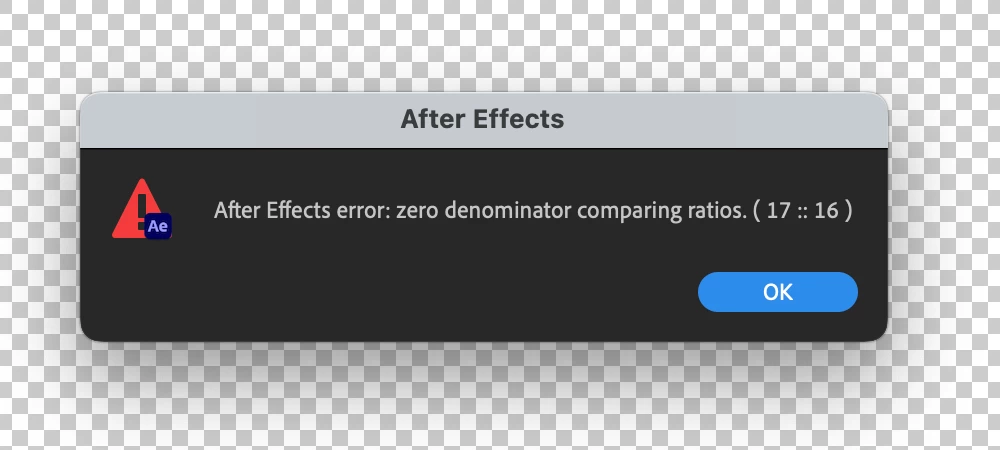
After Effects Error - Zero Denominator comparing ratios (17 :: 16) error in Ae version 23.6

  • August 10, 2023
  • 82 replies
  • 32798 views

Hey y'all, I'm really stuck.


This error keeps popping up for me and I have no idea how to solve it. It'll appear as I'm trying to play a sequence with an image in it. I made other sequences with images in them a few hours ago and rhey're all fine. But now when tryong to add anything new, it gives me this error and doesn't go away at all - no matter how many times I hit 'okay'. Any ideas?


Thanks!


Title edited by Mod.
 

82 replies

Participating Frequently
July 3, 2024

I would also like to add that I don't want to switch back to classic 3D, this comp needs c4d

Participating Frequently
July 2, 2024

I keep getting this error message while working on my project. Sometimes it pops up and then goes away (temporarily) after I click on "okay" 20 times, only to pop up again when I hit space to view my progress. I am using a MacBook pro 2019.


Participant
February 22, 2024

Ok You fix the issue at Version 24.0 but the problem still exist for us whom cannot upgrade to 24.0 as we have older mac systems. I am using a mac pro late 2013 (cylinder) with latest Monterey 12.7.3 / 128 Gb RAM/ AMD fire Pro D500 4 GB /12 Core XEON E5 and i stil have the issue of "zero denominator comparing ratios (17:16)" every time i am pressing play to see my work...... Is this logical ?  i mean to exclude  even we pay for the use of Adobe suite every month? Are we forced to change all of our equipmen t in order to be able to be upgraded? In any case we are ok to stay at  23,6,2 version of after effects if it is working so can you please fix the bug in this version and not in the newers one?

Jenkmeister
December 8, 2023

@bingbonger You will have to change versions, either back to 23.5 or move to 24.0.3 or 24.1 to get the code fix. 


@ronnykhalil Can you share a project with us so we can investigate your setup?

Participating Frequently
December 8, 2023

I also am having the issue. Im in 24.1.0. There is no video footage, only PS layers. Also no 3D. I made sure all my precomps were 30 fps. 

Participant
December 5, 2023

Still no fix found for the 2023 version, made sure all the comps have the same settings, changed all the comps to Classic 3D even though there is no 3D in my animations, tried reimporting in other projects, still the same pop-up making AE unusable.

The only fix given is upgrading, but I dont have that option and Im sure many others have to still work with 2023. This is a major issue making projects unworkable with a ressource page of 5 pages of people looking for help and still no effecient fix to it...

JohnColombo17100380
Community Manager
Community Manager
November 14, 2023

This issue has been fixed in After Effects 24.0 and later. Please let us know if you continue to experience this error frequently after updating.


- John, After Effects Engineering Team 

jmorenajr
Participating Frequently
November 13, 2023

For those resolving this issue by manually changing the 3D Renderer in the Comp Settings for each individual comp in your project, you can change these 3D renderer settings globally by using this Comp Setter script: https://aescripts.com/rd-compsetter/ It's free!


You can set the 3D renderer to Classic 3D on all comps with it. Good luck!


Tom Olsen
Community Manager
Community Manager
October 24, 2023

We've spent a fair bit of time trying to eliminate these zero denominator issues. Give AE 24.x builds a try.

EYEIDEA
Inspiring
October 7, 2023

Ok, so I updated full release AE to 23.6.0 and updated my C4D to 24.0.2 with the Maxon app – I then made sure that only the pre-comps for my 3D type are set to C4D 3d renderer, and my main comp that has those 3d type pre-comps in it is set to classic 3d renderer.  The error is gone!  So I guess either the update to AE and Cinema4D fixed it or setting my main comp to classic 3D, and only having my two pre-comps set to Cinema 4D 3D renderer fixed it.