


saladdreesing
Participant
August 10, 2023

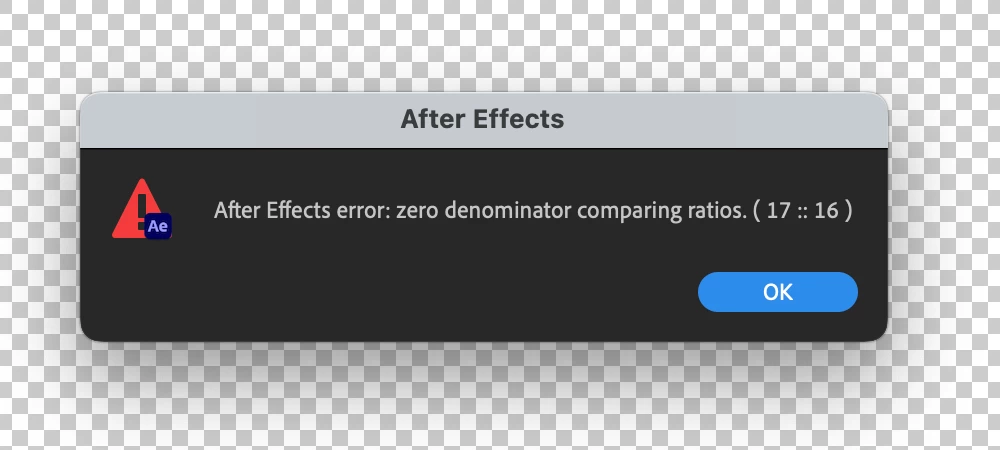
After Effects Error - Zero Denominator comparing ratios (17 :: 16) error in Ae version 23.6

  • August 10, 2023
  • 82 replies
  • 32970 views

Hey y'all, I'm really stuck.


This error keeps popping up for me and I have no idea how to solve it. It'll appear as I'm trying to play a sequence with an image in it. I made other sequences with images in them a few hours ago and rhey're all fine. But now when tryong to add anything new, it gives me this error and doesn't go away at all - no matter how many times I hit 'okay'. Any ideas?


Thanks!


Title edited by Mod.
 

82 replies

saladdreesing
Participant
August 10, 2023

I ended up un/reinstalling AE and reseting my preferences, things seem to be fine now - but no idea what was causing the issue.

Participating Frequently
August 11, 2023

Yup, I emptied disk cache and reset preferences and that worked. Thx. 

Participating Frequently
August 11, 2023

Nope. Same issue recurring. 

nishu_kush
Legend
August 10, 2023

Hi saladdreesing,


Welcome to the community and sorry for your issue.

It could happen due to a corrupted media file. As you mentioned it happens when you try to preview an image, try re-exporting that image using Photoshop or Media Encoder and then import in After Effects.

Let us know if it helps.


Thanks,

Nishu

saladdreesing
Participant
August 10, 2023

Hi Nishu,

Appreciate the response. I don't think that's the case unfortuneately. It's not just that one file, it's every image file I try and use. Some files I've used in other sequences, but now when I try to place them in a different sequence, it brings the error up.

Participant
August 16, 2023

I'm having the iussue as well. Really annoying!