


After Effects: font dropdown throws "Cannot create font [X]" repeatedly / freezes on scroll — survives full reinstall, fresh Windows account, and GPU driver rollback
Background
I'm new to After Effects — I'm working through a beginner course and this is the first time I've actually tried to use the app for real (I'd previously only opened it a few times to follow along with a template's instructions, and didn't touch the type tool then). This issue showed up the first time I tried to change a font. To be clear, this isn't a "type tool is unfamiliar to me" issue — I've since done extensive troubleshooting (below), and everything else in After Effects seems to work normally: layers, effects, keyframing, rendering, other panels, other tools. The font dropdown/font-creation step is the only thing that's broken.
Summary
Opening the font dropdown in the Character panel (or Properties panel in the new UI) in After Effects triggers a warning dialog: "After Effects warning: Cannot create font '[font name]'." Clicking OK / pressing Escape does not resolve it — the dropdown either loops through repeated versions of this error and after a while for different fonts, and when the dropdown is open for a split second it shows almost nothing (sometimes just one entry) and errors immediately on whatever it tries to process first.
This is not tied to any specific font. Over the course of troubleshooting, the named font has included: a commercial third-party family (Tisa Sans Pro), two unrelated display fonts, and — critically — core Windows-bundled fonts that ship on every Windows install and cannot normally be uninstalled: Terminal, Arial Narrow, Small Fonts, and Segoe UI Light. The specific font named changes between attempts, which points away from a corrupt individual font file and toward something in After Effects' font-handling/rendering pipeline itself.
Steps to reproduce
- Create a new project and a new composition in it (happens in a brand-new, empty project too — not specific to any one project file).
- Add a background (solid/shape layer).
- Type a line of text with the type tool.
- Highlight the text/select the text layer, then open the Character panel (or Properties panel in the new UI) and click the font family dropdown.
- "After Effects warning: Cannot create font '[font name]'" appears. Dismissing it (OK/Escape) re-triggers the same warning for the same font repeatedly — often 5–10+ times in a row — before either moving on to error on a different font, or the dialog stops appearing entirely for that attempt. Even after it stops, trying to open the font dropdown again immediately restarts the whole loop from scratch. The dropdown itself, when it does briefly open, shows only a partial/near-empty list and errors on whatever it tries to load first.
System info
- After Effects version: 23.3.0 (Build 87)
- OS: Windows 11 Home 64-bit, version 26200 (build 10.0.26100.9168), German system language
- CPU: Intel Core i7-12700K (20 logical processors), ~3.6GHz
- RAM: 128 GB
- GPU: NVIDIA GeForce RTX 3070, Studio Driver 32.0.16.1047 (rolled back one version from a driver that had auto-updated the day before, to rule out a driver regression — see #12 below)
- Display: 3840×2160 @ 60Hz, HDR-capable primary monitor at 125% scaling (300% "recommended"), plus a second 1920×1080 monitor at 100% scaling (no mismatch there — see #13)
- Creative Cloud desktop app: freshly reinstalled current version (see #9 below)
What I've already ruled out
I've gone through an extensive elimination process, roughly in this order:
- Third-party font manager (MainType). Fully quit the app, and later fully uninstalled all non-system fonts through it (with a full reboot). Issue persists even with a minimal, stock-Windows-only font set.
- Adobe Fonts / Creative Cloud font sync. Disabled the Adobe Fonts service entirely in Creative Cloud desktop preferences. No change.
- Windows "Block untrusted fonts" (Exploit Protection). Checked and disabled the per-app override for AfterFX.exe. No change.
- Per-user vs. system-wide font installation. Investigated in depth (including a detour through Windows 11's per-user font install location and "Install for all users" duplication issue) — ruled out as the cause once the failure reproduced with a completely minimal, system-fonts-only environment.
- Font file corruption. Ruled out once the error started naming core, unmodifiable Windows system fonts (Terminal, Arial Narrow, Small Fonts, Segoe UI Light) in addition to third-party ones.
- Adobe's font cache. Closed all Adobe processes and deleted every
AdobeFnt*file system-wide, then rebooted before testing. No change. - Windows system file integrity. Ran
sfc /scannow— reported no integrity violations. - After Effects installation itself. Fully removed After Effects using the Adobe Creative Cloud Cleaner Tool (not just a normal uninstall) and did a completely fresh reinstall. No change.
- Creative Cloud desktop app AND every installed Creative Cloud app. Used the Cleaner Tool to fully remove Creative Cloud desktop and all installed CC apps (not just After Effects), in case this was a cross-app font-handling issue rather than something isolated to AE, then did a completely fresh reinstall of everything. No change.
- After Effects preferences. Reset via Ctrl+Alt+Shift on launch (full preferences wipe, not just a project-level issue). No change.
- Windows user profile. Tested under a completely separate, unrelated Windows user account with no font manager, no prior AE preferences, and no history in this troubleshooting. Same error occurs there too (failed on Segoe UI Light).
- GPU driver. Rolled back the NVIDIA Studio Driver to the version installed immediately before a recent update, using the "Install a previous version" option in the NVIDIA app. No change.
- Display/DPI scaling. Dug into this at length after noticing the font dropdown rendered a decorative/vector font (Segoe Script) correctly while failing right next to a plain system font (Segoe UI Light). My primary 4K monitor shows "300% empfohlen" (recommended) but is manually set to 125% (300% would be unreadable); a second monitor is at 100% with no mismatch at all. Tested: all three "Override high DPI scaling behavior" compatibility modes for AfterFX.exe (Application, System, System Enhanced) — no change (though "System Enhanced" visibly changed how the composition viewer scaled, confirming AE's rendering pipeline does react to this setting, just not in a way that fixes the bug). Also moved the entire AE window onto the second monitor (100%/100%, zero scaling mismatch) and retested there — same error. This rules out display scaling/DPI mismatch as the cause.
- Missing "Adobe Clean" shared font component. This is the most significant finding so far. After Effects' font-loading fallback appears to depend on Adobe's own bundled UI font, "Adobe Clean" (used internally when a font fails to load cleanly — several Adobe bug reports describe the exact same looping-across-different-fonts symptom being caused by this fallback font itself being missing or broken). Checked my system directly: there is no Adobe Clean font file anywhere — not in
C:\Windows\Fonts, andC:\Program Files\Common Files\Adobe\Fonts(where it would normally live) does not exist at all, even immediately after the full Cleaner Tool wipe-and-reinstall of AE, Creative Cloud desktop, and every CC app described in #9. I had "Adobe Fonts" sync disabled in Creative Cloud desktop preferences since before that reinstall (to rule it out as a variable); re-enabled it and let it sync, then rechecked — still no Adobe Clean file, still the same error. Adobe Clean does not appear to be available as a normal activatable font through Adobe Fonts (fonts.adobe.com) the way regular library fonts are, so there's no obvious self-service way to (re)install it. - Other Creative Cloud apps. The font dropdown/font list works completely normally in Photoshop, Illustrator, InDesign, and Premiere Pro on this same machine — full font list, no errors, no looping. This only happens in After Effects, which argues against a system-wide, shared-across-all-apps font problem and points more specifically at something in After Effects' own font-handling code path (it may simply be stricter about, or more dependent on, the missing Adobe Clean component than the other apps are).
At this point the issue reproduces on: a fresh Windows user profile, a fresh After Effects install, a fresh Creative Cloud desktop install, a minimal/stock font environment, a system with clean SFC results, a rolled-back GPU driver, both display-scaling configurations available to me, and both Adobe Fonts sync states — while every other Creative Cloud app on the same machine handles fonts without any issue. That rules out essentially everything within normal user control, and narrows this down to something specific to After Effects' own font-loading pipeline, quite possibly its handling of the missing "Adobe Clean"/shared font component that ships alongside AE and Creative Cloud desktop but doesn't seem to be required the same way by the other apps. I found several existing bug reports describing what looks like the same underlying issue (see links below), where the only resolution documented was Adobe engineering directly providing the affected user a working copy of the font files — not something fixable from the user side.
Question for the community / Adobe
Has anyone seen this specific pattern — font dropdown failing on core Windows system fonts (not just third-party ones), the "Adobe Clean" shared font component and its Common Files\Adobe\Fonts folder being entirely absent even after a full Cleaner Tool reinstall of AE and every Creative Cloud app, surviving a fresh Windows profile, unaffected by display scaling, and yet isolated to After Effects while Photoshop/Illustrator/InDesign/Premiere Pro on the same machine handle fonts fine? This looks closely related to these existing reports, but none of them show a self-service fix — only cases where Adobe engineering manually supplied working font files:
- https://community.adobe.com/bug-reports-528/unable-to-create-agm-font-adobe-clean-bold-in-after-effects-1215991
- https://community.adobe.com/bug-reports-528/after-effects-warning-unable-to-create-agm-font-adobe-clean-bold-unresolved-ae-bug-1216082
- https://community.adobe.com/bug-reports-528/bug-report-after-effects-25-0-1-error-messages-when-changing-fonts-on-file-1215647
Could Adobe support/engineering provide a working copy of the Adobe Clean font files (and confirm the correct install location/registration) for my system, the way was done in the threads above? Happy to provide additional logs/screenshots on request.
Screenshot
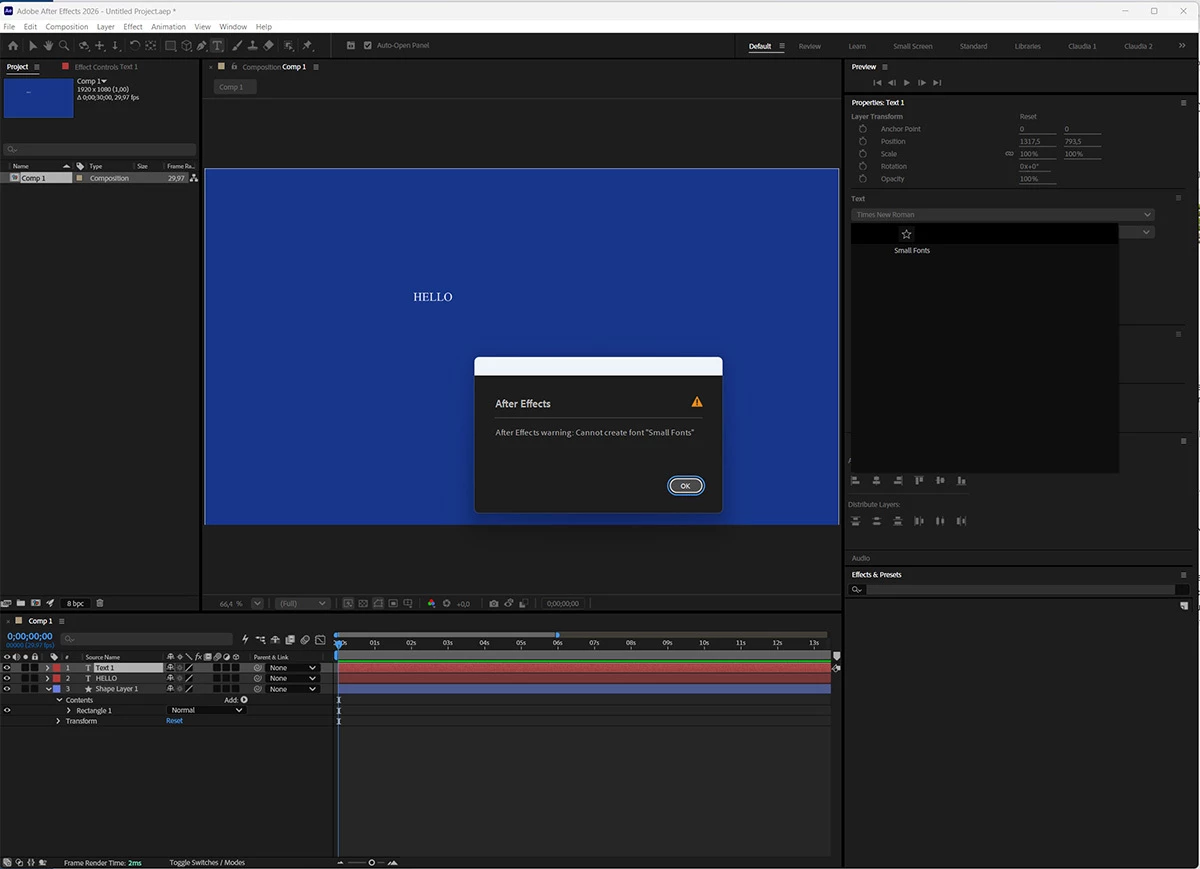
(Note: Claude helped me during the entire troubleshoot and I've asked it to summarize everything we've tried for this post)
 AdChoices