



Thiago Guimarães
Participating Frequently
June 18, 2024

After Effects Freezes after some time with error: "Direct2D Drawbot Error. HRESULT:-2005270523"

  • June 18, 2024
  • 159 replies
  • 53122 views

I can't say for sure, but after two or three more recent versions of AE Beta I started to get a random error, after working for a few minutes the whole computer crashes and then this Direct2D Drawbot Error box. HRESULT:-2005270523 appears, but I can't close it, it keeps reopening endlessly and then I have to force close the program.


I've been using AE Beta since they redid the interface, it's just become another program! It's very fluid and enjoyable. I'm not using to use the retail version because he not received the interface update., but I can say that the problem is in the beta, because when i use the reail version there is no issue i don't have any errors or freezes.


Here's a picture of the error I get when I close.
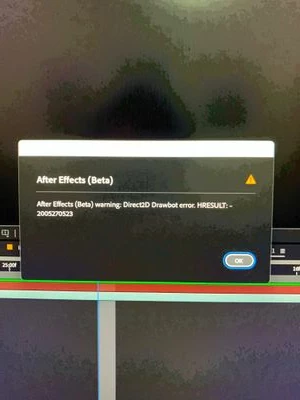


AE Beta V24.6.0 b23

Windows 11, i7 9750H, GTX 1660TI 6GB, 32gb de RAM, 512gb SSD.

Driver Nvidea Studio  555.99.


159 replies

Participant
December 16, 2024

This is happening to me as well.  RTX 4080 SUPER Driver 566.36.
Have had both After Effects and Premiere open at the same time.

Participating Frequently
December 16, 2024

My video card: NVIDIA GeForce RTX 2080 Ti ... latest driver updated.. latest version of AE.. all same issues reported here... so bad I had to go back to AE 2024 because AE 2025 is not usable... PLEASE FOR ALL THAT IS GOOD IN PIXEL MOTION WORLD FIX THIS!!!!!!!!!!!!!

Participating Frequently
December 16, 2024

Additionally i will say that it's happening to me while im minimizing after effect esspecialy after using adobe dynamic link, as i said im using rtx 2060 super with newest nVidia studio driver, its my new pc and i bought it for using adobre programs, please fix it..

Participating Frequently
December 16, 2024

One or two 2070RTX

Community Manager
December 16, 2024

Hello Everyone,

To highlight from John's request - if you can let us know what GPU you are using as well as your driver version, we can work towards an inhouse reproduction and reach out to the GPU companies if necessary to determine a solution. 

This issue is only on Windows machines and likely with specific GPU/Driver combinations with the new version of AE. We switched draw technologies to improve the speed at which UI interactions could be drawn (most noticibly when interacting in the timeline). 

We have a few approaches we are actively investigating and updates will be posted to this thread. 

All the best,Jessica McMillan - AE Engineering
charmander4444
Participating Frequently
December 16, 2024

Getting the same issue multiple times a day now.

Participating Frequently
December 16, 2024

I am getting the exact same error. All I have to do is open AE 2025 and and just play a timeline.. it give exactly same error. Here are my system specs:


Processor AMD Ryzen 9 3900X 12-Core Processor 4.00 GHz
Installed RAM 64.0 GB

Edition Windows 11 Home
Version 24H2
Installed on ‎2024-‎12-‎13
OS build 26100.2605
Experience Windows Feature Experience Pack 1000.26100.36.0

Participating Frequently
December 15, 2024

U had the same and it worked for u?

Participant
December 15, 2024

i worked, open After effect choose with Safe Mode, and close Comp about your error. and create new Comp or test open again. thank you

Participating Frequently
December 15, 2024

it doesn't show when im rendering without adobe dynamic link, but when im using it and im trying to go back to my premiere pro project its show this crush, its so annoying, i bought new pc just for editing, ryzen 9 5950x, rtx 2060s, all drivers are up to date, no third party plugins...