


Participant
March 26, 2026

After Effects not opening - really really need it to open

  • March 26, 2026
  • 2 replies
  • 49 views

I recently updated my laptop to MacOS Tahoe and at the start AfterEffects was working fine until it crashed. Now every time I try to launch it I just get this message:
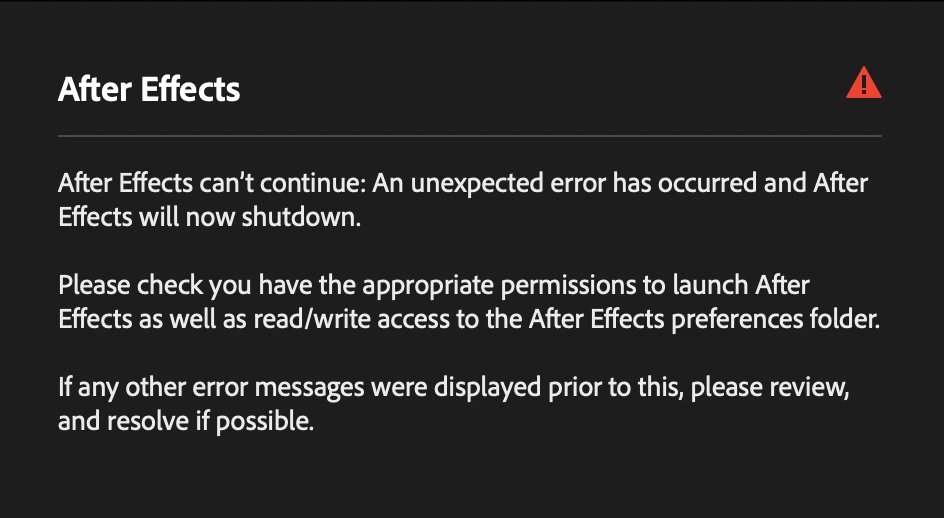
 

No matter what I do, it will not open. I have tried everything I can find on the internet on forums suggested such as this one: 

It will not open in save mode. I have tried changing permissions, read/write settings, uninstalling and reinstalling etc. 


I was on the phone to Adobe Help for over an hour where the man tried everything he could think of to get it to work on this account. Eventually he made a separate test user account and it launched on that and he then told me it was a problem with Apple and I had to contact them. I then contacted Apple who have no idea how to fix the issue and told me it is an issue with Adobe. 


I REALLY need AfterEffects to work on my computer, on my own account as this is where all my files are and I use it for work.


I don’t understand why free apps such as Blender and Cavalry work seamlessly but the one I am paying  for won’t even open. 


This is my THIRD day spending trying to fix this issue, so I can have AfterEffects open on my own laptop. 

Any suggestions on how to fix this!? As I really need it to work. 

    2 replies

    VinithaChatra
    Participant
    March 30, 2026

    Hi im facing the same issue please help me out with this problem 

    nishukushwaha
    Community Manager
    Community Manager
    March 31, 2026

    Could you share more details? Are you on macOS or Windows? Are you getting the exact same message? Have you made any changes to your machine recently? Can you try the steps in the following article: https://helpx.adobe.com/in/x-productkb/multi/preferences-folder-read-only-error.html

    Let me know.


    Thanks,

    Nishu

    nishukushwaha
    Community Manager
    Community Manager
    March 26, 2026

    Hi rodgers,


    Sorry for the poor experience. Have you installed any new fonts recently? If yes, please try removing them. If that doesn't help, please DM me your registered email ID so I can check the details and move the investigation forward.

    Looking forward to your response.


    Thanks,

    Nishu

    Participant
    March 30, 2026

    Hello,


    Thank you for your response. I haven’t downloaded any new fonts since upgrading to MacOS Tahoe.

    I will DM the registered email ID.


    Thank you!


    nishukushwaha
    Community Manager
    Community Manager
    March 31, 2026

    Looking forward.


    Thanks,

    Nishu