


December 5, 2025

After Effects on M4 Pro: Persistent Ghost Image on Alpha Channel Even in Empty Composition

  • December 5, 2025
  • 2 replies
  • 750 views

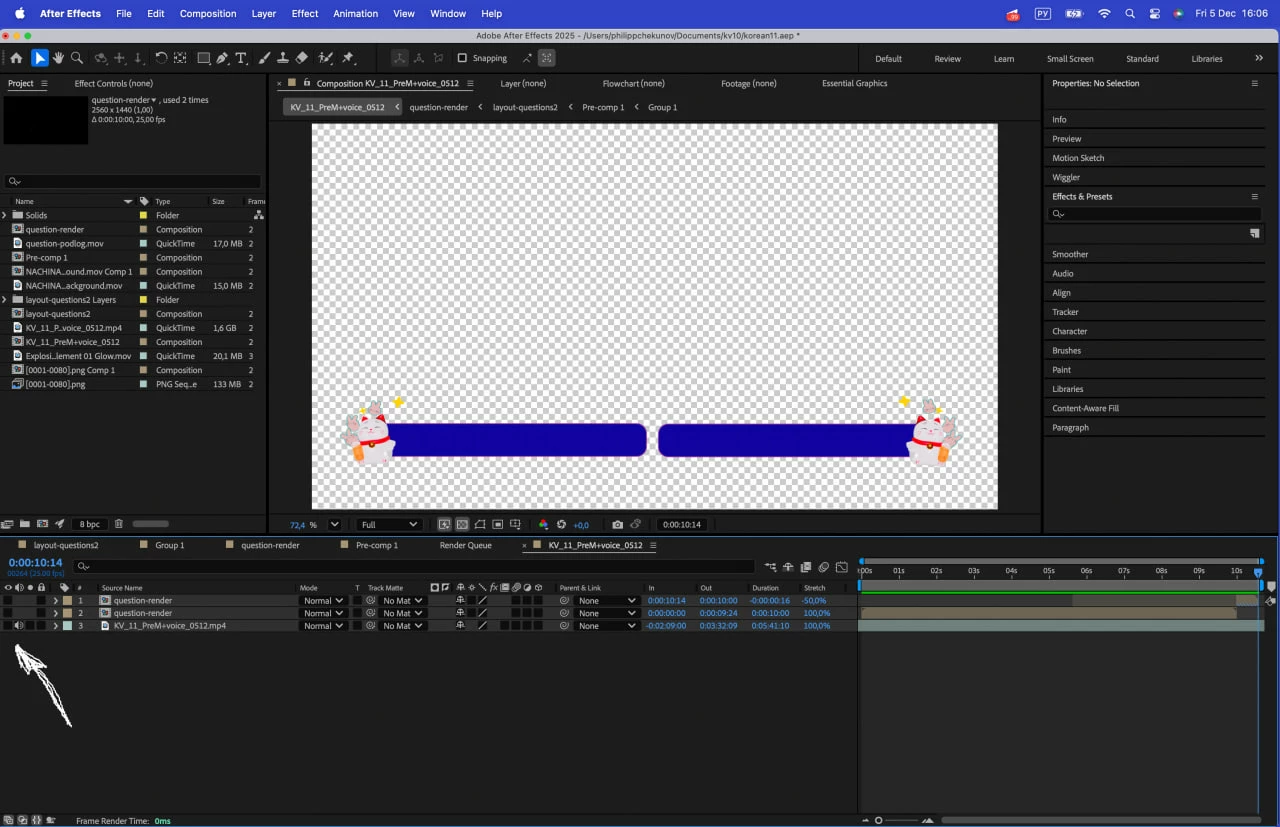
AE shows invisible ghost image on alpha channel in completely empty composition
No layers, no effects, color management disabled, Photoshop PSD/PSB cleared
Ghost persists in final render on M4 Pro, the latest AE update. photo_2025-12-05_16-06-53.jpg
2 replies

nishu_kush
Legend
December 16, 2025

Changing thread status to Investigating.


Thanks,

Nishu

December 5, 2025

so far I've noticed that one of the adjustment layers with transformation animated by expression may cause this thing. Also when I switch the quality (full to half for example) bug dissapears in preview, but still appears in the render. I tried all kind of purges and a safe mode, where bug was at first but then also dissapeared after some random tweaks. 

nishu_kush
Legend
December 5, 2025

That's not ideal. Sorry to hear about the issue.

Such issues are usually fixed by clearing the media cache (Edit > Purge > All Memory & Disk Cache). If that didn't help, can you check if it is happening in a specific project or all of them? Can you share the faulty project with me so that I can try to reproduce the issue on my end?

Looking forward to your response.


Thanks,
Nishu

December 5, 2025

of course I tried the purge first, and it didn't work, good news is that all of my other projects seems fine, here's the link for you

https://drive.google.com/file/d/1X1D-Ff5A2qoyu5XfEwJHKgbNtmuoFx88/view?usp=sharing

you gotta render a composition "KV_11_PreM+voice_0512" and after that a bug appears (or you don't even have to render, I just opened the file and already got a bug) PLEASE SIR save my sanity lol