Participant
December 18, 2024

After Effects randomly crashing during renders

  • December 18, 2024
  • 4 replies
  • 1173 views

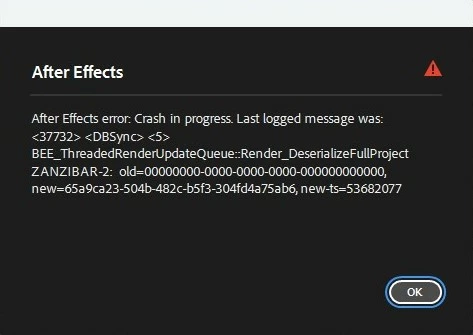
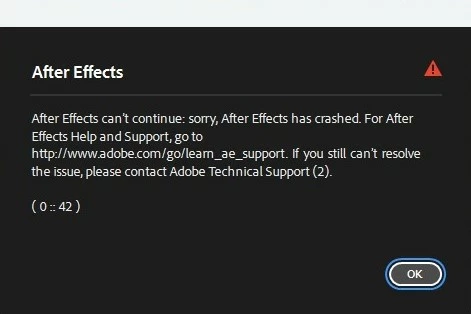
Hey guys, I've got this problem where AE crashes randomly during renders, never during editing or launch just renders. I've had this problem since late AE 24 and have since upgraded to AE 25 and the error persists. I've gotten 2 error codes during this attached below.

Ive tried reinstalling, removing caches, rendering in media encoder (still crashes), resetting preferences, changing render outputs, deleting a majority of layers, changing graphics drivers from Nvidia game to creative and back to game. Ive got no clue on how to fix this

Only plugin i use is Geolayers for work.

I have a small solution of rendering in MOV and stopping and restarting the renders at random points but this is obviously very inefficient with long renders and stops me from actually working as i can no longer render overnight or so on (it can also still crash during this and many render restarts are required). Sometimes while doing this it seems as if it gets on a roll and can render for a while but this is sporadic and the issue comes back after some time.

I have sent the project files to people in the past and haven't heard of any problems from their side.

Any help would be greatly appreciated, thanks!


System info
    Application: After Effects v25.1.0.68
    OS: Windows v10.0.22631, RAM: 95.76 GB GB, CPUs (logical): 32

4 replies

Participant
December 19, 2024

Hey again, just sent you a DM
My PC passed the stress test without any warnings. Currently making a smaller project that can be transferred efficiently that demonstrates the issue for you

Field Kuang
Community Manager
Community Manager
December 18, 2024

What email did you use for submitting the crash report? Feel free to DM me the email.

It would be super helpful if you could narrow down to a few potential causes of the crash, and share the project with me. For example, the project rendered fine but then you added an effect and it starts crashing, or a project that renders in SFR but crashes in MFR, etc...

Participant
December 18, 2024

Hey, just ran a render on a 40 min clip(no effects) without any errors. Then tried a render in project without multi frame rendering for an hour and no error, testing out Prime 95 now, first I'm using this program.

I have filled out a few crash reports but came here after some time, filled out another 2 today.

Field Kuang
Community Manager
Community Manager
December 18, 2024

Hello, please try a few more things when you have a chance

1. Try importing a long video and export the comp without any modifications. See if it can complete the render.


2. Go to AE Preferences -> Memory & Performace and uncheck "Enable Multi-frame Rendering". Try rendering your project again and see if the crash persists.


3. If single frame rendering works, AE could be stressing out your PC and revealing stability issues. Some BIOS activates overclocking profiles like XMP by default which may reveal stability issues only at high load. You could try using Prime95 or OCCT to see if your PC could run the stress tests stably. If not, you could temporarily disabling any overclocking features like Turbo Boost or Precision Overdrive for CPU, and lowering your RAM clock a few hundred Mhz in BIOS, then try Prime95 or AE Multi-Frame Rendering again. One of my PCs had a faulty RAM stick that won't run stably at the rated clock and caused similar crashes so this is worth investigating.


4. When you see the crash reporter dialog after a crash, please fill in the details and your email. We could locate your crash reports using your email and file bugs with the information you provided. Feel free to DM me the email you used for the crash reporter and share your project. A minimized project that crashes for you would be helpful. This could help us narrow down the problem sooner.


Thanks!