


Participant
November 1, 2024

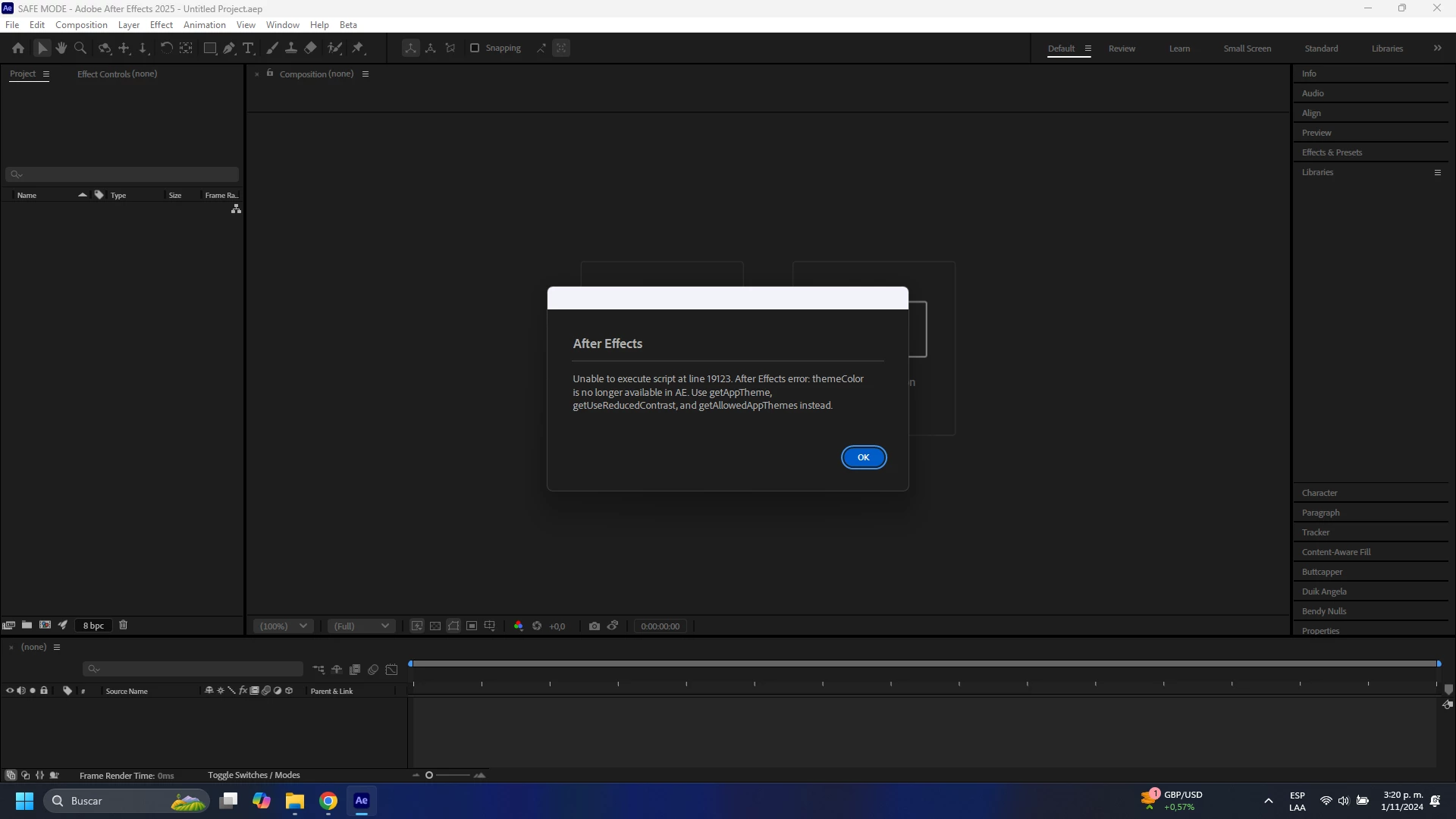
After Effects v25.0.1 error. Unable to execute script at line 19123.

  • November 1, 2024
  • 1 reply
  • 944 views

This error just appears every time I start the program. I don't know what it is, as it doesn't seem to affect how the program works. But I think it is pertinent to report it.


  • Issue - Unable to execute script at line 19123. ThemeColor is no longer available in AE
  • Adobe After Effects version number - After Effects v25.0.1
  • Operating system - Windows 11
  • Steps to reproduce - Just by starting the program
 

1 reply

Community Manager
November 1, 2024

Hello @Andres F Quevedo V 

This error is due to a ScriptUI extension attempting to use a function we no longer support. 

I see you have Duik on your right side bar, this is one that is known to use this call in an older version of the plugin. Could you update to the most recent version and see if this error goes away? 

Otherwise I would suggest loading your 3rd party extensions one by one if it is not the Duik extension causing this to narrow it down.

See similar thread here: After Effect Duik Angela error at line 20042 of th... - Adobe Community - 14928587

All the best,
Jessica
AE Engineering

All the best,Jessica McMillan - AE Engineering