


Participating Frequently
February 3, 2025

Error while importing .glb files

  • February 3, 2025
  • 17 replies
  • 1458 views


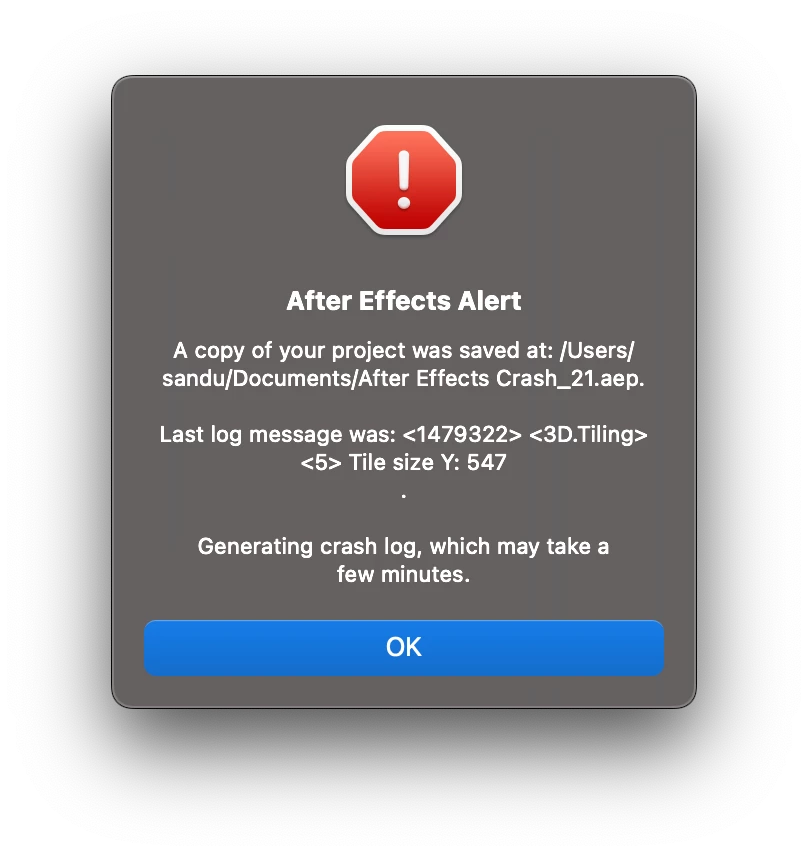
Good morning everyone, I have this problem with AE both 2025 and 2024 and I have the latest versions and updates. While importing any .glb file it crashes immediately.

However, if I import the same files onto my friends' PCs, everything works.

I have a MacBook m3 pro 18gb ram.


17 replies

Participating Frequently
February 5, 2025

@David.Arbor I sent you all the project files, including the .glb file.

Let me know if you recieved them, thank you!

David.Arbor
Community Manager
Community Manager
February 4, 2025

Great, thank you! I meant the 3D model (the GLB file) in addition to the After Effects project file.


- David, After Effects Engineering Team

Participating Frequently
February 4, 2025

Hi David, what do you mean by ''model''? 

Of course i can send you the project files 🙂

David.Arbor
Community Manager
Community Manager
February 4, 2025

It would also be great if you could send the project you're working in. The error in your screenshot tells us the last message that was reported, but that doesn't necessarily mean it was the cause of the crash. Having the project will really help. 


Thanks,
- David, After Effects Engineering Team

David.Arbor
Community Manager
Community Manager
February 4, 2025

Hi @sandu.solo, sorry to hear you're experiencing this crash. It would really help us get to the bottom of this issue if you could send us the model causing the problem. Feel free to DM me if you don't want to post it in this thread.


Thanks,
- David, After Effects Engineering Team

Participating Frequently
February 4, 2025

Hi, I get the error with both old and newly created projects, when I import a .glb file AE crashes. Did not used Motion Tile.

The funny thing is I created the new project on my friend pc, but when I open it on my macbook AE crash

Kevin J. Monahan Jr.
Community Manager
Community Manager
February 4, 2025

Hi,
I read your message. Are you getting the error for a new project or an existing project? It seems like the Motion Tile effect might be referenced in the error dialog box. Could there be anything going on there? Let me know. I hope we can help you. Sorry for the trouble.


Thanks,
Kevin


Kevin Monahan - Sr. Community and Engagement Strategist – Adobe Pro Video and Audio