
Inspiring
March 25, 2023

Essential Graphics window renders properties on top of each other

  • March 25, 2023
  • 3 replies
  • 1384 views

Hey, 

I'm currently experiencing a "overloaded" essential graphics window again. 

I use Essential Graphics properties pretty extensively in my projects, since they are just so convient.

But now and then I hit the bug that the properties get "out of line" after the program loaded them in.
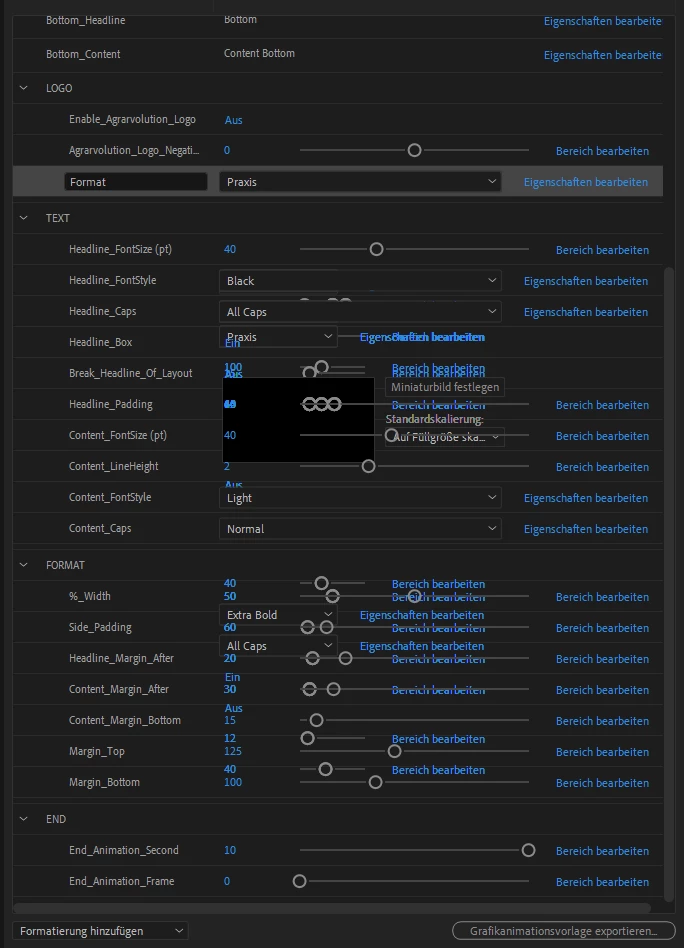
I couldn't really reproduce, when this happens, since I have some comps that have more properties and don't have this issue. And other that have less and do.

The sliders still work and if you export it for Premiere, everything is fixed. But you can't access the properties that render "behind" the editable ones.


Sometimes redoing everthing will fix it, but not always and it tends to come back.


Does anybody know what I am doing wrong here?


Edit:

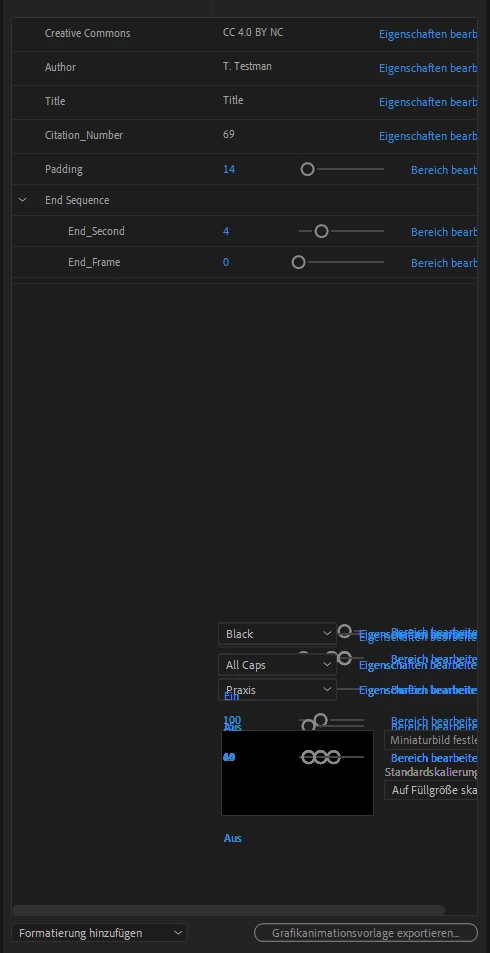
After some further work, the glitched out part stays in the essential graphics window for other comps. You can interact with the glitched part but it doesn't affect anything.
3 replies

Inspiring
April 13, 2023

Hey nishu_kush,


thank you for getting back to me. I'm glad you could replicate my situation.


I'm looking forward to the next Beta then. 🙂

Inspiring
March 28, 2023

Has nobody else experienced this issue before?

nishu_kush
Legend
March 29, 2023

Hi Agrarvolution,


I haven't seen this issue before. Would love to investigate.

Could you share your system specifications (CPU, GPU, RAM, OS version)? What's the language of your OS and After Effects? Also, what's the exact version of After Effects you're using? Could you share a file with us that repeats the issue?

Looking forward to your response.


Thanks,

Nishu

Inspiring
March 29, 2023

Thank you for your reply!

I've experienced this issue with two systems. here are the specs:

System 1:

AMD Zyzen 9 5950X (no OC)

Nvidia GTX 1080ti (no OC)

128 GB DDR4 3600MHz

WIN 10/11


System 2:

Intel i9 13900K (no OC)

Nvidia 3080 12G (no OC)

128 GB DDR5 5200MHz

WIN 11


My After Effects language is German and I've been seeing this issue almost from when I started using Essential Graphics properties (Maybe 2 years). But I always figured it will get fixed eventually. 🙂 I'm currently using AE 23.2.1 Build 3 and I haven't checked if this still appears in the Beta version. 

I'll prepare a file that hopefully reproduces the issue. I'll post it here later. 

Are there any logs I can include as well?


What I haven't mentioned - when this bug occurs the Essential graphics panel has a hard time loading the properties and has to reload a couple of times until it displays them. Should I capture a video of that?


Community Expert
March 26, 2023

Have you tried resetting preferences?

press and hold the following keys while the application is starting.
  1. Windows: Ctrl+Alt+Shift.
  2. macOS: Command+Option+Shift.
Inspiring
March 26, 2023

Yes, I did that several times over the past of this still happening.

If I restart After Effects, it's gone until I load but two or three comps with a lot of properties.


When I made the screenshots it was particularly bad, since it usually goes away, when you have a comp open, where not a lot of properties are connected.